














The 12 Best Project Risk Management Software Tools for 2026

Matthew Sia
Product Marketing Manager
Sep 18, 2026
Matthew Sia
Sep 18, 2026

31 min read


A project plan begins with optimism, but reality is rarely so tidy. A missed deadline, a critical bug, or a budget cut are not mere inconveniences—they are risks. When left unmanaged, these issues can cascade, threatening deadlines and success. While risk is inherent in any project, succumbing to chaos is not. The difference lies in foresight and preparation through proactive risk management.
Where this process was once a manual, fragmented effort, a powerful new class of software has emerged to transform the discipline. This guide provides a comprehensive overview of modern project risk management software. We'll move beyond basic definitions to review the top solutions, helping you select the right platform to build a more resilient and successful team. Here are the top 12 project risk management solutions for you to view quickly:
1. Lark: All-in-one suite for communication and project management
2. Mitratech: Enterprise risk, legal, and compliance management platform
3. Wrike: Customizable work management for complex projects
4. Confluence: Collaborative documentation and knowledge management hub
5. Jira: Agile project management for software development teams
6. Monday.com: Visual work OS for customizable team workflows
7. StandardFusion: GRC platform for streamlining risk and compliance
8. Acumen Risk: Quantitative risk analysis for complex project schedules
9. ClickUp: Ideal for customized workflows
10. Hyperproof: Compliance operations software to manage and track risks
11. Corporater: Business management platform for strategy and performance
12. nTask: Project management software for teams and professionals

What is project risk management software?
At its core, project risk management software is a dedicated application designed to centralize, streamline, and automate the process of managing project uncertainty. It moves beyond the limitations of static documents like spreadsheets by providing a dynamic, interactive environment where risks can be effectively managed throughout their entire lifecycle.
Project risk management software enables teams to effectively manage risks by supporting proactive identification, assessment, and response throughout the project lifecycle.
Think of it as a command center for project risks. Instead of a scattered collection of files, emails, and meeting notes, these platforms provide a single, unified hub. Software for project risk management is built to support the complete risk management framework:
- Identification: Providing easy-to-use forms and templates for any team member to systematically identify risks and flag a potential risk.
- Analysis: Offering tools to assess risks by evaluating the probability and impact of each risk, often through visual risk matrices.
- Response planning: Facilitating the creation and assignment of mitigation tasks to specific team members to proactively address risks.
- Monitoring: Using real-time dashboards, automated alerts, and risk monitoring to keep the entire team aware of the current risk landscape.
Top 12 project risk management software in 2026
The market for project risk management software tools is vast. Some are all-in-one platforms, while others are highly specialized. These tools support the entire project risk management process, from risk identification to mitigation and monitoring, ensuring a structured approach to risk control throughout a project's lifecycle. The right choice depends on a team's size, methodology, and existing toolset. While this review focuses on leading commercial solutions, it's also worth noting that various open source project risk management software options are available for teams with the technical resources to implement and maintain them. Here is a review of 12 leading solutions, evaluated for their collaborative risk management capabilities and their effectiveness in managing risk with the right software.
1. Lark: All-in-one suite for communication and project management
Lark is a comprehensive collaboration platform that combines messaging, video conferencing, calendars, documents, and project management in a single application. For project risk management, Lark allows teams to build a powerful risk register using its database tool, Lark Base. Each risk can be linked directly to chat groups for discussion, collaborative documents for mitigation planning, and tasks with assigned owners and deadlines. This creates a seamless workflow where risks are identified, discussed, and resolved within one connected ecosystem, eliminating the need to switch between different applications and lose valuable context.
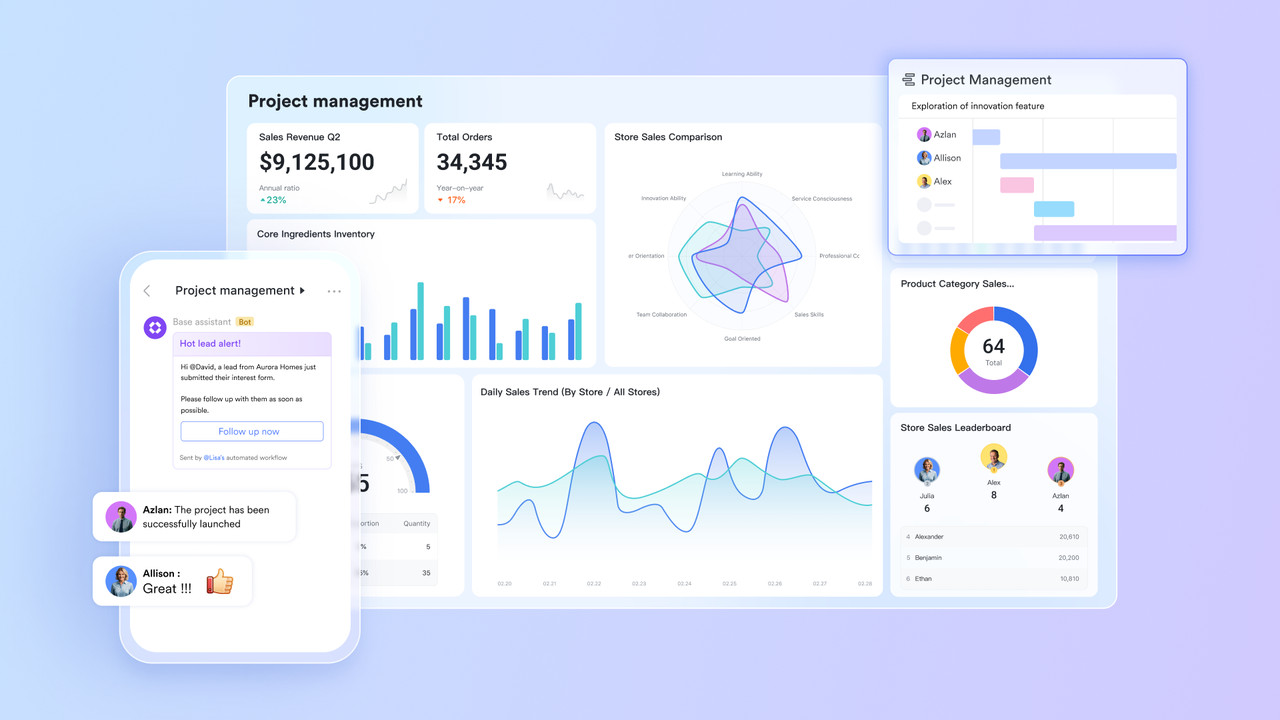
Build a dynamic and collaborative risk register
At the heart of Lark's risk management capability is Lark Base, a powerful and flexible database tool. You can start immediately with the 4x4 Risk Assessment template to move beyond static spreadsheets and create a fully customized, interactive risk register.
This isn't just a list; it's a dynamic command center for your project. Use customizable, color-coded dropdown fields for "Likelihood" and "Severity" to visually plot each risk on a 4x4 matrix. You can also add two fields to automatically calculate a priority score with a "Formula" field and assign a "Risk Owner" to ensure clear accountability.
From the register, you can create detailed mitigation plans in a connected Doc. Because the entire team can access, filter, and update the register in real-time, everyone is working from a single source of truth, transforming your risk register from a simple document into a proactive, collaborative system.
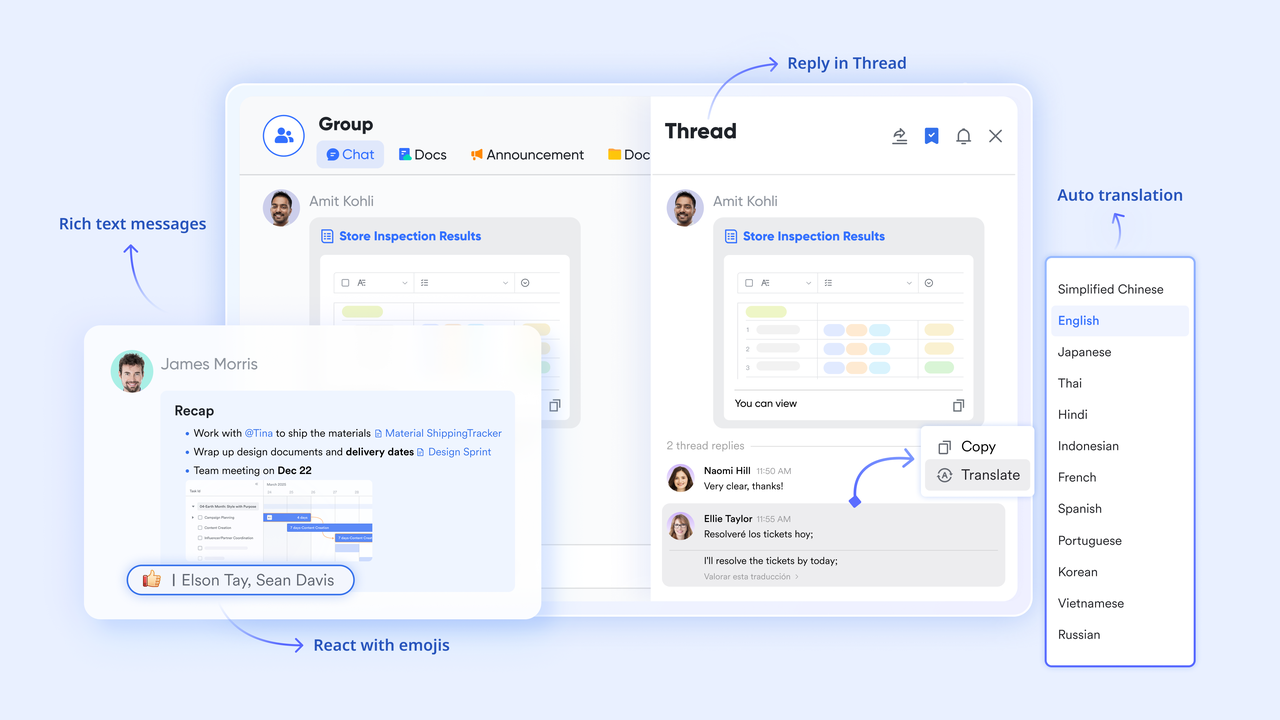
Connect risk identification directly to team discussion
A risk entry is only useful if it leads to a conversation. Lark Messenger bridges this gap by allowing any record from the risk register to be shared directly into a project's chat group with a single click. This action embeds a rich card of the risk—showing its owner, status, and priority—right into the conversation. Team members can then discuss the risk in a threaded conversation, ensuring the critical context and discussion are permanently linked to the risk item itself, eliminating confusion and preserving the decision-making history.
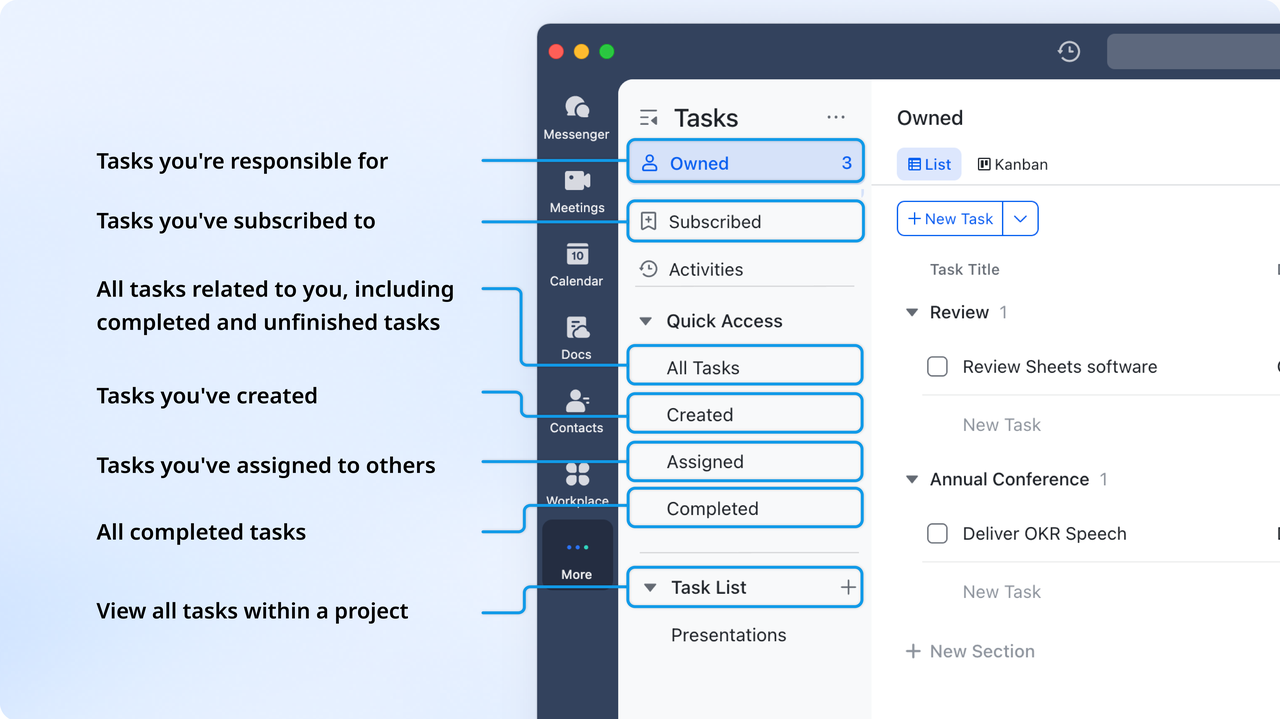
Turn mitigation plans into actionable, trackable tasks
Once a mitigation strategy is decided upon, Lark makes it easy to take action. Directly from the chat discussion, a manager can create a task, assign it to a team member, and set a due date. This task automatically appears in the assignee's personal task list and on the calendar. This creates a clear line of accountability and closes the loop between identifying a risk and executing the plan to control it, ensuring that mitigation strategies don't get lost in conversation.
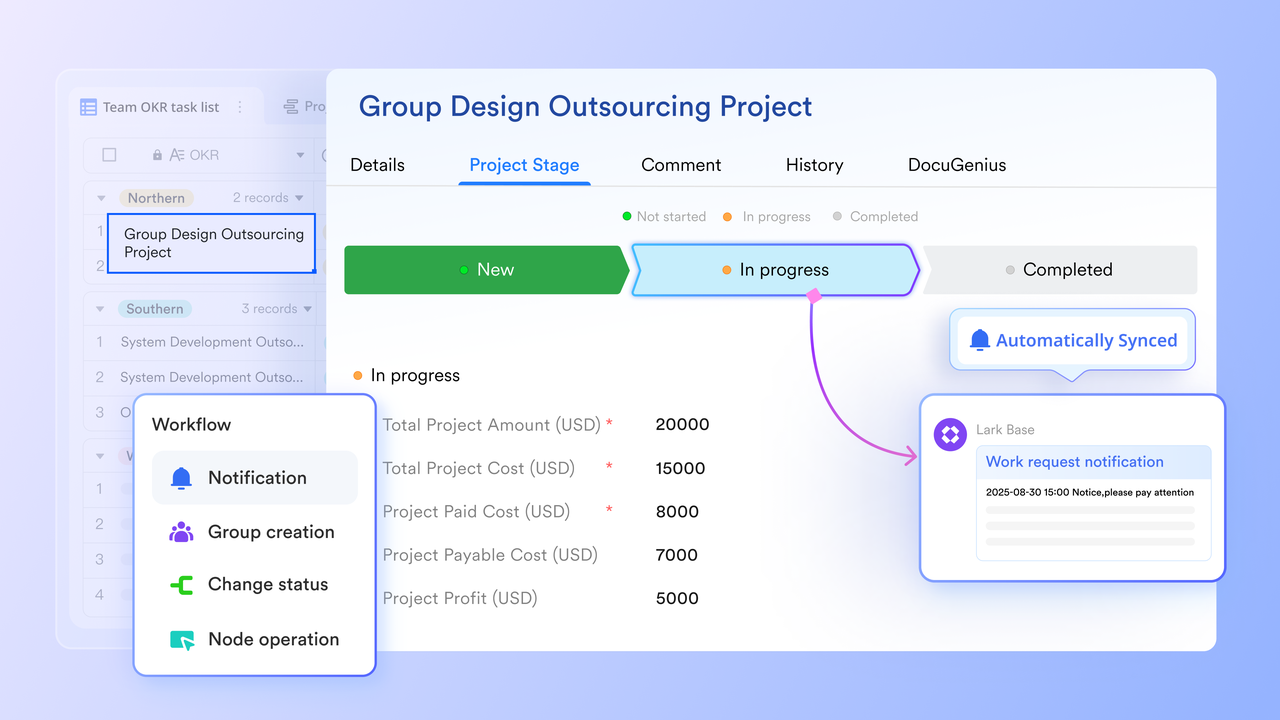
Automate notifications and streamline monitoring
Lark helps reduce the manual work of monitoring risks through automation and visualization. You can set up automation rules within the risk register, such as "When a risk's priority is changed to 'Critical', automatically send a notification to the project lead and the executive chat group." Furthermore, you can create a live dashboard directly from the register's data, using charts and graphs to visualize the number of open risks by priority, the distribution of risks per owner, or the status of mitigation tasks, providing instant, at-a-glance visibility for all stakeholders.
Pros:
- All-in-one platform reduces the need for multiple tools.
- Automations can connect risk status to team notifications and tasks.
- Real-time collaboration on documents and databases.
- Generous free tier with robust functionality.
- Centralizes communication and documentation around each risk.
- Mobile-friendly application keeps distributed teams connected.
Ideal for:
Teams of all sizes seeking a unified platform to manage projects and risks within their daily communication workflow.
Pricing:
- Free plan: Includes 11 powerful products, supporting up to 20 users, 100 GB storage, 1,000 automation runs and unlimited AI translation in chats, docs and email.
- Basic plan: $6/user/month (billed annually) for up to 500 users. Includes everything in Starter plus unlimited message history, 5TB storage, 1,000 automation runs, and more. Some users may need to contact sales to purchase.
- Pro plans: $12/user/month, supporting up to 500 users. Includes unlimited message history, 50,000 automated Base workflow executions per month.
- Enterprise plan: Contact sales for custom pricing. Supports unlimited users and includes even more automation runs and advanced security, compliance, and management features.
2. Mitratech: Enterprise risk, legal, and compliance management platform
Mitratech provides enterprise-level software designed for managing corporate legal, risk, and compliance functions. Its solutions are not just for project management but offer a holistic view of risk across an entire organization. Within this framework, it can be used to manage project portfolios, aligning project-specific risks with broader corporate governance strategies. The platform helps standardize risk assessment methodologies, automate compliance reporting, and provide executives with a top-down view of risk exposure. As a type of project and portfolio risk management software, it is built for large organizations where project risks have significant legal and financial implications.
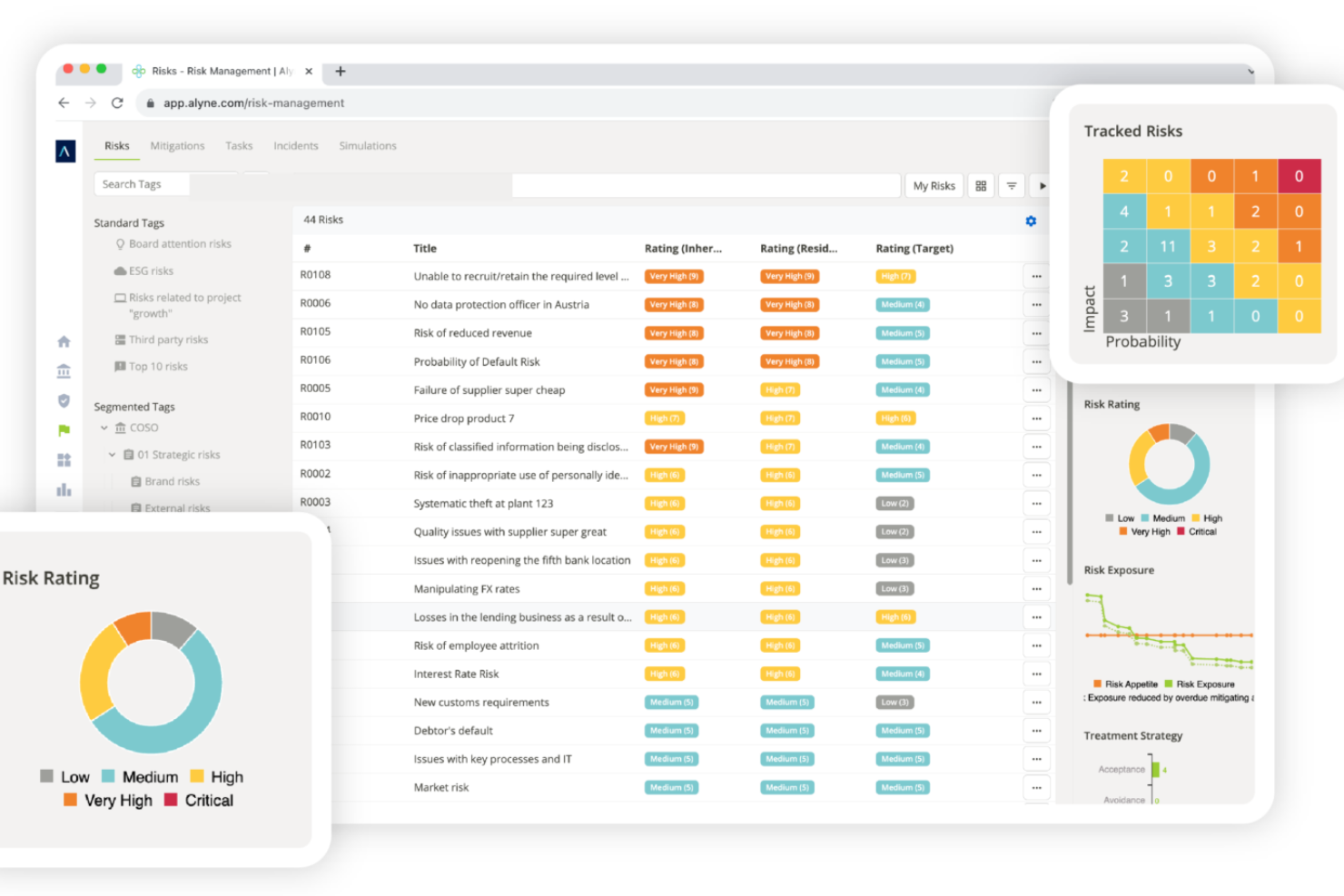
Image source: thecfoclub.com
Pros:
- Provides a comprehensive, enterprise-wide view of risk.
- Strong focus on compliance, governance, and legal requirements.
- Powerful tools for creating audit trails and ensuring regulatory adherence.
- Standardizes risk management processes across the organization.
- Highly scalable for large, complex enterprises.
Cons:
- Significant overkill for teams focused solely on operational project risk.
- Implementation can be complex and requires specialized expertise.
- Higher cost compared to project-focused tools.
Ideal for:
Large enterprises in highly regulated industries needing to integrate project risk into a corporate GRC (Governance, Risk, and Compliance) strategy.
Pricing:
By quote only.
3. Wrike: Customizable work management for complex projects
Wrike is a powerful and versatile work management platform that excels at handling complex projects. While it doesn't have a pre-built "risk" module, its high degree of customization allows teams to build sophisticated risk management workflows. Users can create custom item types for risks, use custom fields to track probability and impact, and build visual dashboards to monitor the overall risk landscape. Wrike's dynamic request forms can be used to standardize the risk submission process, ensuring all necessary information is captured from the start. Its reporting engine is robust, capable of generating detailed risk summaries for stakeholders.
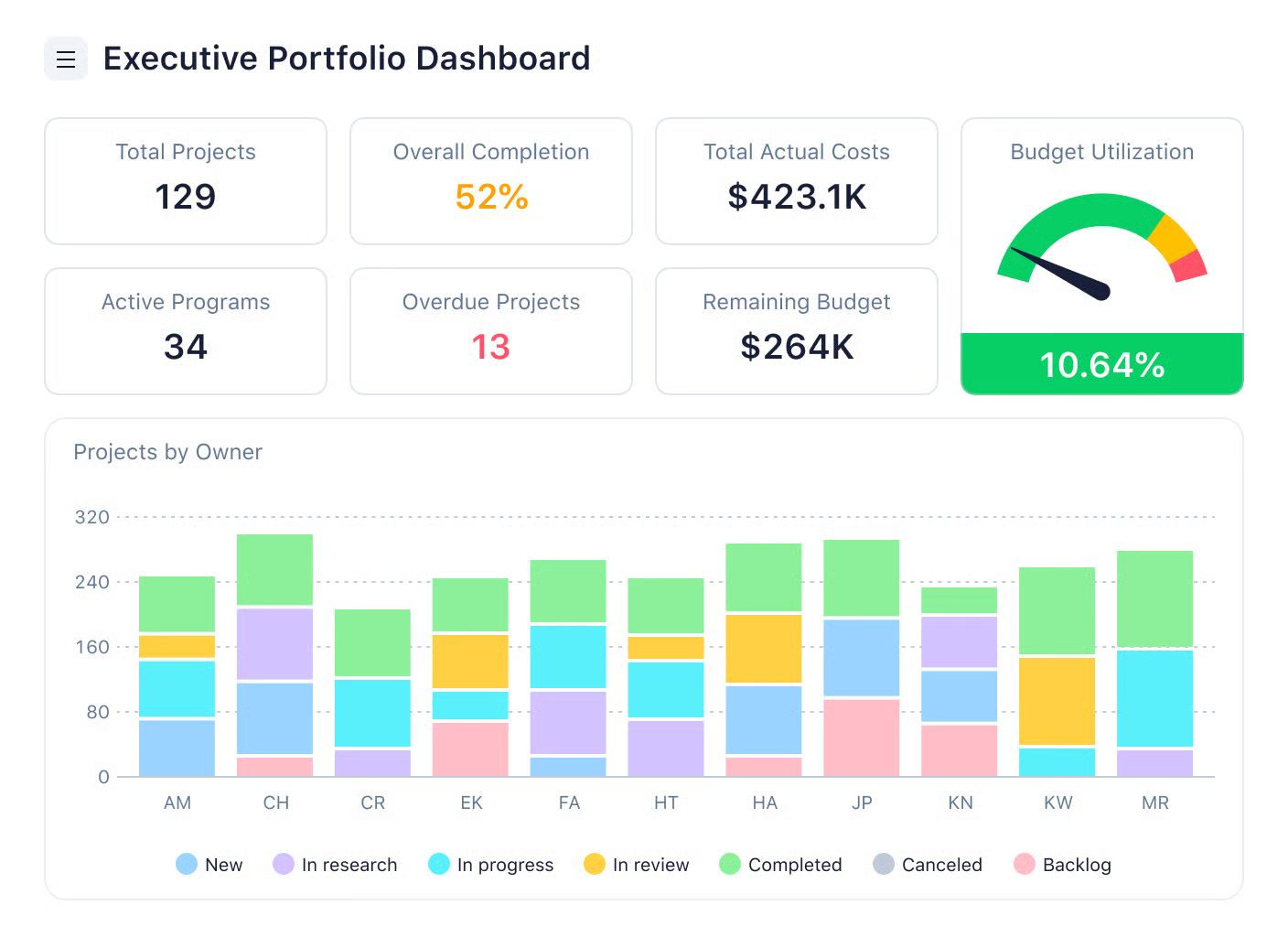
Image source: wrike.com
Pros:
- Highly customizable to fit specific risk management methodologies.
- Powerful analytics and reporting for creating detailed risk dashboards.
- Excellent for managing dependencies between risks and project tasks.
- Gantt charts and board views help visualize risk impact on timelines.
- Strong automation engine to streamline workflows.
- Integrates with a wide range of business applications.
Cons:
- Setting up custom risk workflows requires significant initial effort.
- Can become expensive as more users and features are added.
- May be too complex for smaller teams with simple projects.
Ideal for:
Marketing, professional services, and product teams in medium to large organizations that need a powerful, configurable platform for complex projects.
Pricing:
- Free plan: $0/user/month, for teams getting started, includes intelligent task management and quick start.
- Team plan: $10/user/month, for small teams, the most popular option with effective team management features.
- Business plan: $25/user/month, for all teams across an organization, offers a customizable platform for any use case (includes Team plan features).
- Enterprise plan: Custom pricing, for large teams, provides enterprise-grade security and scalability (includes Business plan features).
- Pinnacle plan: Custom pricing, for teams with complex work needs, comes with advanced tools and analytics (includes Enterprise plan features).
4. Confluence: Collaborative documentation and knowledge management hub
Confluence, part of the Atlassian suite, is a knowledge management and documentation tool. It is not a standalone risk management software but serves as the central repository for all risk-related documentation. Teams can use Confluence's powerful templates to create detailed risk management plans, risk assessment frameworks, and meeting notes from risk review sessions. Its key strength is its deep integration with Jira. A risk register created in a Confluence table can link directly to corresponding risk tickets in Jira, creating a seamless connection between high-level documentation and actionable development tasks.
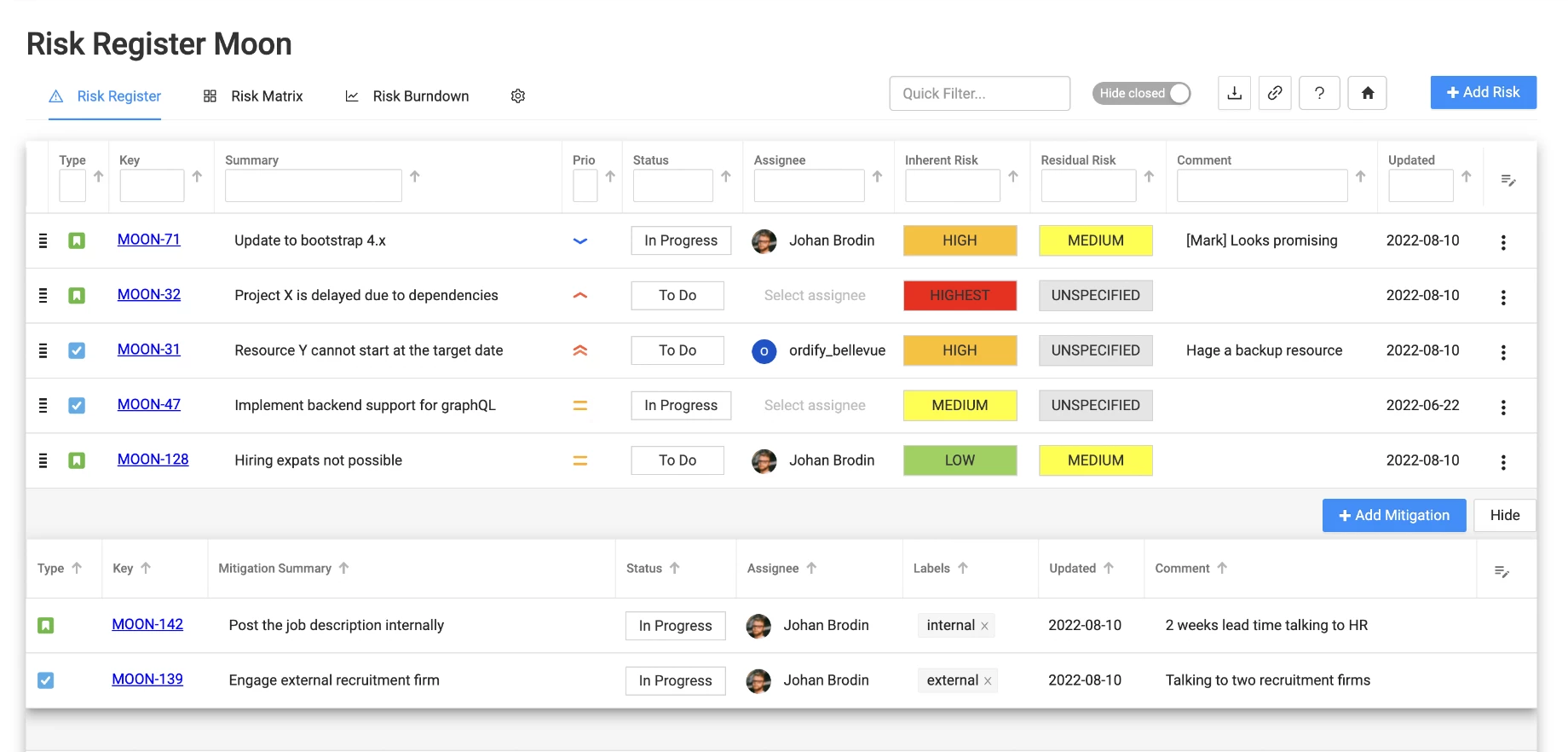
Image source: marketplace.atlassian.com
Pros:
- Excellent for creating and organizing detailed documentation.
- Pre-built templates for plans, meeting notes, and project posters.
- Seamless, native integration with Jira.
- Powerful search functionality makes information easy to find.
- Facilitates collaborative editing and commenting on risk strategies.
Cons:
- Is not a project or task management tool on its own.
- Lacks features for automation, dashboards, or real-time task tracking.
- Requires Jira for an effective, actionable risk management workflow.
Ideal for:
Agile teams already using Jira that need a centralized and collaborative space to document their risk management strategies and processes.
Pricing:
- Free plan: $0/user/month (forever free), supports up to 10 users. Includes basic pages, templates, 2 GB storage, and 10 monthly automations.
- Standard plan: $5.42/user/month (billed monthly), up to 150,000 users. Adds AI tools, 250 GB storage, and 9/5 regional support.
- Premium plan: $10.44/user/month (billed monthly), up to 150,000 users. Includes unlimited storage/whiteboards, 24/7 support, and 99.9% uptime SLA.
- Enterprise plan: Custom pricing, up to 150,000 users. Offers advanced security, unlimited automations, and 99.95% uptime SLA.
5. Jira: Agile project management for software development teams
Jira is the industry standard for agile software development teams. It is also used as a tool for risk management in software project management. While designed for issue and project tracking, it is highly adaptable for risk management. Teams can configure a custom issue type called "Risk" with specific fields like "Impact", "Probability", and "Mitigation Plan". These risk tickets can then be managed within the same agile boards (Scrum or Kanban) used for development work. Most importantly, risks in Jira can be directly linked to epics, stories, and bugs, providing developers with clear context on why a certain task is critical. The Atlassian Marketplace also offers add-ons that provide more advanced risk matrix and reporting functionality, making it a cornerstone of effective software project risk management.
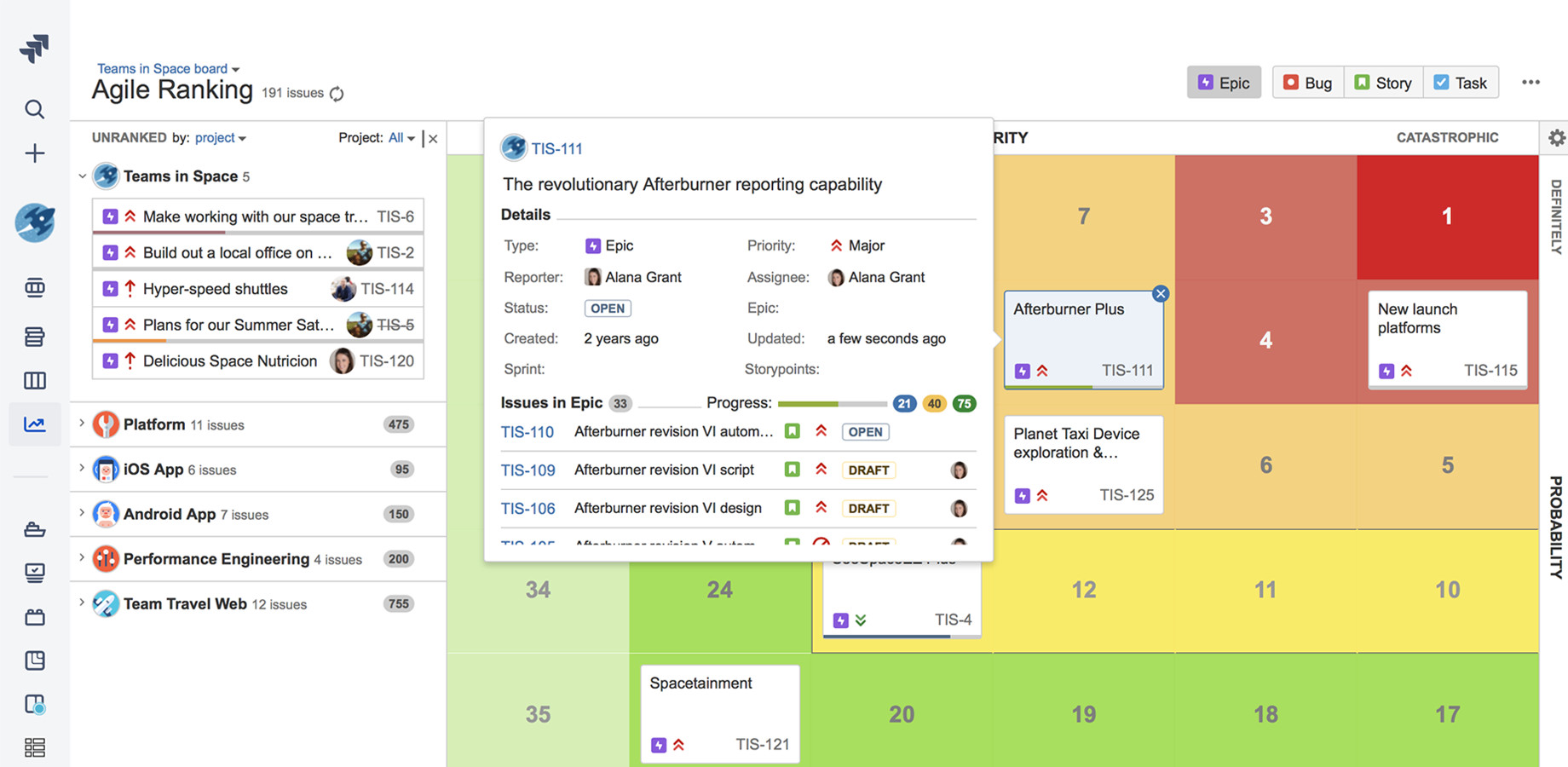
Image source: community.atlassian.com
Pros:
- Deep integration into the software development lifecycle.
- Highly customizable workflows and issue types.
- Allows direct linking of risks to specific work items.
- Leverages the powerful JQL (Jira Query Language) for advanced searching and reporting.
- Extensive marketplace for third-party risk management apps.
Cons:
- Can have a steep learning curve for non-technical users.
- Requires initial administrative effort to configure for risk management.
- User interface can feel cluttered and overwhelming for simple projects.
Ideal for:
Software development and IT teams that want to manage project risks within the same platform they use for their agile workflows.
Pricing:
- Free plan: $0/user/month (forever free), supports up to 10 users. Includes unlimited projects/tasks, 2 GB storage, and 100 monthly automation runs.
- Standard plan: $7.91/user/month (billed monthly), up to 100,000 users. Adds AI tools, 250 GB storage, and 9/5 regional support.
- Premium plan: $14.54/user/month (billed monthly), up to 100,000 users. Includes unlimited storage, cross-team planning, 24/7 support, and 99.9% uptime SLA.
- Enterprise plan: Custom pricing, up to 100,000 users. Offers advanced security, unlimited automations, and 99.95% uptime SLA.
6. Monday.com: Visual work OS for customizable team workflows
Monday.com is a Work Operating System (Work OS) that provides a highly visual and flexible platform for managing any type of work. Its strength lies in its colorful, board-centric interface where teams can build custom workflows for nearly any process, including risk management. A team can easily create a risk register board with columns for risk owner, status, probability, impact score, and mitigation costs. Its automation capabilities can handle notifications and status changes, while its dashboard widgets can be configured to display high-level risk metrics. The platform is user-friendly and highly engaging, making it easier to get team-wide adoption.
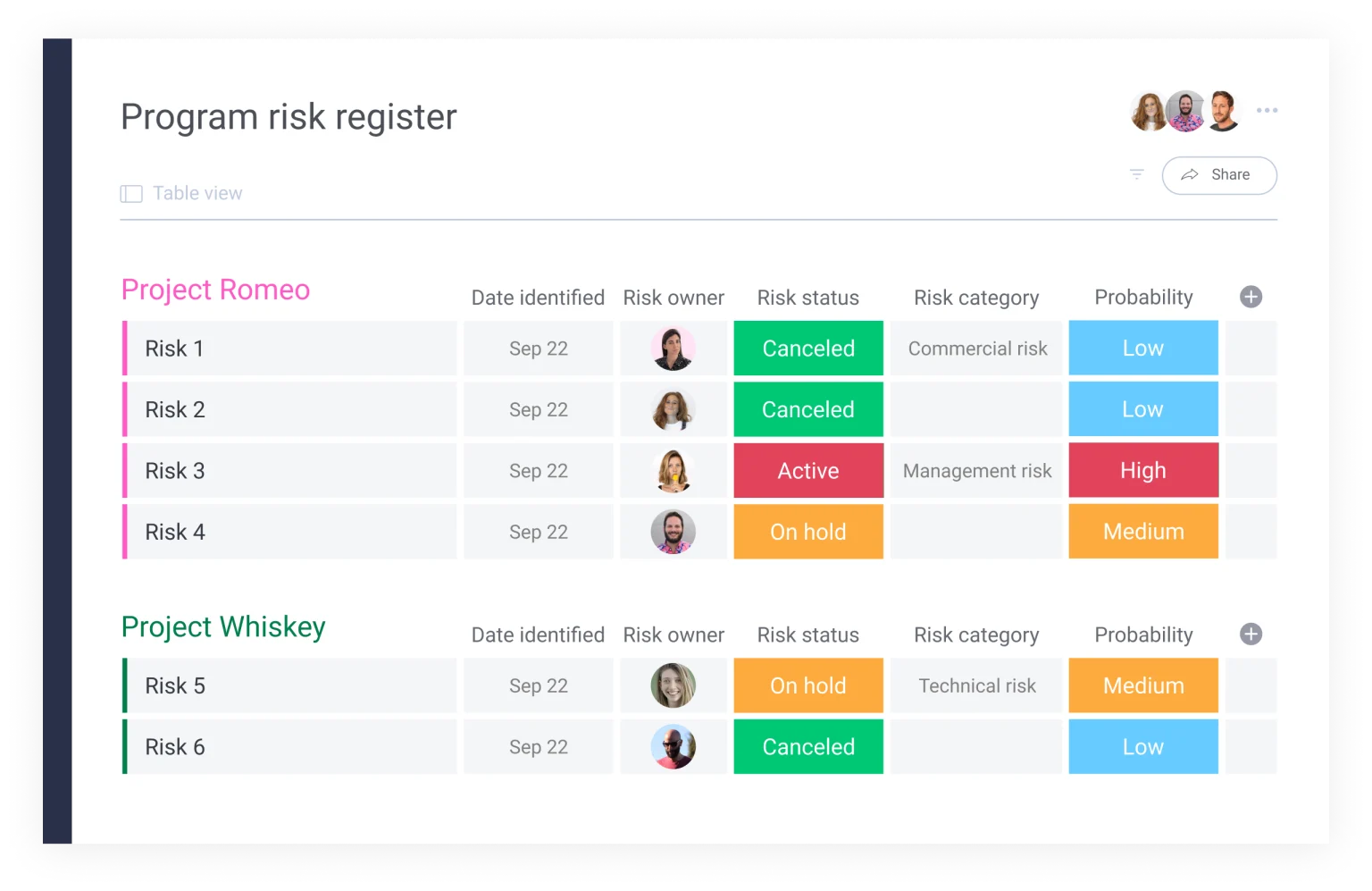
Image source: monday.com
Pros:
- Highly visual and intuitive user interface.
- Extremely flexible and customizable to a wide range of use cases.
- Robust automation features to reduce manual work.
- Large library of integrations with other popular tools.
- Excellent dashboard and reporting capabilities for visual summaries.
Cons:
- Per-user pricing model can become costly for large teams.
- Can be less structured than more opinionated project management tools.
- Some advanced features are locked behind higher-tier plans.
Ideal for:
Creative, marketing, and business teams that value a highly visual and flexible platform to design their own custom risk management workflows.
Pricing:
- Free plan: $0/seat/month (forever free), supports up to 2 seats. Includes up to 3 boards/docs, 200+ templates, and mobile apps.
- Basic plan: $9/seat/month, starts from 3 seats. Adds unlimited viewers, 5GB storage, and 1-board dashboard.
- Standard plan: $12/seat/month, starts from 3 seats. Includes Gantt/calendar views, guest access, and 250 monthly automations/integrations.
- Pro plan: $19/seat/mont, starts from 3 seats. Adds private boards, time tracking, and 25K monthly automations/integrations.
- Enterprise plan: Custom pricing, for large organizations. Offers portfolio/resource management, 250K monthly automations, and 24/7 support.
7. StandardFusion: GRC platform for streamlining risk and compliance
StandardFusion is a Governance, Risk, and Compliance (GRC) platform designed to help organizations manage their adherence to various security and privacy standards (like ISO 27001, SOC 2, and GDPR). While its scope is broader than project management, it offers powerful tools for identifying, assessing, and mitigating risks within a compliance context. Project managers can leverage it to manage risks that have compliance implications, ensuring that project activities do not violate regulatory requirements. It excels at audit management, allowing teams to connect risks directly to internal controls and collect evidence for auditors seamlessly.
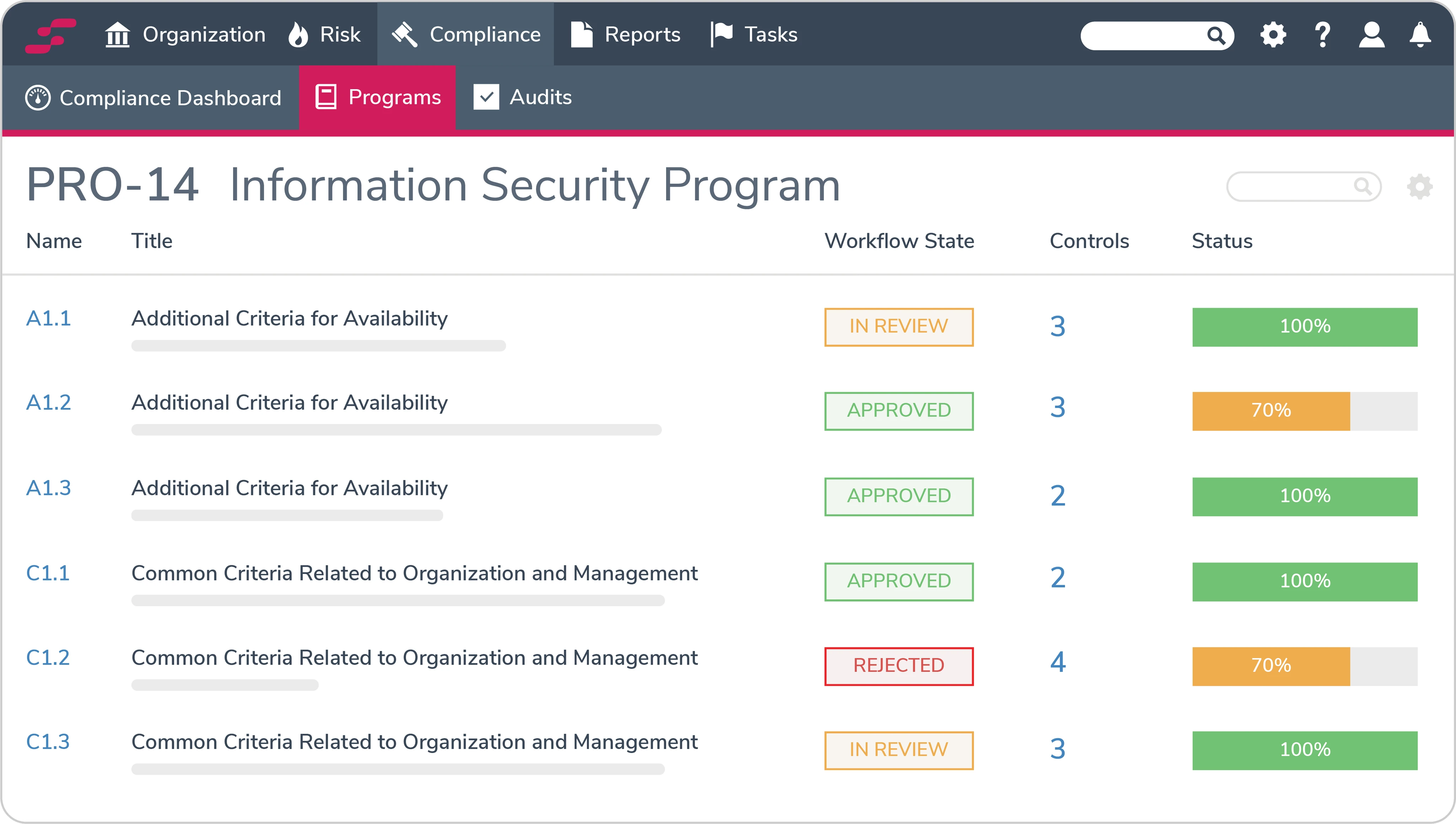
Image source: standardfusion.com
Pros:
- Streamlines compliance and audit management processes.
- Directly maps risks to specific controls and standards.
- Helps automate evidence collection for audits.
- Provides a centralized view of compliance-related risk.
- Clean and user-friendly interface for a GRC tool.
Cons:
- Focused on compliance risk, not operational or schedule risk.
- Not designed as a general-purpose project management tool.
- May be too specialized for teams without strict compliance needs.
Ideal for:
IT, security, and compliance teams managing projects that must adhere to specific industry standards and regulatory frameworks.
Pricing:
By quote only.
8. Acumen Risk: Quantitative risk analysis for complex project schedules
Acumen Risk is a highly specialized software tool focused on quantitative schedule and cost risk analysis. Unlike general-purpose project management tools, Acumen Risk integrates with scheduling software like Primavera P6 and Microsoft Project to run sophisticated Monte Carlo simulations. It helps project controllers and risk analysts understand the statistical probability of meeting project deadlines and budgets. It identifies the true drivers of risk in a complex schedule, moving beyond subjective assessments to provide data-driven insights. It could be considered as a type of construction project risk management software due to its popularity in construction management.
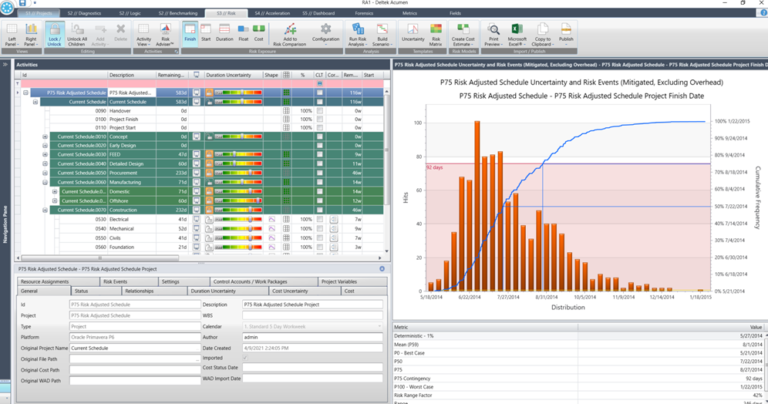
Image source: primepmo.com
Pros:
- Provides powerful Monte Carlo risk simulation capabilities.
- Quantifies the probability of meeting cost and schedule targets.
- Integrates directly with leading scheduling software.
- Identifies high-impact risks based on statistical analysis.
- Excellent for creating a strong, data-backed business case.
Cons:
- Highly specialized with a very steep learning curve.
- Not suitable for qualitative risk tracking or general project management.
- Requires clean, well-structured project schedules to be effective.
Ideal for:
Specialized risk analysts and project controllers in industries like construction, aerospace, and energy who manage large, complex, and high-stakes projects.
Pricing:
By quote only.
9. ClickUp: Ideal for customized workflows
ClickUp is a productivity application known for its ambitious scope and deep customization options. Its core strength lies in its flexibility, allowing teams to build a highly specific risk management system from the ground up to fit their exact workflow. Using its Custom Fields, teams can add 'Probability' and 'Impact' criteria to tasks, which can then be used to create dynamic risk registers through advanced filtering. For mitigation, ClickUp’s nested subtasks and checklists are useful for breaking down complex plans into actionable steps, and its multiple views (List, Board, Gantt) allow teams to visualize risk data in different formats.
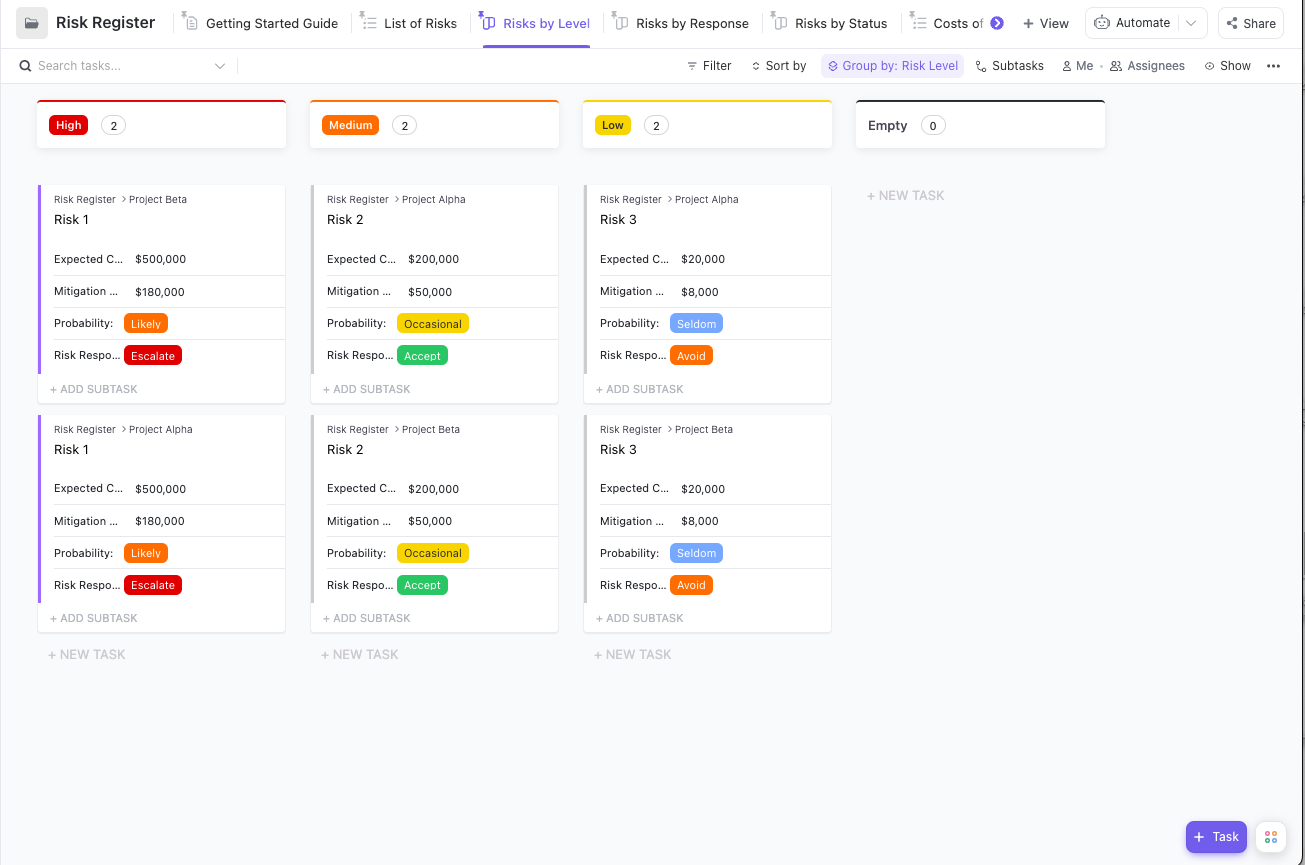
Image source: clickup.com
Pros:
- Flexible with deep feature customization.
- Bundles task management with docs, goals, and other work tools.
- Generous free plan and competitive pricing on paid tiers.
- Constantly updated with new features and improvements.
- Multiple ways to visualize work, including mind maps and tables.
Cons:
- The sheer number of features and settings can be overwhelming for new users.
- Performance can occasionally be slow due to its complexity.
- Mobile app is less robust than the desktop version.
Ideal for:
Tech-savvy teams of any size who want a single, highly customizable platform to manage every aspect of their work, including risk.
Pricing:
- Free plan: $0/user/month (forever free), best for individual users. Includes 60MB storage, unlimited tasks, Kanban boards, and 24/7 support.
- Unlimited plan: $7/user/month, best for small teams. Adds unlimited storage, integrations, Gantt charts, and native time tracking.
- Business plan: $12/user/month, best for mid-sized teams. Includes Google SSO, unlimited dashboards/whiteboards, and workload management.
- Enterprise plan: Custom pricing, best for large teams. Offers white labeling, advanced permissions, SSO, and dedicated customer success support.
10. Hyperproof: Compliance operations software to manage and track risks
Hyperproof is a compliance operations (ComOps) platform designed to help organizations efficiently manage their security and privacy compliance programs. Like other GRC tools, its focus is on managing risks relative to specific control frameworks (such as SOC 2, ISO 27001, NIST, etc.). It excels at streamlining the process of evidence collection and audit preparation. For projects with a heavy compliance component, Hyperproof can manage the associated risks, ensure controls are implemented correctly, and provide a clear dashboard of the project's compliance posture. It turns compliance from a manual, spreadsheet-driven chore into an automated, collaborative process.
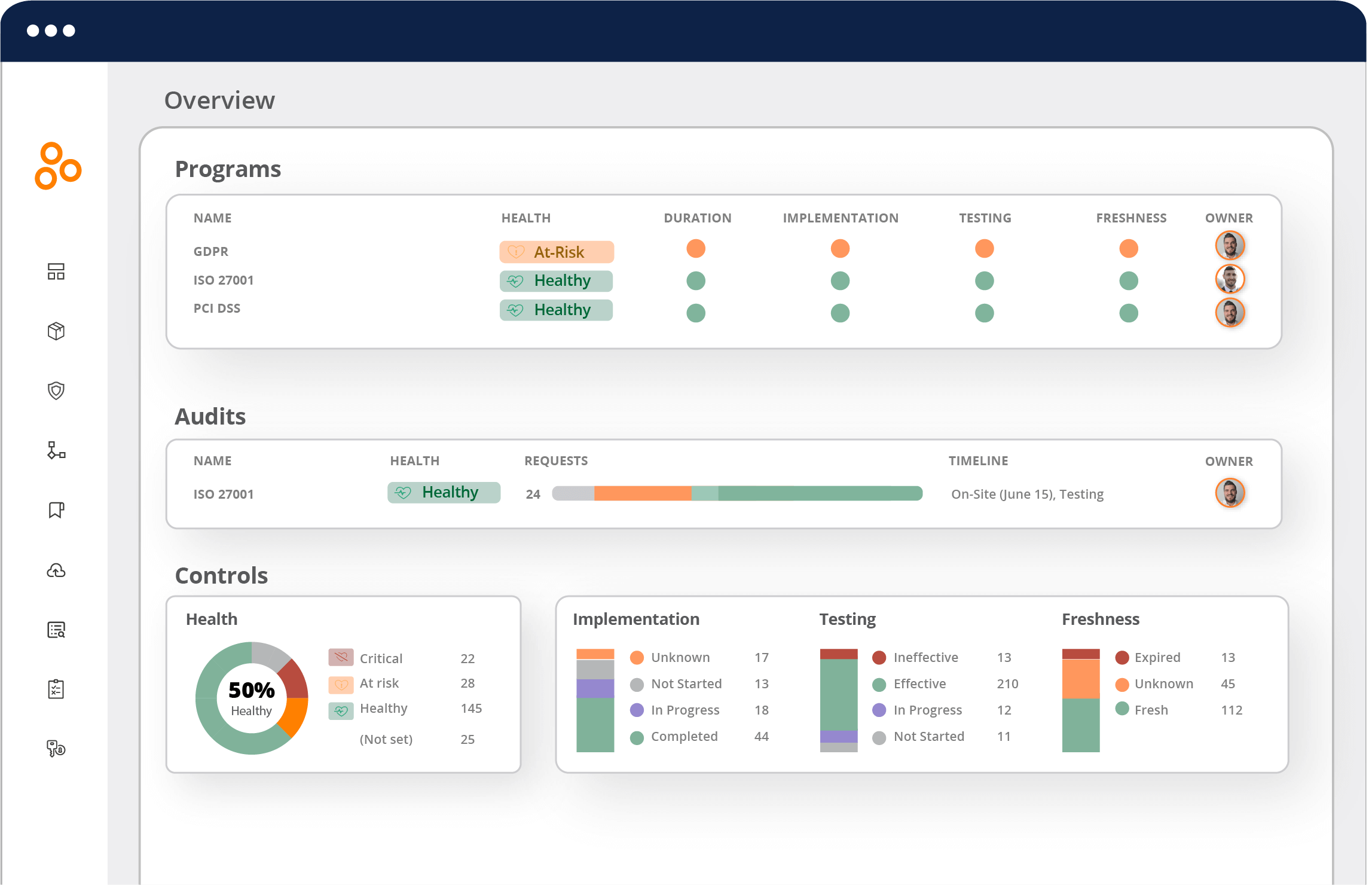
Image source: hyperproof.io
Pros:
- Automates many aspects of evidence collection and compliance management.
- Strong focus on collaboration between business and audit teams.
- Provides clear visibility into compliance posture.
- Pre-built templates for many common security frameworks.
- Integrates with cloud services to help automate control testing.
Cons:
- Highly specialized on compliance; not a general project management tool.
- Focus is on security and privacy risk, not broader project risks like budget or schedule.
Ideal for:
Security, IT, and internal audit teams who need to manage the risks and tasks associated with achieving and maintaining compliance certifications.
Pricing:
By quote only.
11. Corporater: Business management platform for strategy and performance
Corporater is a comprehensive business management platform that connects strategy, performance, risk, and operations. It is a top-down solution designed for executives and strategy teams to monitor the health of the entire business. Within this platform, project risks can be managed and, crucially, rolled up to show their potential impact on strategic business objectives. As a powerful piece of project and portfolio risk management software, it allows leaders to see how the combined risks from multiple projects could affect a business unit's financial targets or a key strategic goal. It excels at creating high-level dashboards and scorecards for executive-level reporting, translating low-level project data into strategic insights.
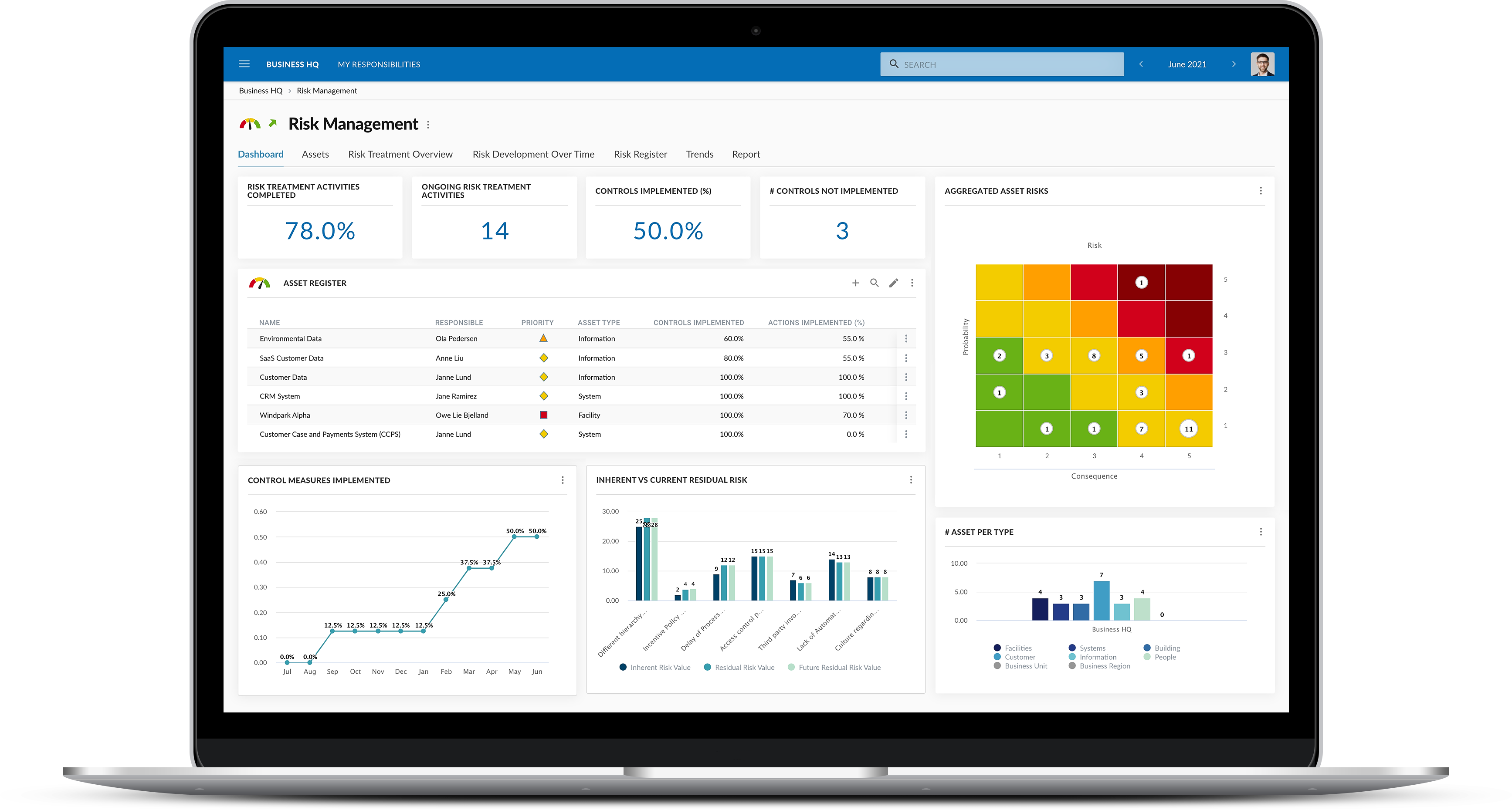
Image source: corporater.com
Pros:
- Directly links project risk to overall business strategy and KPIs.
- Extremely powerful dashboarding and data visualization capabilities.
- Provides a holistic, top-down view of organizational performance and risk.
- Highly configurable to model complex business structures.
Cons:
- Primarily an enterprise-level, strategic tool, not for day-to-day project task management.
- Complex to implement and likely requires significant investment.
- Overkill for teams needing to manage only project-level risks.
Ideal for:
Executive leadership, strategy teams, and PMOs in large organizations seeking to connect project execution and risk directly to strategic business outcomes.
Pricing:
By quote only.
12. nTask: Project management software for teams and professionals
nTask is a project management tool that offers a broad set of features for individuals and teams, including a dedicated risk management module. This makes it stand out among many other project management apps in its price range. Within nTask, users can create a risk register for each project, define risks with owners and mitigation plans, and generate a risk matrix to visualize priorities. The ability to link risks to specific project tasks helps teams understand the direct impact of a risk on the project's workflow. It provides a structured, out-of-the-box solution for teams looking to implement a formal risk management process without a steep learning curve.
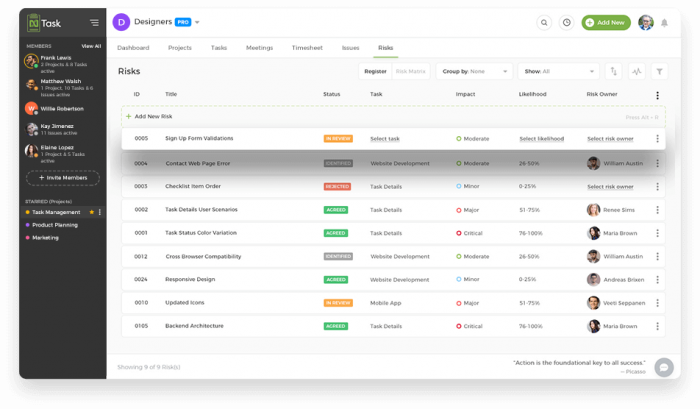
Image source: ntaskmanager.com
Pros:
- Includes a dedicated, built-in risk management module.
- Generates a risk matrix automatically.
- Allows risks to be linked directly to project tasks.
- Clean, user-friendly interface.
- Affordable pricing plans suitable for small and medium businesses.
Cons:
- Fewer advanced integrations compared to larger platforms.
- Reporting and customization options are less robust than enterprise-level tools.
Ideal for:
Small to medium-sized businesses and teams looking for an affordable and easy-to-use project management tool with built-in risk management capabilities.
Pricing:
- Basic plan: $0/user/month (forever free), supports up to 5 users. Includes unlimited workspaces/tasks, 100MB storage, and meeting management.
- Premium plan: $3/user/month, for individuals/startup teams. Adds unlimited projects, 5GB storage, Gantt/Kanban views, and sub-tasks.
- Business plan: $8/user/month, for teams needing confident project planning. Includes 10GB storage, custom fields, risk tracking, and priority support.
- Enterprise plan: Custom pricing, for teams needing customizations. Offers 100GB storage, SSO, dedicated account manager, and custom onboarding.
Benefits of using project risk management software
Adopting a dedicated software solution for risk management provides tangible benefits that directly impact project efficiency and success rates. The goal of effective risk management software project management is to transform this discipline from a passive, administrative task into a proactive, strategic advantage.
- A single source of truth for all project risks: Perhaps the most significant benefit is the creation of a centralized, real-time repository for all risk-related information. Every team member and stakeholder can access the same up-to-date data, eliminating the confusion caused by multiple spreadsheet versions. This ensures that decisions are always based on the most current information and that everyone is operating from a shared understanding of the project's challenges and opportunities.
- Increased efficiency through automation: These tools save a significant amount of time by automating manual, repetitive tasks. This includes generating risk reports for stakeholder meetings, sending automated reminders to risk owners about upcoming deadlines, and notifying the team when a risk's status changes. This frees up project managers and team members from administrative overhead, allowing them to focus on more strategic, high-value work like problem-solving and mitigation planning.
- Improved decision-making: With intuitive visual tools like risk heatmaps and customizable dashboards, project leaders can understand the risk landscape at a glance. Software makes it easy to filter and sort risks by priority, owner, or other criteria, enabling leaders to immediately identify which issues require the most urgent attention. This data-driven clarity allows for faster, more confident, and more effective decision-making.
- Enhanced team collaboration and accountability: Modern risk management software is built for teamwork. By allowing team members to comment on risks, tag colleagues in discussions, and link risks directly to collaborative documents, these platforms ensure that the context and conversation are never lost. Assigning a clear owner to every risk and mitigation task also establishes unambiguous accountability. Everyone knows what they are responsible for, which fosters a culture of ownership and follow-through.
- Streamlined compliance and reporting: For organizations in regulated industries or those with strict internal governance, maintaining a clear audit trail is essential. Project risk management software automatically creates a historical record of every action taken on a risk—from initial assessment changes to the completion of mitigation tasks. This makes it simple to generate compliance reports and conduct effective post-project reviews to learn from past challenges and successes.
Key features to look for in project risk management software
When evaluating project risk management software tools, it is crucial to look beyond a simple feature checklist. The value lies in how these features work together to create a cohesive, collaborative environment. The best tools are more than just digital versions of a spreadsheet; they are integrated systems for action.
- A dynamic and centralized risk register: The risk register is the heart of any risk management process. In modern software, this should not be a static list. Look for a dynamic, database-like register where each entry is a rich object. It should be easily searchable, sortable, and filterable by criteria like risk owner, status, priority, or date identified. Team members should be able to add new risks easily, complete with custom fields to capture all necessary information.
- Integrated mitigation planning and task management: Identifying a risk is only the first step. The real work is in mitigation. The software should seamlessly connect the risk to the action plan. Look for the ability to create and assign mitigation tasks directly from the risk item. This ensures that every risk has a clear owner and an actionable plan. The ability to set deadlines for these tasks and track their status closes the loop, ensuring that plans are not just made but are also executed.
- Real-time dashboards: Manual report generation is a major time sink. Modern project risk management software should offer customizable, real-time dashboards that provide an instant overview of the project's risk profile. Leaders should be able to see metrics like the number of open risks, risks by priority level, and overdue mitigation tasks. Some forms of advanced AI project risk management software are even beginning to offer predictive analytics to forecast potential risk hotspots.
- Seamless workflow and communication integrations: A tool's true power is revealed in its ability to connect with other systems. The software should not be another isolated island. Prioritize solutions that integrate deeply with the tools the team already uses every day, such as chat/messaging platforms, document editors, and calendars. An ideal workflow might look like this: a risk is flagged in the software, which automatically triggers a notification in a specific team chat channel. The team can then initiate a video call to discuss it and link the collaborative meeting notes directly back to the risk item. This creates an unbroken, fully documented chain of events. Without complex integrations, Lark involves these capabilities on its own, showing its advantages over other project risk management software.
- Comprehensive audit trails: Accountability is key in risk management. A robust system should provide a complete and unalterable audit trail for every risk. It should log every change, from the initial identification to the final resolution. This includes any modifications to the risk's description or assessment, all comments and discussions, and the completion of mitigation tasks. This history is invaluable for post-project reviews and for satisfying compliance requirements in regulated industries.
Guide to choose the right risk management tool for your needs
Selecting the right software is a critical decision that will impact team workflows and project outcomes. AA systematic approach to the risk management software project management selection process ensures the chosen tool aligns with the team's actual needs.
1. Evaluate your team's process maturity
Start by assessing the current state of risk management within the team. Is the team just beginning to formalize its process, or is there a well-established system that needs to be optimized? A team transitioning from spreadsheets may prioritize ease of use and a simple interface. A more mature team may need advanced customization, reporting, and portfolio management capabilities.
2. Define your must-have features versus nice-to-haves
Using the feature list in this guide as a starting point, create a checklist of requirements. Categorize them into "must-haves" and "nice-to-haves." This will help to objectively compare different solutions. For some, this might include exploring advanced AI project risk management software, while for others, basic tracking is sufficient. Some organizations may need solutions that are listed on government procurement frameworks, seeking an "AI project risk management software g-cloud" certified tool for compliance reasons.
3. Run a pilot program with a small team
Before a full-scale rollout, select a single project team to run a pilot program with one or two shortlisted tools. There is no substitute for hands-on experience. This trial period will reveal the practical strengths and weaknesses of the software in a real-world context. This is especially important if you are considering either highly specialized tools or more flexible open source project risk management software.
Conclusion
The goal of project management is not to create a flawless plan that never changes, but to build a resilient team capable of navigating uncertainty with confidence. In today's fast-paced environment, this resilience is built on a foundation of proactive risk management, powered by collaborative tools. Moving beyond the limitations of static spreadsheets is the critical first step in this evolution.
This shift from isolated data to all-in-one workflows is where platforms like Lark excel. By bringing risk identification, discussion, and resolution into the same space where teams communicate and collaborate every day, it transforms risk management from a periodic chore into a continuous habit. To see how a truly unified platform can empower your team to face challenges proactively, explore Lark and start building a more resilient project environment today.
FAQs
Why not just use a spreadsheet for risk management?
While spreadsheets are a start, they create version control issues and lack real-time collaboration. Dedicated software provides a dynamic, single source of truth, automates key notifications, and directly links risks to mitigation tasks and owners, making the process active rather than passive.
How should a team choose between a specialized tool and an all-in-one platform?
Choose a specialized tool for deep, quantitative analysis (like Monte Carlo simulations) or strict compliance needs. Opt for an all-in-one platform like Lark when the goal is to integrate risk management seamlessly into your team's daily communication and project tasks for broader adoption.
What is the single most important feature to look for in this software?
Beyond a basic risk register, the most crucial feature is seamless workflow integration. The ability to link risks directly to chat discussions, assigned tasks, and collaborative documents is what turns a passive list into an actionable management system and prevents tool-silos.
What is the best way to ensure the team adopts the new software?
Start with a pilot program on a single project to get buy-in and gather feedback. Choose a tool with an intuitive interface that fits into existing workflows. Most importantly, project leadership must lead by example, using the platform consistently for all risk-related communications.
Related reading
Table of contents
Start using Lark today

Manage all your work in one place
Boost team efficiency by 10x
Save up to 70% on software costs
Table of contents
Start using Lark today
Manage all your work in one place
Boost team efficiency by 10x
Save up to 70% on software costs
Keep reading








2026 Lark Technologies Pte. Ltd.
Headquartered in Singapore with offices worldwide.






Explore: