














Monday CRM Review: Features, Pricing, and a Smarter Alternative

Ryan Tanner
Product Marketing Specialist
Sep 18, 2026
Ryan Tanner
Sep 18, 2026

15 min read


Monday CRM has quickly gained traction among businesses seeking a colorful, visual platform to manage their sales pipelines and client relationships. With its drag-and-drop boards, automation templates, and collaboration tools, the platform promises to make sales management intuitive for both startups and mid-size teams. But as more companies scale, a key question arises: Is Monday CRM powerful enough to handle complex workflows, real-time collaboration, and cross-functional visibility, without piling on integrations and costs?
In this in-depth Monday CRM review, we'll examine every layer of the platform from pricing and features to pros and limitations.

What is Monday CRM?
Monday CRM, also known as Monday Sales CRM, is a customizable customer relationship management platform built on the Monday.com Work OS. It helps teams track leads, manage pipelines, and organize client communication through visual, drag-and-drop boards. Designed for flexibility, it allows users to tailor columns, statuses, and dashboards for every stage of the sales process. Businesses can view deals in Kanban, table, or calendar formats and automate simple workflows like lead assignments or follow-ups.
While the platform is praised for its intuitive interface and ease of setup, many Monday CRM reviews highlight that it lacks deeper automation and integrated communication tools found in more unified systems. As a result, growing teams often compare Monday CRM software with alternatives like Lark to achieve better scalability, collaboration, and cost efficiency. Overall, it's a good fit for small to mid-sized teams seeking visual sales management and customizable workflows.
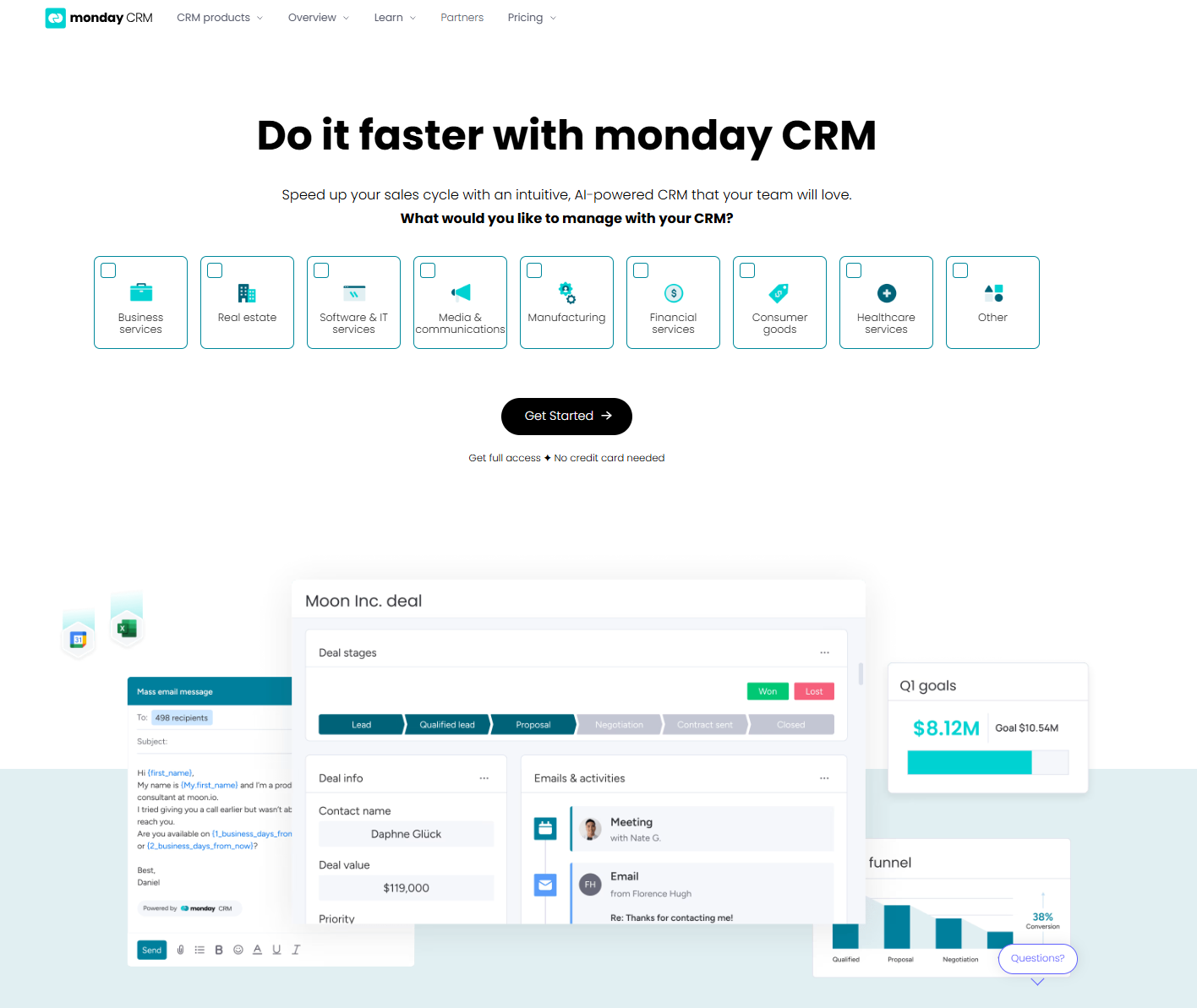
Pricing source: monday.com
Key features of Monday CRM
Monday CRM is built to simplify how teams track leads, manage pipelines, and automate sales processes. It turns complex deal stages into clear, visual boards that keep every rep aligned. With customizable workflows, reminders, and reports, teams can stay on top of every opportunity. Here’s a look at the key features that make Monday CRM a popular choice for growing businesses.
Visual pipeline and board customization
One of the standout features often mentioned in Monday CRM reviews is its visual and flexible pipeline management. The platform makes it easy for teams to design workflows that match their exact sales process. No coding or complex setup required.
- Boards and columns can be tailored for each pipeline stage: Every business manages leads differently, and Monday Sales CRM adapts to that. Users can create custom columns for stages like "New Lead," "Negotiation," or "Closed Won," ensuring every deal follows a clear visual path through the pipeline.
- Easy drag-and-drop movement of leads and deals: With Monday's intuitive interface, updating a deal's progress is as simple as dragging it to the next stage. This visual approach helps teams quickly spot bottlenecks, prioritize high-value opportunities, and maintain pipeline clarity without manual data entry.
- Offers multiple views like Kanban, table, Gantt, and calendar: Different teams prefer different perspectives. Monday CRM software allows switching between Kanban for flow visualization, table for detailed tracking, Gantt for timelines, and calendar for deadline management, offering flexibility to manage sales from any angle.
Contact and deal management
A strong CRM should centralize client data, and Monday CRM delivers this through its structured contact and deal management tools. As noted in many Monday.com CRM reviews, this feature helps sales teams keep every lead interaction organized and accessible in one place.
- Centralized contact database with communication history: Monday CRM maintains a unified database where all client details, from company info to deal value, are stored. Each record includes communication history, allowing teams to quickly review past interactions and ensure smooth handovers between sales reps.
- Timeline tracking of emails, calls, and updates per deal: The platform creates a chronological view of every customer touchpoint. Users can log calls, record meeting notes, and view email exchanges, all connected to the respective deal, making it easy to monitor engagement and progress throughout the sales cycle.
- Integrations available for Gmail and Outlook: Monday CRM software connects with popular email tools like Gmail and Outlook, letting users sync conversations directly within the CRM. This ensures no message is missed and that communication remains visible to the entire sales team for better collaboration.
Workflow automation
Automation is a key highlight in many Monday CRM software reviews, helping teams reduce manual work and focus more on closing deals. The platform enables users to set up smart workflows that trigger actions automatically, improving consistency and speed across the sales cycle.
- Automates repetitive sales actions such as email follow-ups, reminders, and status changes: Monday CRM lets users automate common tasks like sending follow-up emails, updating deal statuses, or assigning reminders. This ensures that no opportunity slips through the cracks and that repetitive administrative work is handled automatically.
- Pre-built templates for lead assignment and task creation: To make setup easier, the platform includes ready-made automation templates. Sales teams can instantly create workflows for actions such as assigning new leads to specific reps or generating tasks when a deal moves to a new stage, saving time and maintaining process consistency.
- Advanced automations reserved for higher-tier plans: While basic automation is available on standard plans, more complex multi-step workflows are locked behind Monday CRM's Pro and Enterprise tiers. Teams needing advanced triggers or cross-board automation may find themselves upgrading sooner than expected to access these features fully.
Reporting and dashboards
Effective sales management depends on visibility, and Monday CRM offers reporting tools that give teams a clear overview of performance and progress. Many Monday CRM reviews note that while its dashboards are visually appealing and easy to use, they focus more on surface-level metrics than deep forecasting analytics.
- Custom dashboards with graphs and charts for tracking KPIs: Monday CRM allows users to build personalized dashboards that visualize data through charts, graphs, and performance widgets. Teams can track metrics like deal conversion rates, pipeline value, and sales activity trends in real time, helping managers make informed decisions quickly.
- Limited in-depth forecasting compared to full-scale CRM analytics tools: While great for basic reporting, Monday CRM's analytics can feel restrictive for teams needing advanced insights, such as predictive forecasts or revenue projections. Compared with enterprise-grade tools, its dashboards offer less granular analysis, making it better suited for small to mid-sized teams rather than data-driven enterprises.
Collaboration and integrations
Collaboration is central to any CRM, and Monday CRM aims to make teamwork smoother by offering shared access and third-party tool connections. However, as highlighted in many Monday sales CRM reviews, its collaboration features often depend on external apps rather than being built into the platform itself.
- Shared boards for team visibility: Monday CRM enables multiple team members to view, edit, and comment on shared boards in real time. This transparency helps sales and marketing teams stay aligned on deal status, task ownership, and upcoming deadlines, all within a unified workspace.
- Integrations with Slack, Zoom, and external marketing tools: The platform connects with popular apps like Slack for messaging, Zoom for meetings, and marketing tools for campaign tracking. These integrations extend Monday CRM's functionality, allowing teams to synchronize communication and customer data across systems.
- Communication still occurs outside the platform (email or chat): Despite its integration, Monday CRM doesn't offer native messaging or calling. Teams still rely on external chat or email apps for real-time discussions, creating occasional context gaps between communication and CRM records, a challenge many teams address by exploring all-in-one solutions like Lark.
Monday CRM pricing
Monday CRM offers a tiered pricing model designed to suit individuals, small teams, and large organizations. Each plan builds on the previous one, unlocking more automation, integrations, and analytics capabilities.
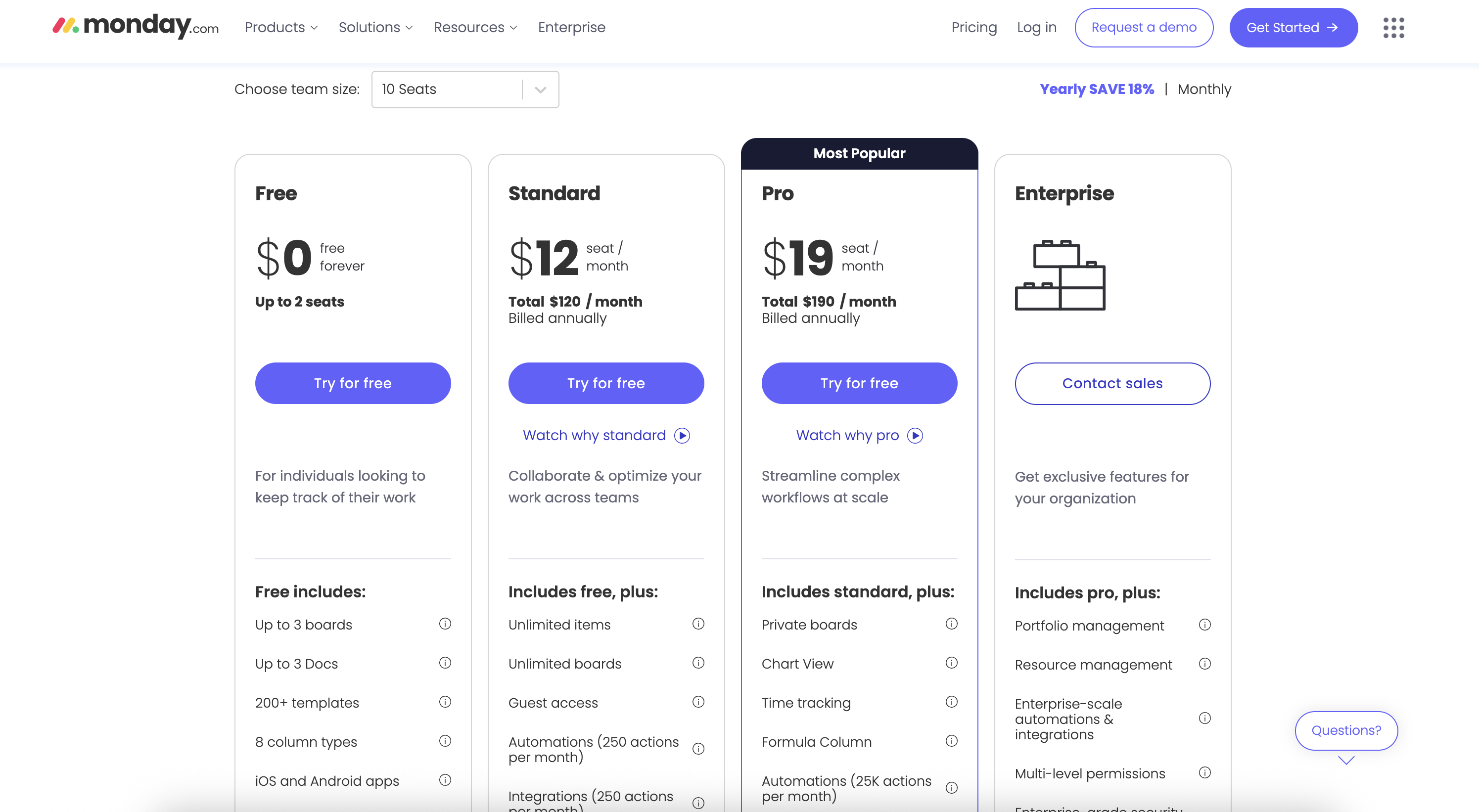
Pricing source: monday.com
Disclaimer: Verified November 2025. Pricing may vary by region and billing frequency.
Plan overview and recommendations
- Free plan: Best for individuals or very small teams testing the Monday CRM. It's limited to 2 users and 3 boards, but retains key features like templates and mobile access.
- Standard plan: Ideal for growing teams managing multiple pipelines or collaborative projects. Offers expanded automation and integrations for basic CRM workflows.
- Pro plan: Recommended for scaling organizations that require time tracking, advanced reports, and high-volume automation. It's the best balance between price and capability.
- Enterprise plan: Built for large companies needing portfolio-level visibility, resource allocation, and compliance-grade security features.
Pros and cons of Monday CRM
When evaluating Monday CRM, it's important to understand both its real strengths and where it may fall short as a full-scale CRM. Many reviewers praise its visual workflows, ease of setup and customization for smaller teams. At the same time, some limitations emerge around advanced analytics, automation ceilings and scaling costs. Let's break down the key pros and cons of Monday CRM so you can judge whether it fits your team's needs.
Pros
Across most Monday.com CRM reviews, users consistently praise the platform for its ease of use, flexibility, and visually engaging interface. It's particularly well-suited for teams that want a customizable CRM without the steep learning curve of traditional enterprise systems.
- Clean visual design with strong customization: Monday CRM stands out for its bright, intuitive interface that makes tracking deals and projects effortless. Teams can customize columns, colors, and board layouts to reflect their unique sales stages and priorities, helping everyone stay organized at a glance.
- Easy to get started for small teams: The platform's simplicity is one of its biggest advantages. Even users new to CRM systems can set up pipelines, add contacts, and automate tasks in minutes. This makes Monday Sales CRM ideal for startups or small teams that need a quick, no-fuss solution.
- Built-in automations for repetitive workflows: Monday CRM includes pre-built automation options that streamline daily operations, like sending follow-up reminders or updating statuses automatically. These time-saving features reduce manual work and help sales reps stay focused on building relationships and closing deals.
Cons
While Monday CRM software earns praise for its design and flexibility, several Monday CRM reviews point out limitations that may impact growing or enterprise-level teams. These drawbacks mainly relate to scalability, communication, and depth of analytics.
- Limited native communication tools: Monday CRM doesn't include built-in chat, calling, or email tracking beyond basic integration. Teams often rely on external platforms like Slack or Gmail, which can fragment communication and reduce visibility across deals.
- Scaling requires multiple add-ons: As teams expand, managing additional features like marketing automation or advanced reporting often means purchasing extra add-ons or using third-party tools, making scalability less seamless than all-in-one CRMs.
- Advanced features locked behind higher tiers: Powerful capabilities such as multi-step automation, time tracking, and advanced permissions are reserved for Monday CRM Pro or Enterprise plans, which can increase costs for smaller teams.
- Reporting is less detailed than enterprise CRMs: While the dashboards are visually appealing, they lack advanced forecasting and analytics depth. Compared to full-scale CRMs, Monday's reporting is more surface-level, limiting data-driven decision-making for complex sales operations.
How Monday CRM compares with other platforms
While Monday CRM offers an intuitive interface and flexible workflow setup, it often requires teams to rely on multiple add-ons or external tools for communication, documentation, and automation. This fragmentation can slow down coordination and increase overall costs as teams scale.
For organizations looking for a more connected, all-in-one experience that brings CRM, collaboration, and automation together seamlessly, Lark emerges as a stronger alternative. It combines real-time communication, task management, and data organization in a single unified workspace, helping teams move faster, stay aligned, and maintain full visibility without juggling multiple platforms.
Lark: A no-code alternative to Monday CRM
For teams seeking a unified workspace beyond traditional CRMs, Lark offers a powerful no-code alternative to Monday CRM. Built for modern collaboration, Lark combines database management, communication, and automation in one seamless platform. Unlike Monday, it eliminates the need for add-ons; chat, video calls, tasks, and forms are all built in. With real-time updates and customizable tools, teams can manage clients, projects, and data-driven workflows effortlessly from a single hub.
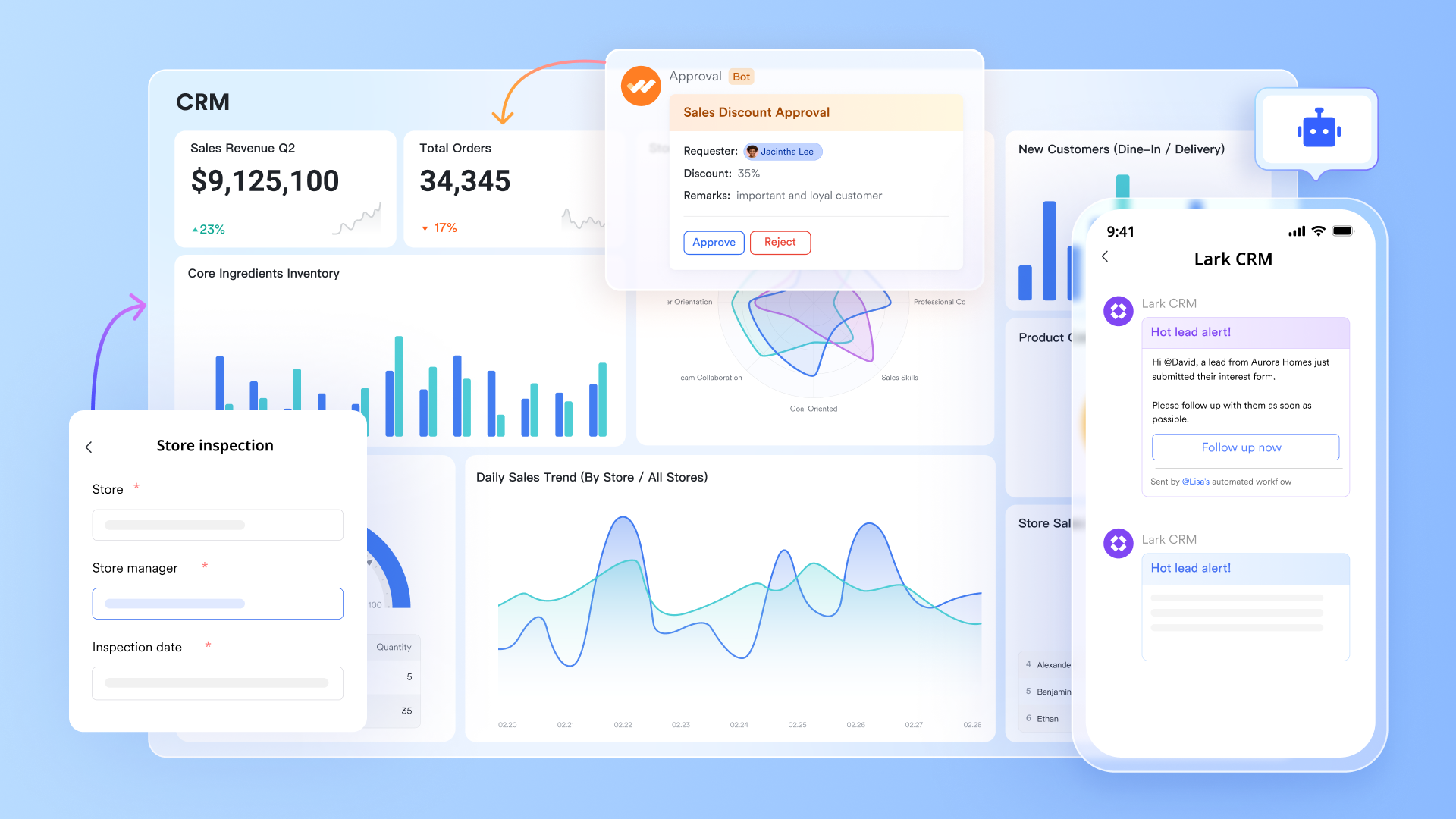
Lark Base: Flexible database-powered tracking
Lark Base acts as a relational workspace where you can build custom tables for leads, deals, projects, or clients without writing code. You choose views such as Kanban, Grid, Gantt, or Calendar to visualise your workflow. Because each table supports auto-filters, custom fields, and two-way links between records, your data stays connected and up to date. With Lark Base automations, you can set up rules that trigger actions, such as changing task status, sending a message in Messenger, or updating a record, based on data changes or events. Base gives you a deeper structure: you can link a "Deal" record to a "Contact" record and automatically trigger updates in both places, achieving the kind of relational logic that often requires advanced configuration in Monday.
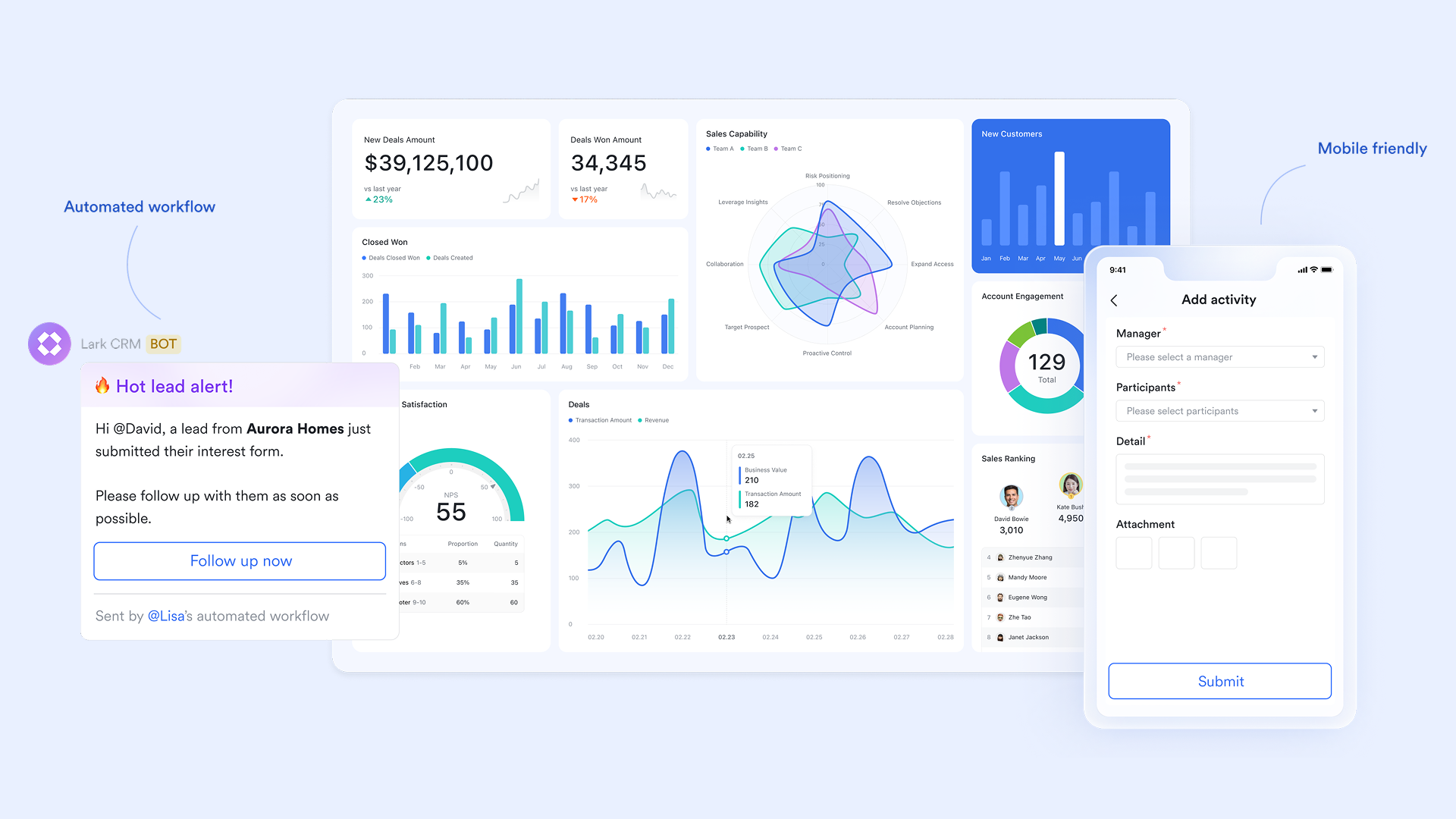
Lark Tasks: Direct task assignment and tracking, embedded in context
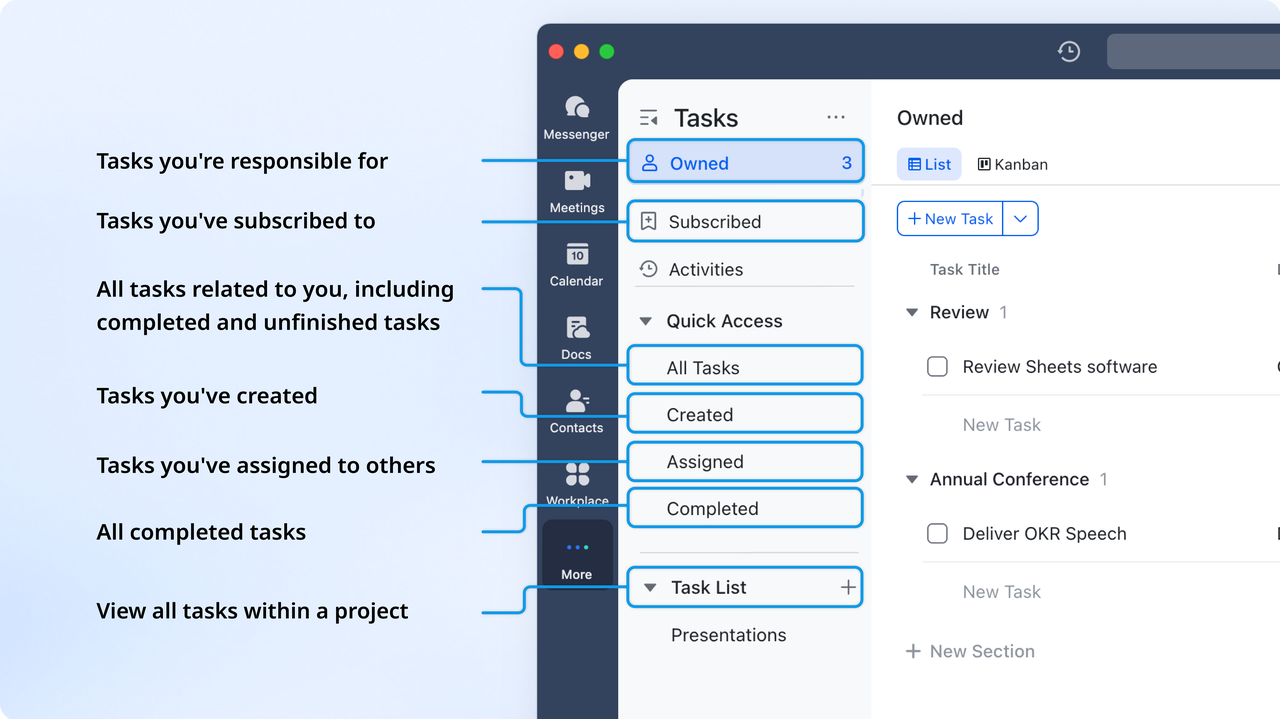
With Lark, you can turn any item, chat message, Base record, or document into a task and assign an owner, deadline, and priority. These tasks appear on a shared list or board where status changes are visible in real time. Unlike Monday CRM, where tasks live within boards but often need separate configurations for tracking dependencies or linking to communications, Lark's tasks are fully embedded in the same workspace that holds your communications and databases. For example, a task created in a document or chat will update in Base automatically.
Lark Messenger: Communication intrinsically tied to work
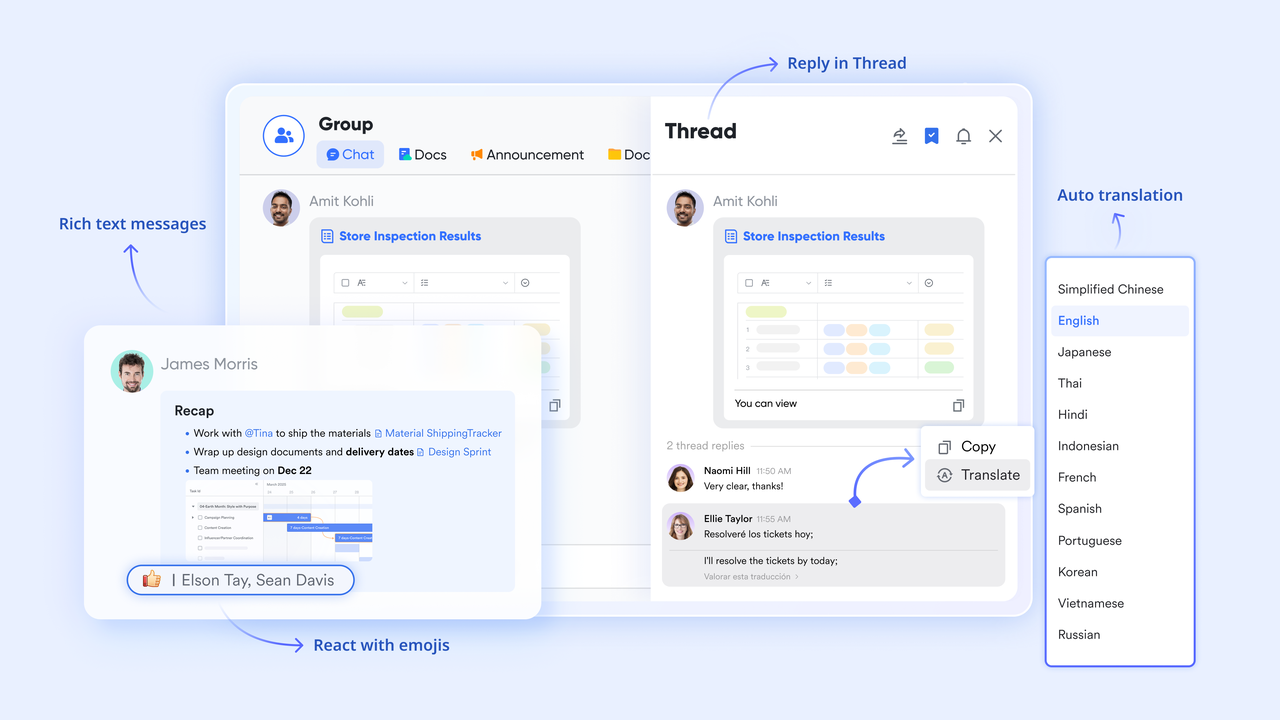
Projects succeed or fail largely because of how teams communicate. Lark ensures chats, calls, and documents are not separate from your project data; they live right beside it. Each conversation can reference Base records, tasks, or Docs. That means when your team is discussing a lead or a campaign, they're doing it in the same window where that lead's data lives. In contrast, Monday CRM often requires external chat tools or integrations to connect communication with tasks. Messenger in Lark reduces context switching and helps teams move faster.
Lark Docs & Wiki: Live collaboration and knowledge sharing
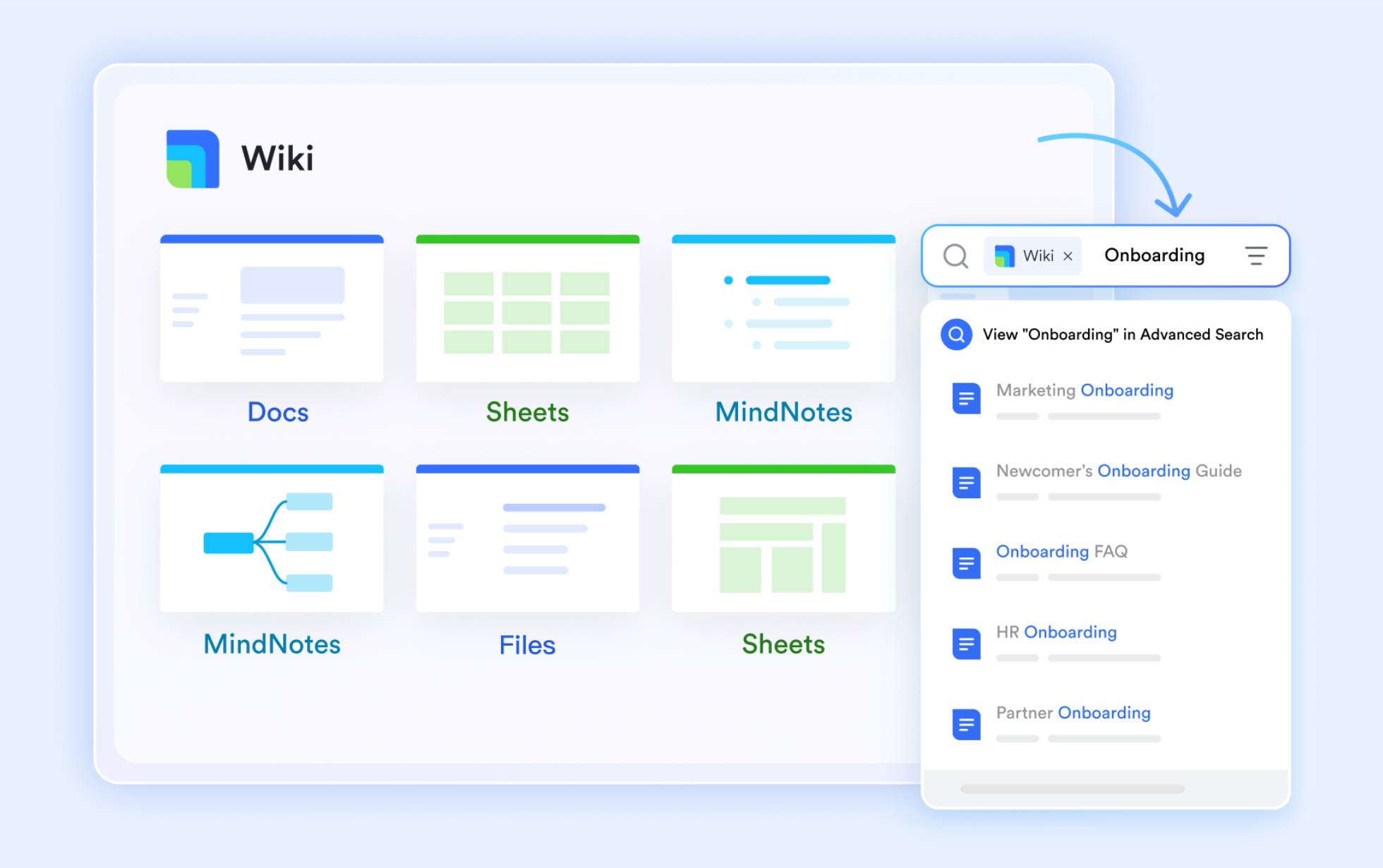
Documentation isn't an afterthought; it's part of the flow. With Lark Docs, multiple users can co-edit in real time, embed Base tables and tasks, and link discussions directly to project records. Lark Wiki then serves as the knowledge hub where finalized documents, playbooks, and process guides live. This means your project briefs, board meeting notes, or client documents remain connected to your tasks and data, something that often feels more manual in Monday CRM setups.
Lark Calendar: Unified scheduling aligned with tasks and data
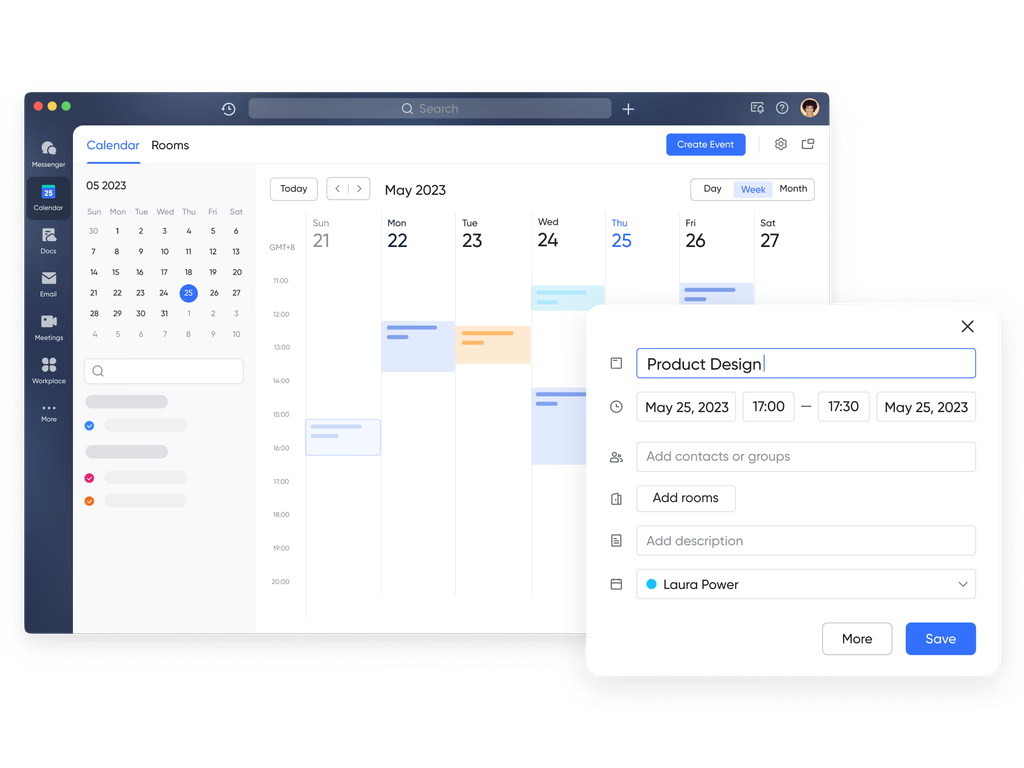
Ensuring that deadlines, meetings, and task dependencies are aligned is key. Lark Calendar lets you schedule events, link them to project records or Docs, and set reminders, all inside the same system where your tasks and communications occur. For teams using Monday CRM, this means fewer tools to manage and a calendar that's context-aware rather than separate and disconnected.
Lark Approval: No-code approval workflows built in
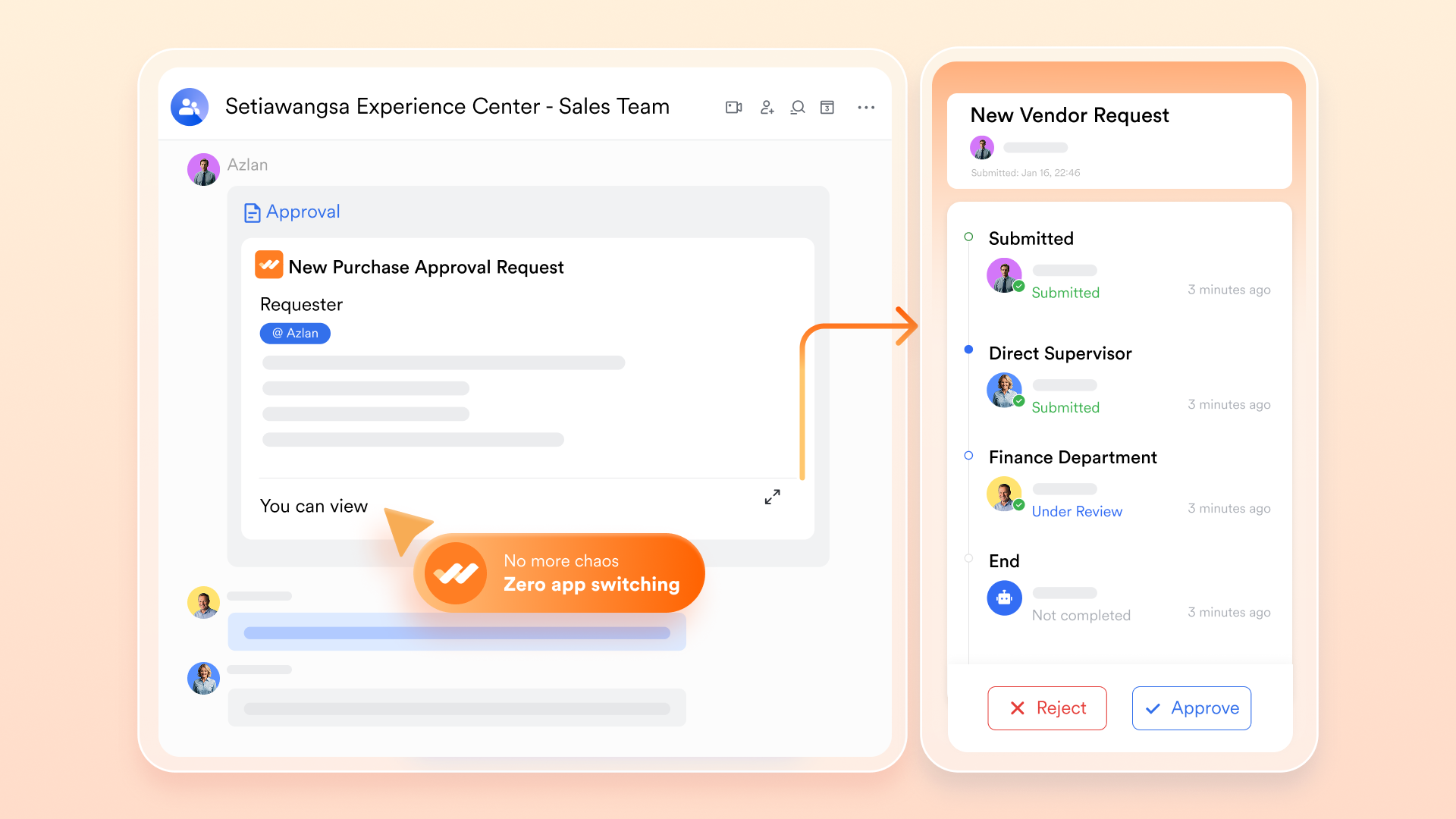
Lark Approval flows let teams submit requests (budget, contract, content) and route them through predefined reviewers, with status updates shown in real time. Compared to Monday CRM, where automation may require higher-tier plans or external apps, Lark brings this capability into the core workspace.
- Starter plan: Free forever plan that includes 11 powerful tools for up to 20 users. It also comes with 100GB of storage, 1000 automation runs, AI translations, and more.
- Pro plan: $12/user/month (billed annually) for up to 500 users. It includes everything in Starter plus group calling for up to 500 attendees, 15TB of storage, 50,000 automation runs, and more.
- Enterprise plan: Contact sales for custom pricing. Supports unlimited users and includes even more automation runs and advanced security, compliance, and management features.
Tips for choosing the right CRM
Selecting the best CRM goes beyond comparing prices or features; it's about finding the system that aligns with how your team actually works. Here are practical tips to guide your decision:
- Match the CRM to your team's workflow: Before committing, map how your team manages leads, projects, and client communication. A CRM should adapt to your workflow, not force you to rebuild it. Tools like Lark let you customize tables, tasks, and dashboards without coding, ensuring the platform fits your real operations.
- Consider scalability and flexibility: Your CRM should grow as your business expands. Evaluate user limits, automation capacity, and customization options early on. A scalable system prevents future migration headaches and supports long-term consistency.
- Evaluate automation and collaboration: Look for a platform that streamlines daily work through automation and built-in communication. CRMs that connect messaging, tasks, and data, like Lark, save hours otherwise lost to switching between tools and emails.
- Check data visibility and analytics: Analytics turn data into directions. Prioritize CRMs that offer customizable dashboards, real-time reports, and goal-tracking features so your team can monitor performance and act quickly on insights.
Pro tip: Before finalizing your CRM, start with a free trial or demo. Observe how easily your team adapts, how information flows between departments, and whether automation actually reduces workload. The right CRM should make collaboration effortless, not more complex.
Conclusion
Monday CRM is a visually appealing and easy-to-use platform that helps small to mid-sized teams organize leads, automate tasks, and track sales performance. Its customizable boards and intuitive interface make it great for managing pipelines and day-to-day sales activities. However, as businesses scale, limitations in communication, analytics, and advanced automation can slow efficiency and increase dependency on external tools. For teams that need a more connected and scalable solution, Lark offers a true all-in-one alternative, combining CRM-style data management, messaging, video meetings, forms, and automation in a single, no-code workspace designed for smarter teamwork.
FAQs
Is Monday CRM suitable for enterprise-level businesses?
While Monday CRM (also called Monday Sales CRM) offers enterprise-level security and customisation via its "Enterprise" tier, many reviews suggest its full CRM depth and scalability may fall short for large organisations. For example, one review states it's "very flexible … ideal for small and large" businesses, but also notes limitations in advanced analytics and automation for high-volume deals. Another review emphasises that large businesses may need a platform more geared to high-volume sales and full CRM capabilities.
Does Monday CRM include email automation or marketing tools?
Yes, but with caveats. Monday CRM offers email syncing and tracking (with Gmail/Outlook) in higher tiers; however, full email automation and marketing features are only available in its Pro or Enterprise plans. For instance, one source mentions that email marketing tools are "not available until the Pro CRM plan". So while core email-deal tracking is built in, advanced marketing automation is locked behind higher plan levels.
Can Lark be used as a CRM replacement for small teams?
Yes. Lark (via its Base module) can function as a no-code CRM alternative for small teams, allowing you to build custom tables for contacts, deals, tasks, and link them together with automation and collaboration tools. It is especially suited for teams that want flexibility, communication, + CRM in one place, and are comfortable buildings rather than using a traditional CRM out of the box.
How does Lark's pricing compare with Monday CRM's higher-tier plans?
Lark's pricing starts very affordably: its "Starter" plan is free (up to 20 users) and the "Pro" plan is about $8/user/month (billed annually) for up to 500 users. Meanwhile, Monday CRM's pricing for Pro and Enterprise tiers is significantly higher (e.g., ~$28/user/month for Pro in some plans) and custom pricing for Enterprise. This means for small to mid-sized teams, Lark can offer comparable functionality or better value.
What makes Lark better for collaborative CRM workflows?
Lark combines real-time communication, document collaboration, relational databases (via Base), and automation in one unified workspace. Because chat, tasks, workflow automation, and CRM data live in the same platform, teams experience less context switching and better alignment. According to Lark's own materials, you can turn any database record into tasks, link meetings and docs to deal records, and automate approvals, all without code. By contrast, many reviews of Monday CRM highlight that communication often still happens outside the platform (e.g., email or chat apps), which can fragment workflows.
Related reading
Table of contents
Start using Lark today

Manage all your work in one place
Boost team efficiency by 10x
Save up to 70% on software costs
Table of contents
Start using Lark today
Manage all your work in one place
Boost team efficiency by 10x
Save up to 70% on software costs
Keep reading



Lark recognized in 2023 Gartner® Collaborative Content Workspaces and Meeting Solutions reports
Lark, the global superapp for productivity, is delighted to announce it receives recognition in the Gartner's 2023 Innovation Insight for Collaborative Content Workspaces and Market Guide for Meeting Solutions.





2026 Lark Technologies Pte. Ltd.
Headquartered in Singapore with offices worldwide.






Explore: