














13 Easiest Project Management Software for Modern Teams

Ryan Tanner
Product Marketing Specialist
Sep 18, 2026
Ryan Tanner
Sep 18, 2026

34 min read


Managing projects can be overwhelming for beginners or small teams, especially with the vast number of project management tools available today. For teams that don't have dedicated project managers, the learning curve and setup time of complex software can be a huge hurdle. That's why many teams have turned to the easiest project management software—tools that combine simplicity, visual clarity, and collaborative features into a lightweight but effective workspace.
From unified platforms like Lark, which combine tasks, communication, and Docs in one, to Kanban-focused solutions like Trello, or database-oriented apps like Airtable, these tools cater to beginners, freelancers, startups, and small teams who want productivity without a steep learning curve. In this guide, we'll explore 13 tools that stand out for their ease of use, key features, pricing, and overall suitability for beginners.
1. Lark: The easiest project management software for teams
2. Trello: Beginner-friendly Kanban boards
3. Asana: Simple task + timeline structure
4. ClickUp: Flexible but easy when used lightly
5. Monday.com: Visual workflows for small teams
6. Notion: Simple docs + task boards for individuals
7. Airtable: Easy database-style project management
8. NiftyPM: Lightweight PM for personal projects
9. Plaky: Simple board-based project tracking
10. Wrike: Simple starter plan for basic collaboration
11. ProofHub: Centralized workspace for beginners
12. ProProfs Project: Easy task tracking system
13. ProjectManager: Beginner-friendly planning tools

Easiest project management software: Quick list review
Information source: Official vendor sites
Update time: 2025-11-16
Note: Pricing and plan details reflect publicly available data as of the update date and may vary based on region, billing cycle, and number of agents.
What makes project management software "Easy to use"?
Choosing the easiest project management software for your team goes beyond picking a tool with a clean interface. True ease of use comes from features that reduce setup time, simplify collaboration, and allow teams to manage projects without a steep learning curve. Beginners and small teams benefit from solutions that combine visual clarity, intuitive navigation, and lightweight automation. Whether you are a freelancer, student, or a cross-functional team, simple project management software ensures tasks, timelines, and communication are all easy to follow.
Let's break down the key characteristics that make project management tools approachable and effective.
- Simple UI and navigation: An intuitive interface is the foundation of the easiest-to-learn project management software. Clear menus, minimal clutter, and logical layouts help new users find tasks, projects, and resources quickly. When teams can navigate without confusion, adoption rates improve significantly. Simple UI also reduces errors and allows non-technical users to focus on completing project work rather than learning the software.
- Fast setup with minimal configuration: Tools that require minimal configuration allow teams to start working immediately. With the easiest project management software to use, you can create projects, assign tasks, and set deadlines without spending hours on setup. Quick setup saves time for both managers and contributors and ensures small teams can implement workflows efficiently. Pre-built templates often accelerate this process, making it ideal for beginners.
- Templates for common workflows: Templates are a key feature in simple project management software because they reduce the need to build workflows from scratch. Teams can replicate common project types, such as marketing campaigns, product launches, or client onboarding. Templates provide structure while maintaining flexibility, allowing new users to learn the software quickly. Using templates ensures consistency across projects and helps keep team alignment.
- Visual project views (Kanban, calendar, timeline): Visual tools like Kanban boards, calendars, and timelines make projects easy to understand at a glance. This is especially valuable for teams seeking the easiest-to-use project management software. Visual views allow team members to track progress, spot bottlenecks, and plan deadlines without navigating multiple screens. They also improve engagement by making tasks tangible and easier to prioritize.
- Easy teamwork: Collaborative features are essential for beginner-friendly software. Built-in comments, file sharing, and messaging help teams coordinate in real time. Simple project management software ensures that conversations stay attached to tasks, reducing back-and-forth emails. This integration promotes transparency and keeps everyone on the same page.
- Lightweight automation: Automation that is easy to configure reduces repetitive tasks, saving time for both managers and contributors. With the easiest-to-learn project management software, simple rules can trigger notifications, update task statuses, or move tasks between stages automatically. Lightweight automation minimizes manual errors and keeps projects moving smoothly.
- Mobile access for quick updates: Mobile-friendly apps ensure teams can update tasks, check progress, and communicate on the go. The easiest project management software to use offers intuitive mobile interfaces, so users do not need to rely solely on desktops. This accessibility keeps projects on track, especially for remote teams or field-based work.
- Low learning curve for non-technical users: The most important aspect of beginner-friendly tools is accessibility. Non-technical users can quickly adopt simple project management software without formal training. Clear instructions, helpful onboarding, and contextual help make it easy for anyone to manage projects confidently. A low learning curve also ensures faster adoption across the team and reduces resistance to new tools.
13 easiest project management software to use
1. Lark: The easiest project management software for teams
Lark groups core project management capabilities—including tables, multiple views, collaborative docs, team communication, and scheduling—into a single unified workspace. This centralized setup allows teams to launch projects quickly while keeping all context in one place, reducing the need to switch between multiple apps. By providing intuitive navigation and pre-built templates, Lark lowers the learning curve for new users and accelerates adoption across teams.
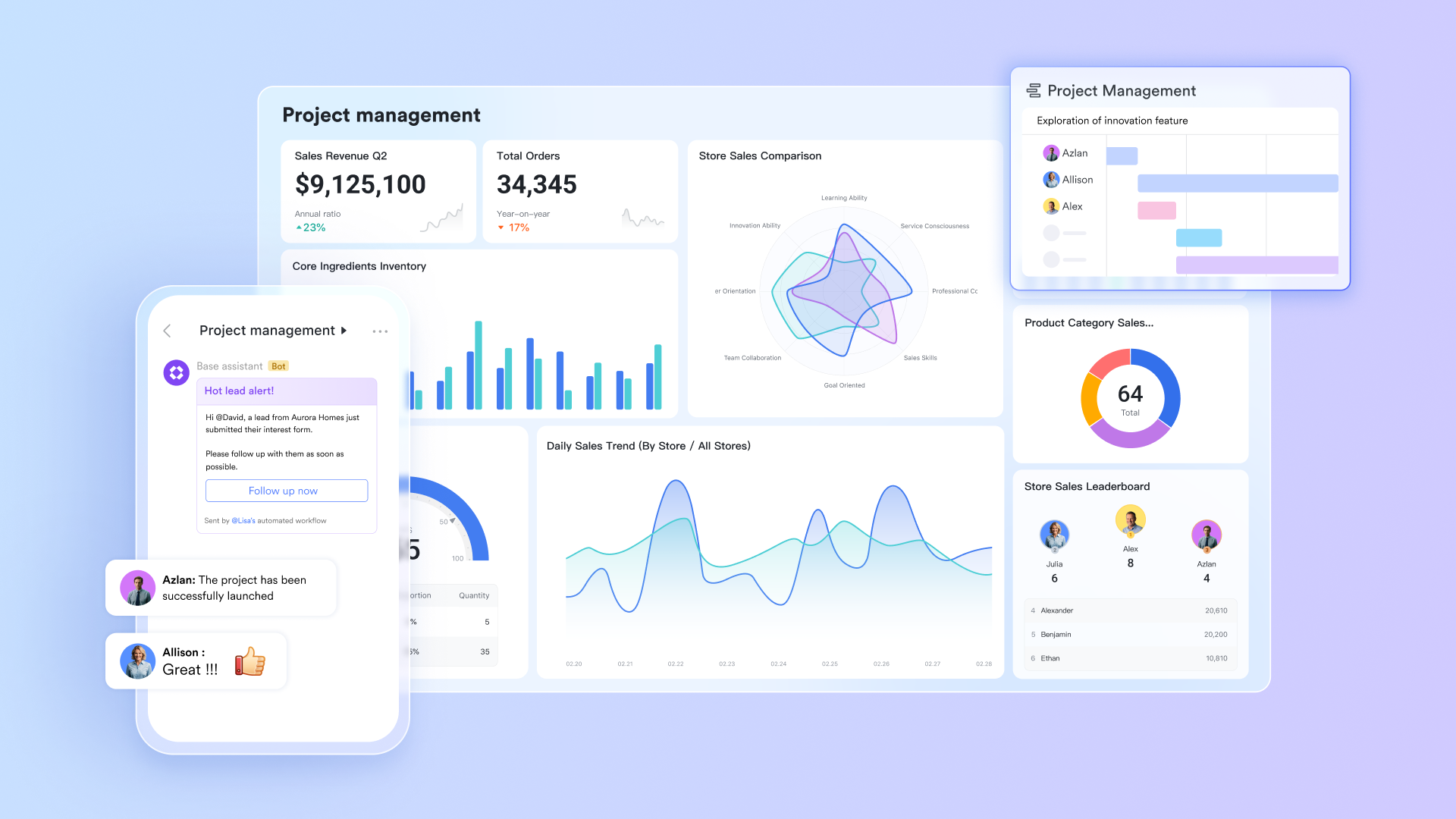
Lark Base dashboards: Clean, deep insights at first glance
Lark Base dashboards strengthen project management by providing clear, visual insights into ongoing work. Teams can analyze project data through a variety of charts—such as column, bar, line, area, and radar—making it easy to interpret information from multiple perspectives. Managers can monitor progress, task categories, individual workloads, and rankings at a glance, helping them spot issues early and make faster, more informed decisions. Dashboards also track resource allocation and key milestones, ensuring leaders maintain a full overview while team members see only what’s relevant to their roles.
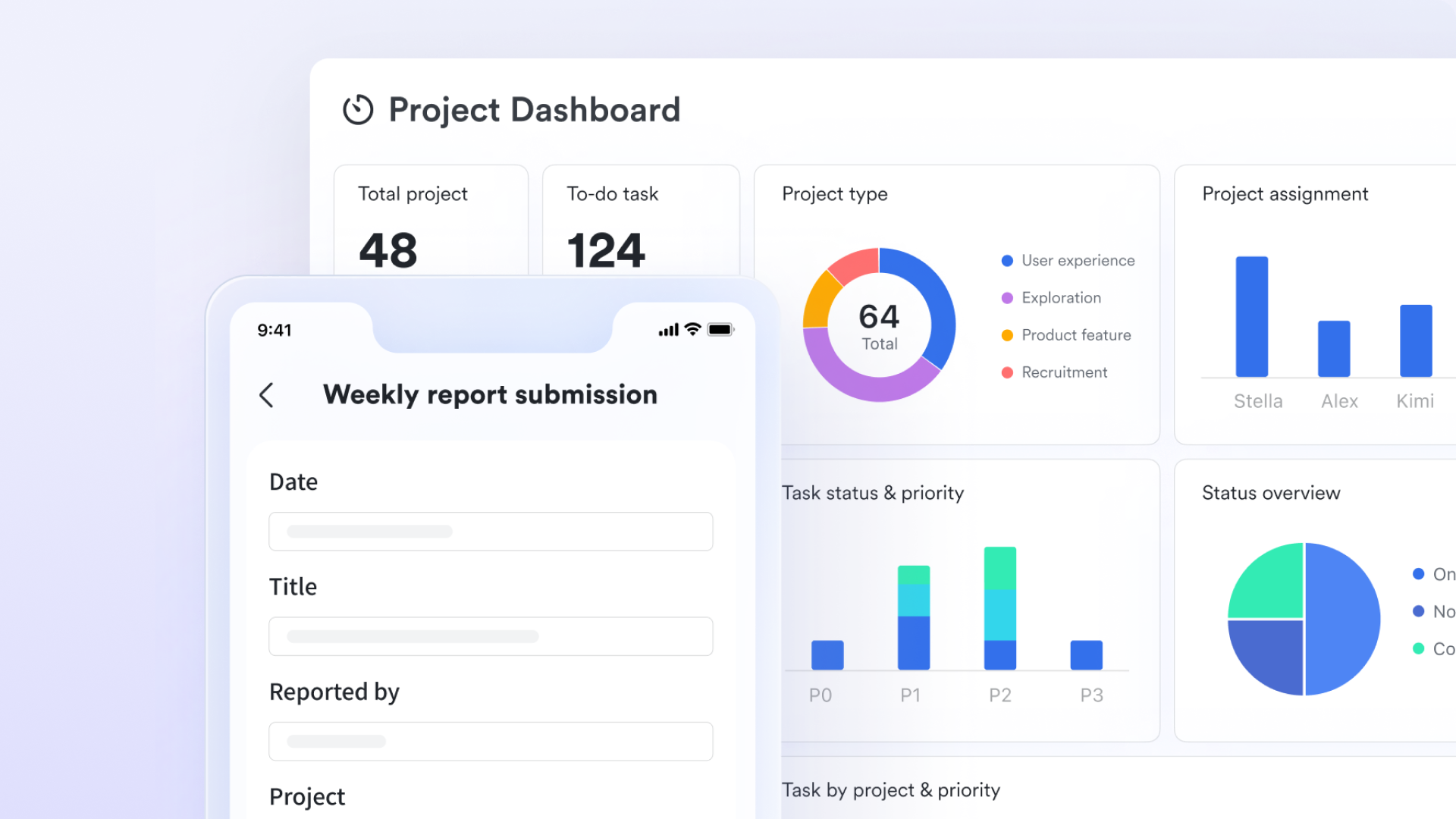
Lark Base tables: Keep related project data tidy and focused
Rather than stuffing every piece of information into a single list, Lark Base supports multiple tables so teams can separate tasks, deliverables, resources, and stakeholder records. Each table has its own fields, views, and permissions, which makes it easy to model real project structure (for example: Tasks table, Assets table, Vendor table). This modular setup prevents clutter, helps new users understand the data model quickly, and makes recurring project templates easy to reuse.
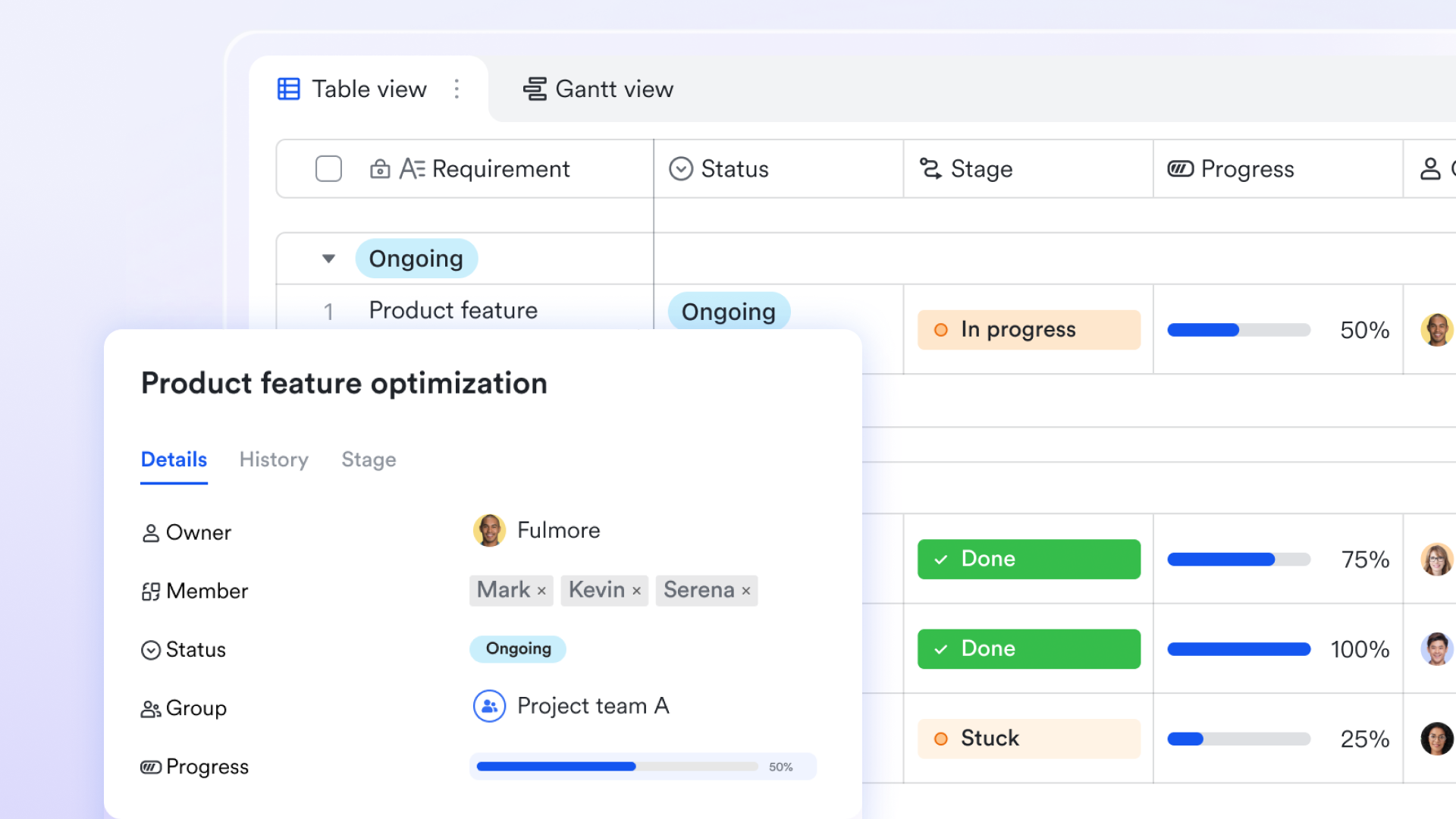
Views in Lark Base: Arrange data & information for smart decision
Different people make better decisions in different views, for example, Kanban shows work flowing through stages (perfect for daily standups and quick pickups), Forms displays the feedback lines by lines, while Gantt view reveals timing, dependencies, and schedule conflicts (perfect for planning and delivery). Switching between these views is immediate, so teams can move from tactical triage to strategic planning without rebuilding anything. The clarity of visual views shortens onboarding and keeps collaboration straightforward.
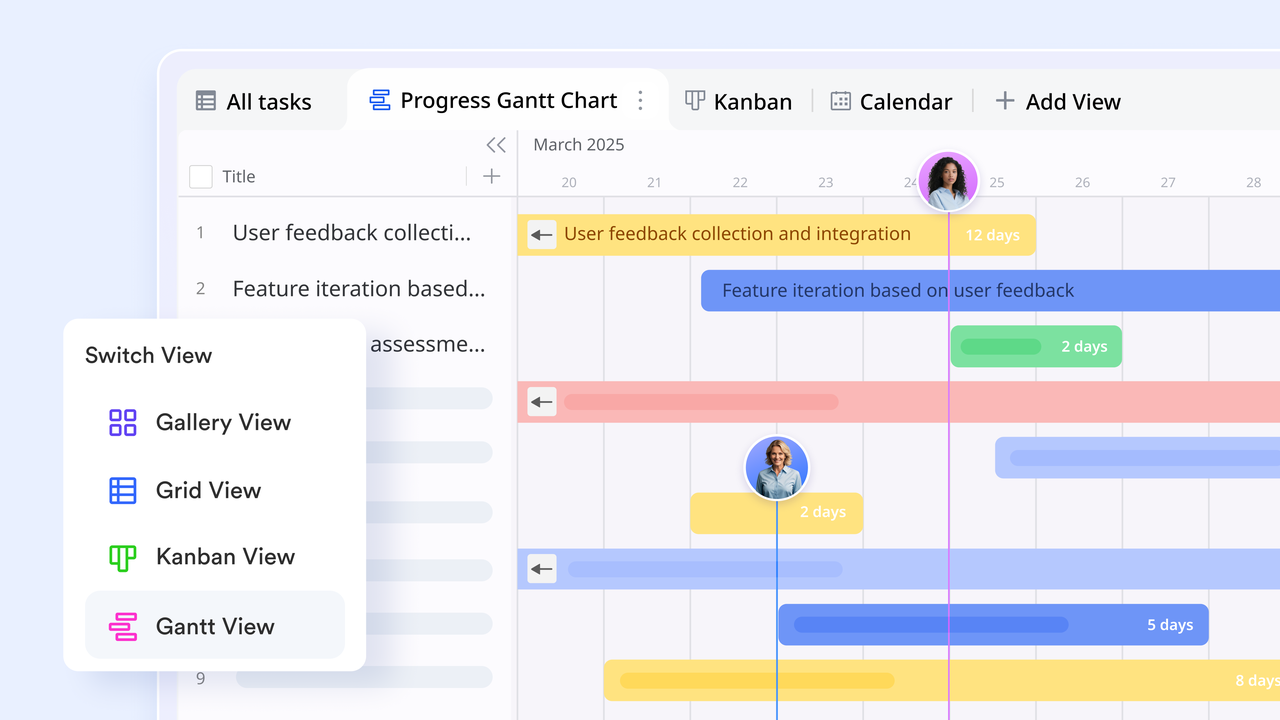
Workflow in Lark Base: Turn complex projects into organized flow
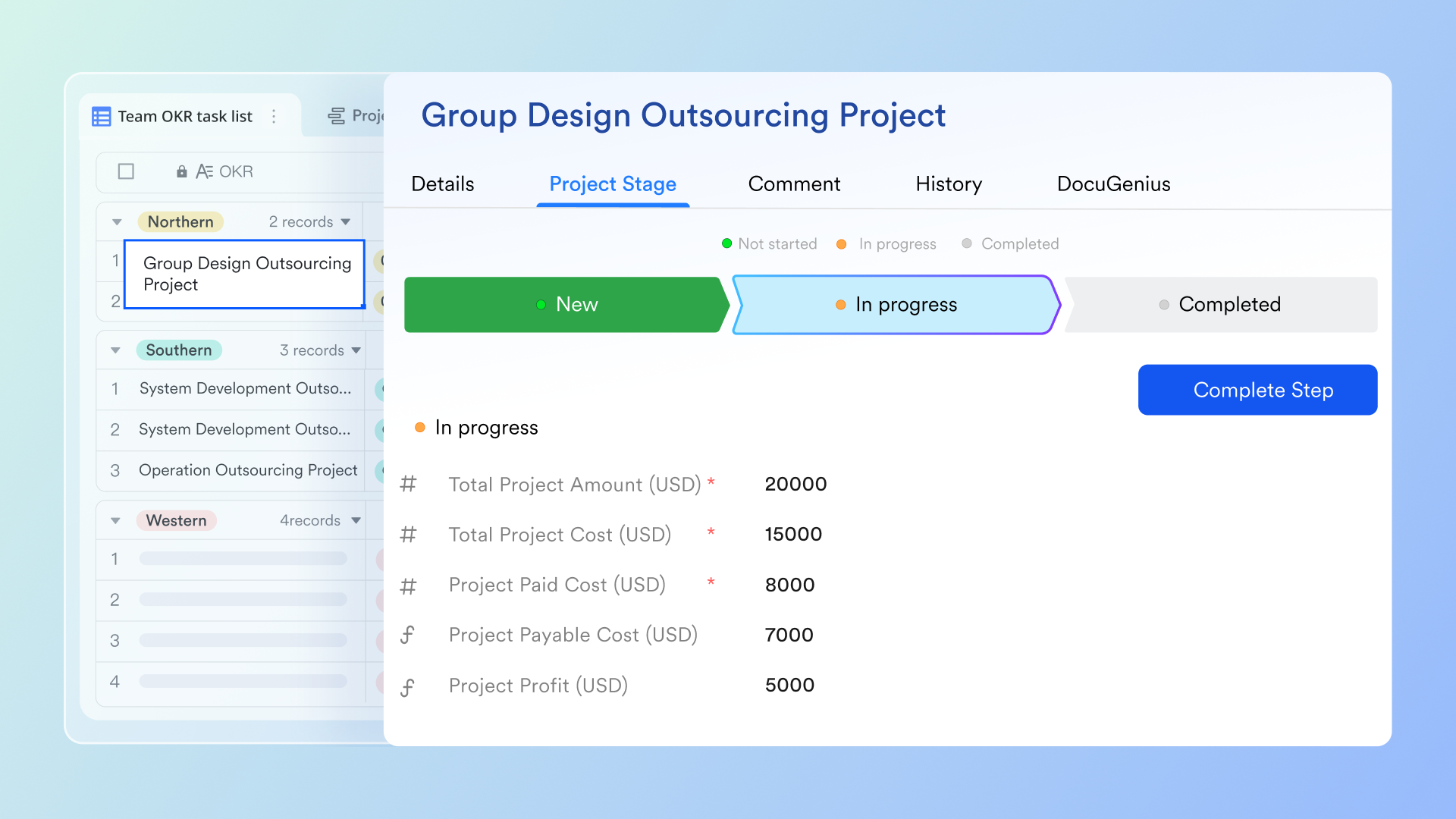
Lark Base Workflow supports project management by giving teams clear visibility and control over every stage—from requirement proposals all the way to rollout—ensuring transparency and accountability throughout the process. Automation features can send timely reminders to the right people, helping work move forward without manual follow-ups. Teams can also use formulas to automatically calculate and add task hours to the project total, simplifying time tracking. With the loop node, managers can send personalized to-do lists to designated members, improving task distribution while minimizing the risk of information leakage.
Lark Tasks: Transparent accountability & task execution flow
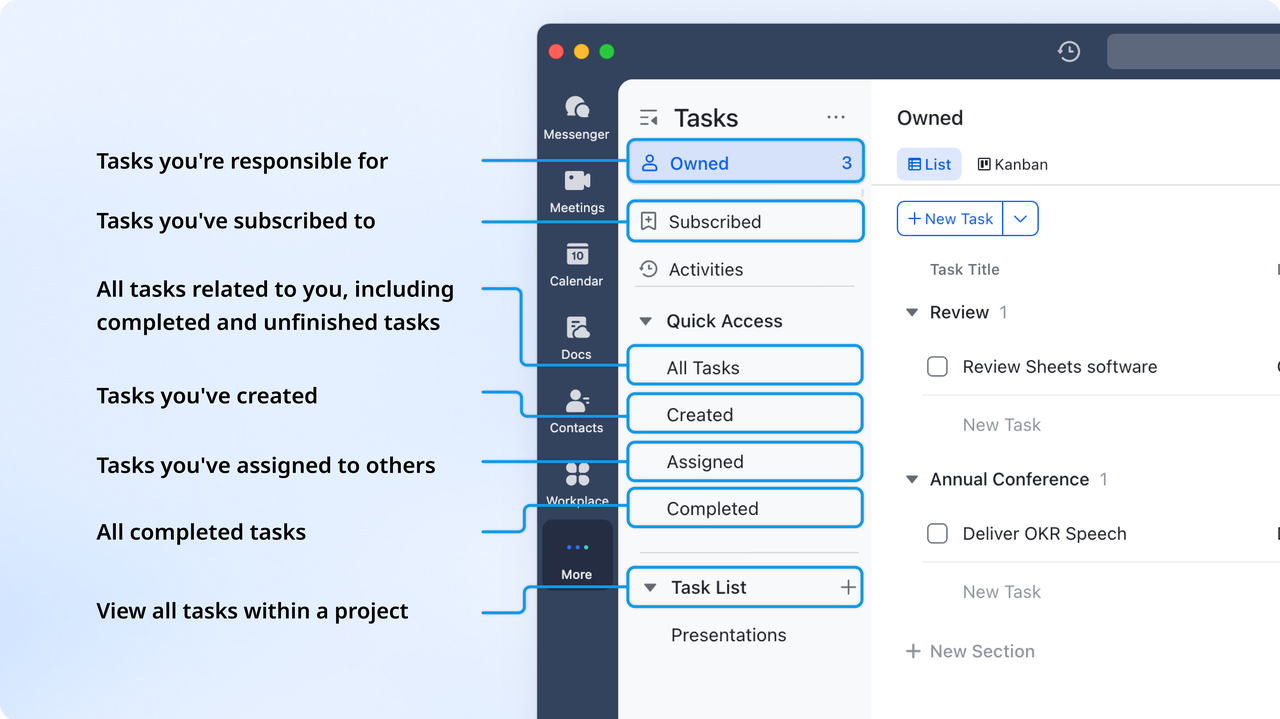
Lark Tasks enhances project management by helping teams organize, collaborate, and execute work more efficiently. It allows you to break large projects into clear, manageable steps and group tasks around specific goals. Responsibilities can be assigned, deadlines tracked, and progress monitored to keep everyone aligned. Custom fields make it easy to prioritize tasks and capture important details, while shared editing enables team members to collaborate seamlessly. With real-time updates and activity tracking, everyone stays informed about changes and can respond quickly as work evolves.
Docs, Sheets, & Calendar: Coordinated work without app-hopping
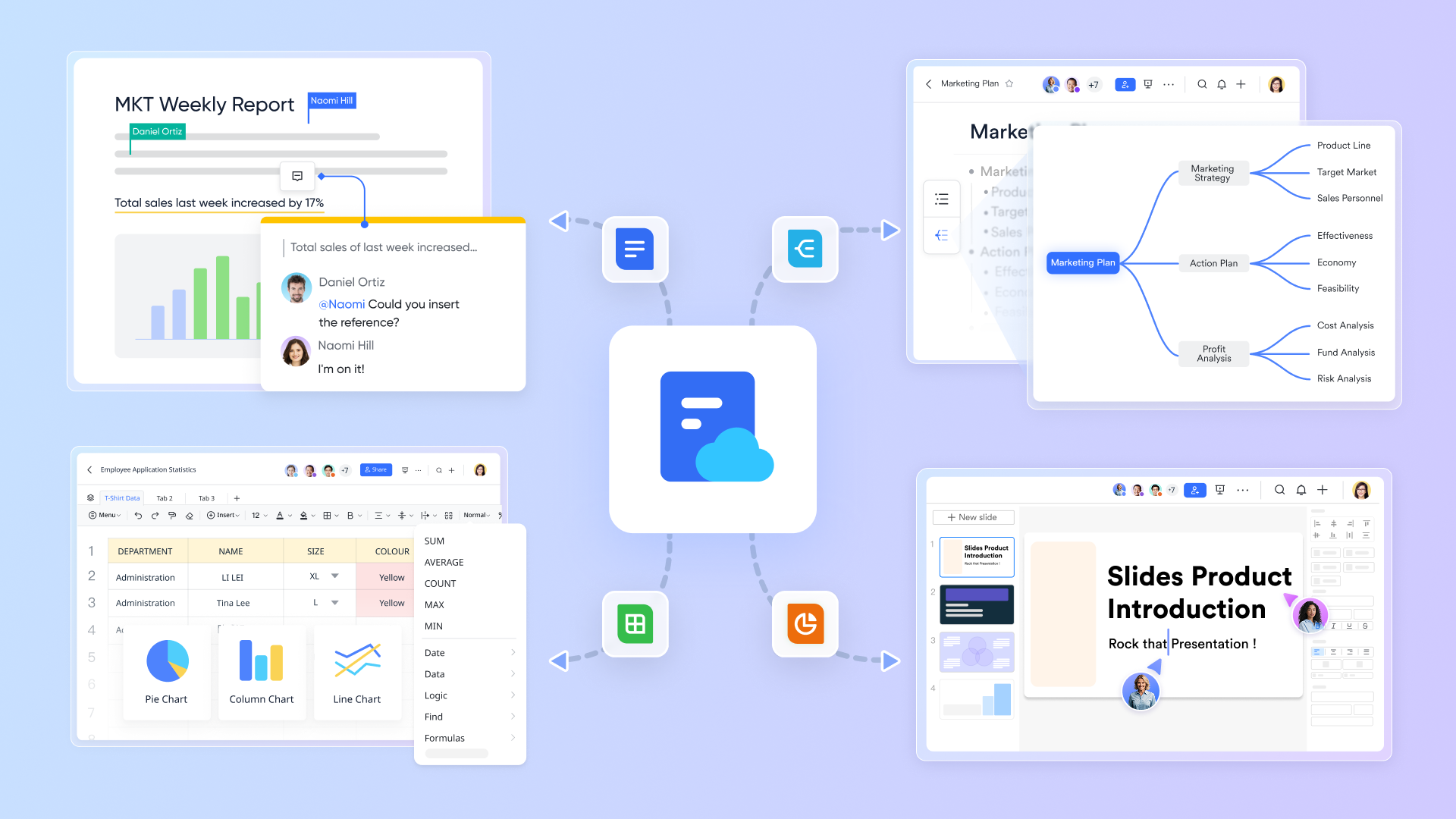
Lark Docs and Lark Sheets let teams author specs, embed live tables, and do quick calculations inside the same workspace where tasks live. Lark Calendar displays deadlines, reviews, regular meetings, and launch dates alongside tasks ensuring all actions attached to the relevant work. Because planning, execution, and communication live together, users, users—especially those who dislike switching contexts—find Lark faster to learn and simpler to use day to day.
- Starter plan: Free forever plan that includes 11 powerful tools for up to 20 users. It also comes with 100GB of storage, 1000 automation runs, AI translations, and more.
- Basic plan: $6/user/month (billed annually) for up to 500 users. It includes everything in Starter plus group calling for up to 500 attendees, 5TB of storage, 1000 automation runs, and more. Some users may need to contact sales to purchase.
- Pro plan: $12/user/month (billed annually) for up to 500 users. It includes everything in Basic plus group calling for up to 500 attendees, 15TB of storage, 50,000 automation runs, and more.
- Enterprise plan: Contact sales for custom pricing. Supports unlimited users and includes even more automation runs and advanced security, compliance, and management features.
2. Trello: Beginner-friendly Kanban boards
Trello is one of the most popular project management tools for beginners due to its intuitive Kanban board interface. It is designed to make task tracking visual, simple, and flexible, allowing teams and individuals to organize work without a steep learning curve. Trello's drag-and-drop system, simple card structure, and board layouts make it easy for first-time users to manage tasks. It is ideal for small teams, freelancers, and non-technical users who want a lightweight but effective solution. Trello also integrates with other tools, allowing workflows to expand as teams grow.
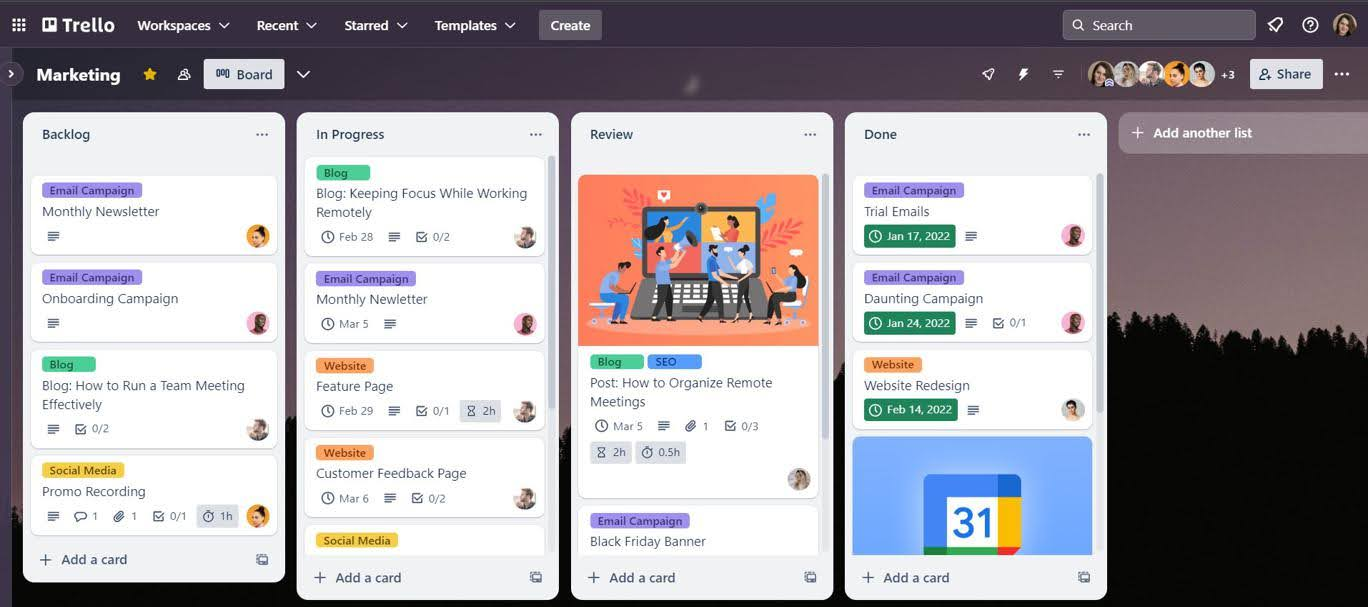
Image source: trello.com
Key features:
- Customizable boards, lists, and cards to match team workflows and project types.
- Labels, due dates, checklists, attachments, and comments for better task tracking.
- Board templates for recurring projects such as marketing campaigns, software sprints, or client tasks.
- Automation rules (Butler) to reduce repetitive tasks like moving cards, assigning members, or sending reminders.
Pros:
- Free plan supports unlimited personal boards, cards, and lists, ideal for small teams.
- Flexible enough to support personal projects, small team collaborations, or client work.
- Supports multiple integrations with popular productivity tools, expanding capabilities as teams grow.
Cons:
- Limited reporting and analytics, which may require third-party tools for advanced tracking.
- Can become cluttered when managing large projects with many boards and cards.
Pricing:
- Standard plan: $5 per user/month (billed annually).
- Premium plan: $10 per user/month (billed annually).
- Enterprise plan: Custom pricing.
3. Asana: Simple task + timeline structure
Asana is a versatile project management tool designed to help teams organize tasks, projects, and workflows with clarity and simplicity. Its clean interface and structured layout make it beginner-friendly while still offering powerful functionality for growing teams. Asana uses lists, boards, and timelines to visualize work, making it easier for teams to track progress and meet deadlines. It is particularly useful for small teams, agencies, and startups that need structured task management without complex setup. With integrations, automation, and templates, Asana allows teams to standardize workflows while keeping collaboration smooth and transparent.
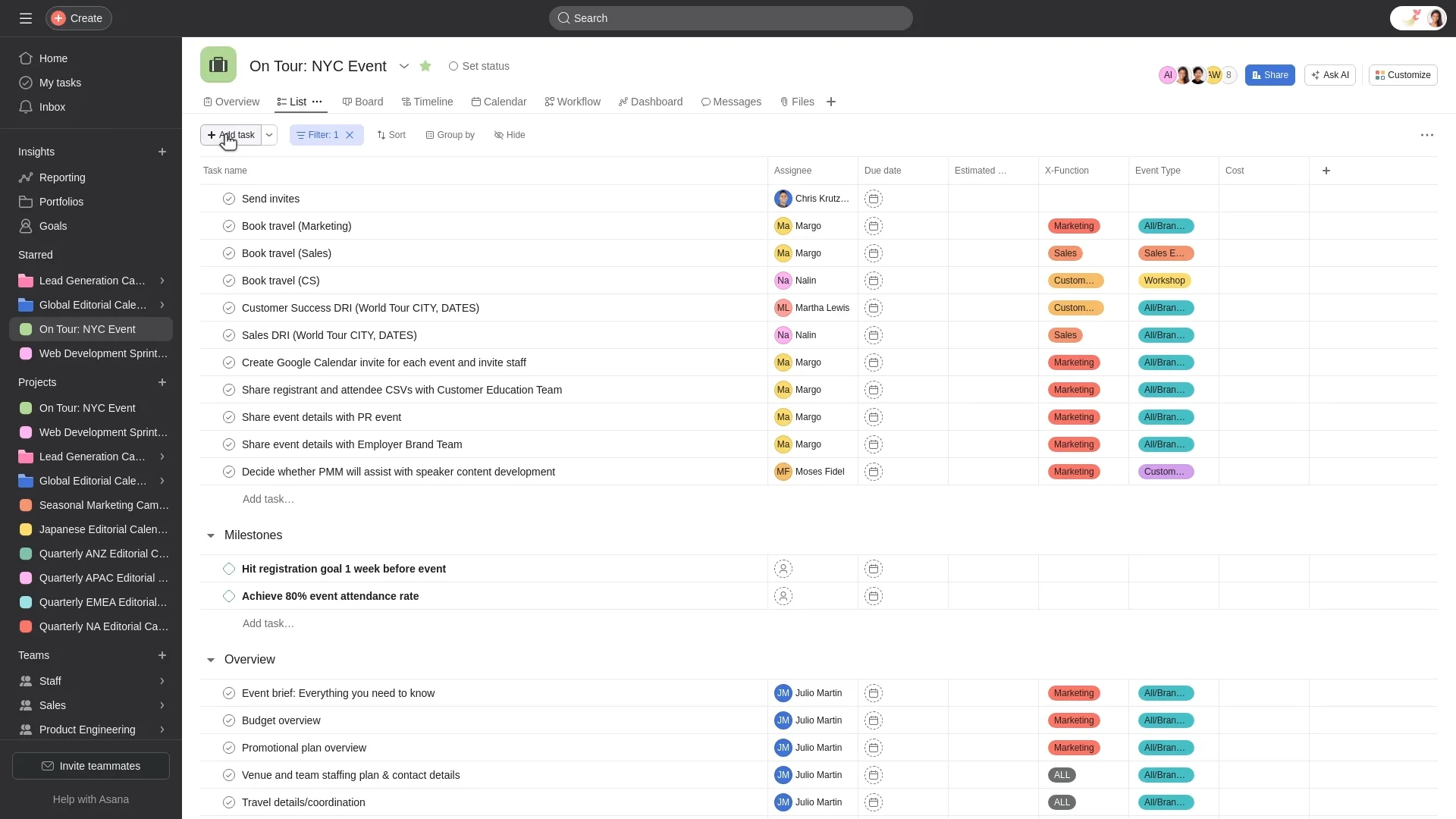
Image source: asana.com
Key features:
- Task lists with due dates, assignees, and priorities for clear accountability.
- Pre-built templates for marketing campaigns, product launches, HR onboarding, and more.
- Rules and automation to assign tasks, update statuses, and send reminders automatically.
- Project dashboards for an overview of progress, completed tasks, and bottlenecks.
Pros:
- Pre-built templates and workflow automation accelerate project setup and reduce manual work.
- Free plan available for small teams or individuals, making it accessible for startups and freelancers.
- Collaboration features such as comments, attachments, and task mentions keep all communication in context.
Cons:
- Advanced features such as portfolio management and custom reporting are only available on paid plans.
- Can become overwhelming for very large projects with many tasks and subtasks.
Pricing:
- Starter plan: $10.99 per user/month (billed annually).
- Premium plan: $24.99 per user/month (billed annually).
- Enterprise plan: Custom pricing.
4. ClickUp: Flexible but easy when used lightly
ClickUp is a highly flexible project management tool that adapts to a wide range of workflows, from simple task tracking to complex project planning. Its customizable interface allows beginners to start with basic features while scaling up as team needs grow. ClickUp offers multiple views, templates, and lightweight automation, making it easy for small teams, freelancers, and startups to manage tasks efficiently. The tool combines task management, document sharing, time tracking, and collaboration in a single workspace. ClickUp's modular design ensures that teams can gradually adopt features without feeling overwhelmed.
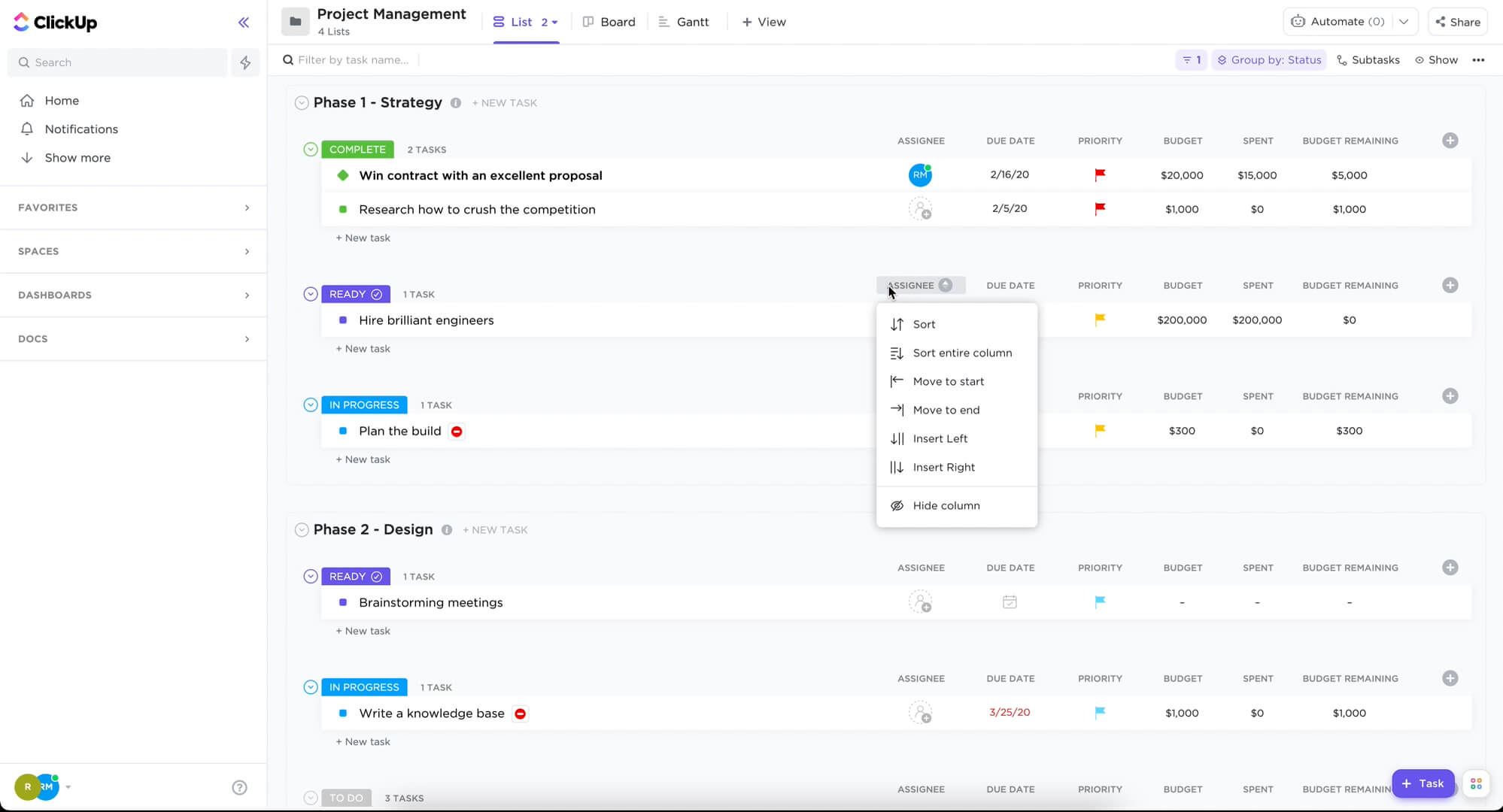
Image source: clickup.com
Key features:
- Tasks, subtasks, and checklists for clear organization and accountability.
- Pre-built templates for sprints, marketing campaigns, product launches, and client projects.
- Built-in time tracking and workload management to monitor team productivity.
- Docs and wikis for project notes, specifications, and collaborative documentation.
Pros:
- Flexible enough to accommodate both simple and complex project needs.
- Beginner-friendly when used lightly, with optional advanced features for scaling.
- Visual project views make it easy to track progress and deadlines.
Cons:
- The abundance of features can feel overwhelming for new users if not simplified.
- Customization options may lead to inconsistent workflow structures if not managed carefully.
Pricing:
- Unlimited plan: $7 per user/month (billed annually).
- Business plan: $12 per user/month (billed annually).
- Enterprise plan: Custom pricing.
5. Monday.com: Visual workflows for small teams
Monday.com is a visual project management platform designed to simplify collaboration and task tracking for teams of all sizes. Its color-coded boards, timelines, and custom workflows make it beginner-friendly while still supporting complex project needs. Small teams, agencies, and startups can quickly organize work, track progress, and maintain visibility across projects. The platform combines task management, automation, and reporting in one workspace, helping teams reduce tool sprawl. Monday.com's flexible interface allows teams to start with basic boards and scale features as workflows grow.
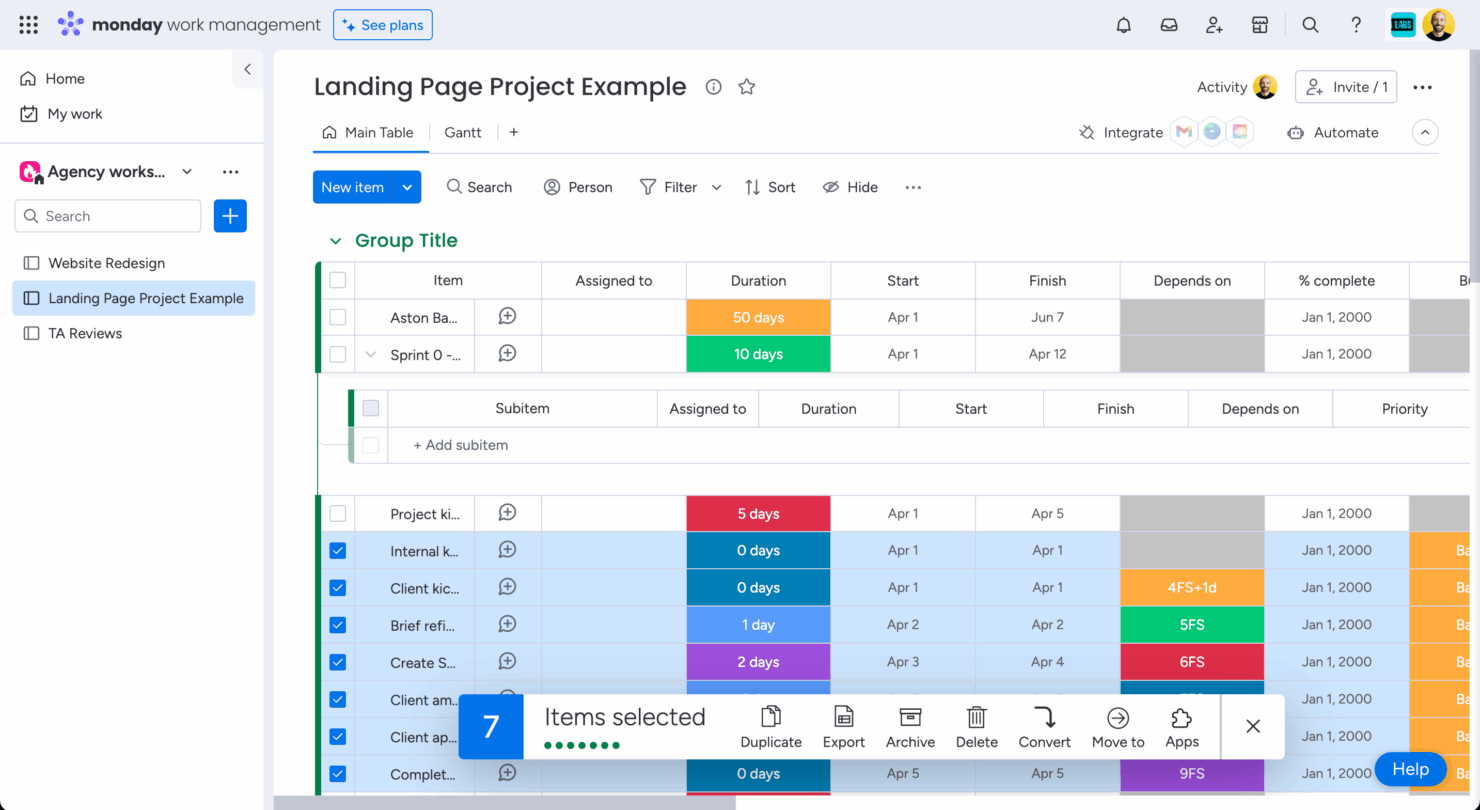
Image source: monday.com
Key features:
- Visual boards with color-coded columns for tasks, status, and priorities.
- Multiple views including Kanban, Gantt, Timeline, Calendar, and Table.
- Pre-built templates for project tracking, marketing campaigns, product launches, and team workflows.
- Automation for recurring tasks, notifications, and status changes.
Pros:
- Visual interface is intuitive and helps beginners understand workflows quickly.
- Flexible boards and views can be tailored to team needs and project types.
- Collaboration features keep communication and files centralized within projects.
Cons:
- Pricing can be higher compared to simpler project management tools.
- Some advanced features require premium plans, limiting functionality on lower tiers.
Pricing:
- Basic plan: $10 per user/month (billed annually).
- Standard plan: $12 per user/month (billed annually).
- Pro plan: $20 per user/month (billed annually).
- Enterprise plan: Custom pricing.
6. Notion: Simple docs + task boards for individuals
Notion is an all-in-one workspace that combines note-taking, task management, and lightweight project organization. Its flexible block-based interface allows users to create pages, databases, and boards that fit their workflow, making it beginner-friendly for individuals and small teams. Notion is particularly useful for freelancers, students, and small teams who want to manage tasks and documents in one place. With templates, relational databases, and collaborative features, Notion helps organize projects efficiently without overwhelming new users. Its mobile and desktop apps ensure that projects and notes are accessible wherever work happens.
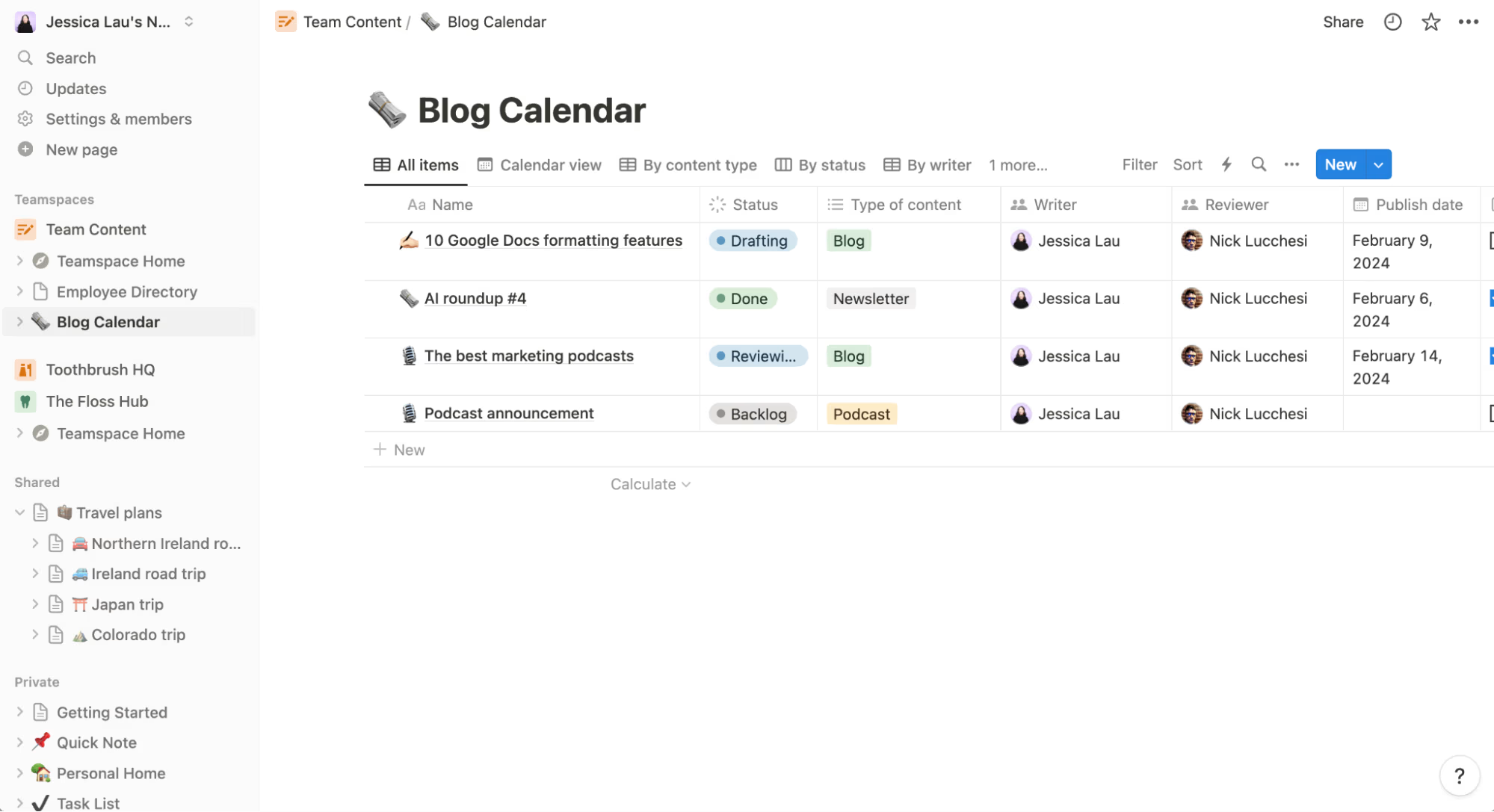
Image source: notion.com
Key features:
- Pages and blocks for creating notes, wikis, and project documentation.
- Kanban boards, calendars, and tables to manage tasks and workflows visually.
- Relational databases to link tasks, projects, and resources efficiently.
- Pre-built templates for project management, personal planning, team tasks, and client projects.
Pros:
- Highly flexible and customizable to match personal or team workflows.
- Combines notes, documentation, and tasks in one workspace, reducing tool sprawl.
- Beginner-friendly templates and simple navigation make adoption easy.
Cons:
- Lacks advanced project tracking features like Gantt dependencies in free tier.
- Limited automation options compared to specialized project management tools.
Pricing:
- Personal Pro plan: $8 per user/month (billed annually).
- Team plan: $15 per user/month (billed annually).
- Enterprise plan: Custom pricing.
7. Airtable: Easy database-style project management
Airtable is a flexible project management tool that combines spreadsheet functionality with database capabilities, making it beginner-friendly yet powerful. It allows teams to organize projects, track tasks, and manage resources visually using tables, boards, and calendar views. Airtable is ideal for small teams, agencies, and startups that need simple database-style tracking without complex setup. Its templates, integrations, and automations help streamline workflows and reduce repetitive work. With mobile and desktop apps, teams can update and manage projects from anywhere while maintaining a centralized workspace.
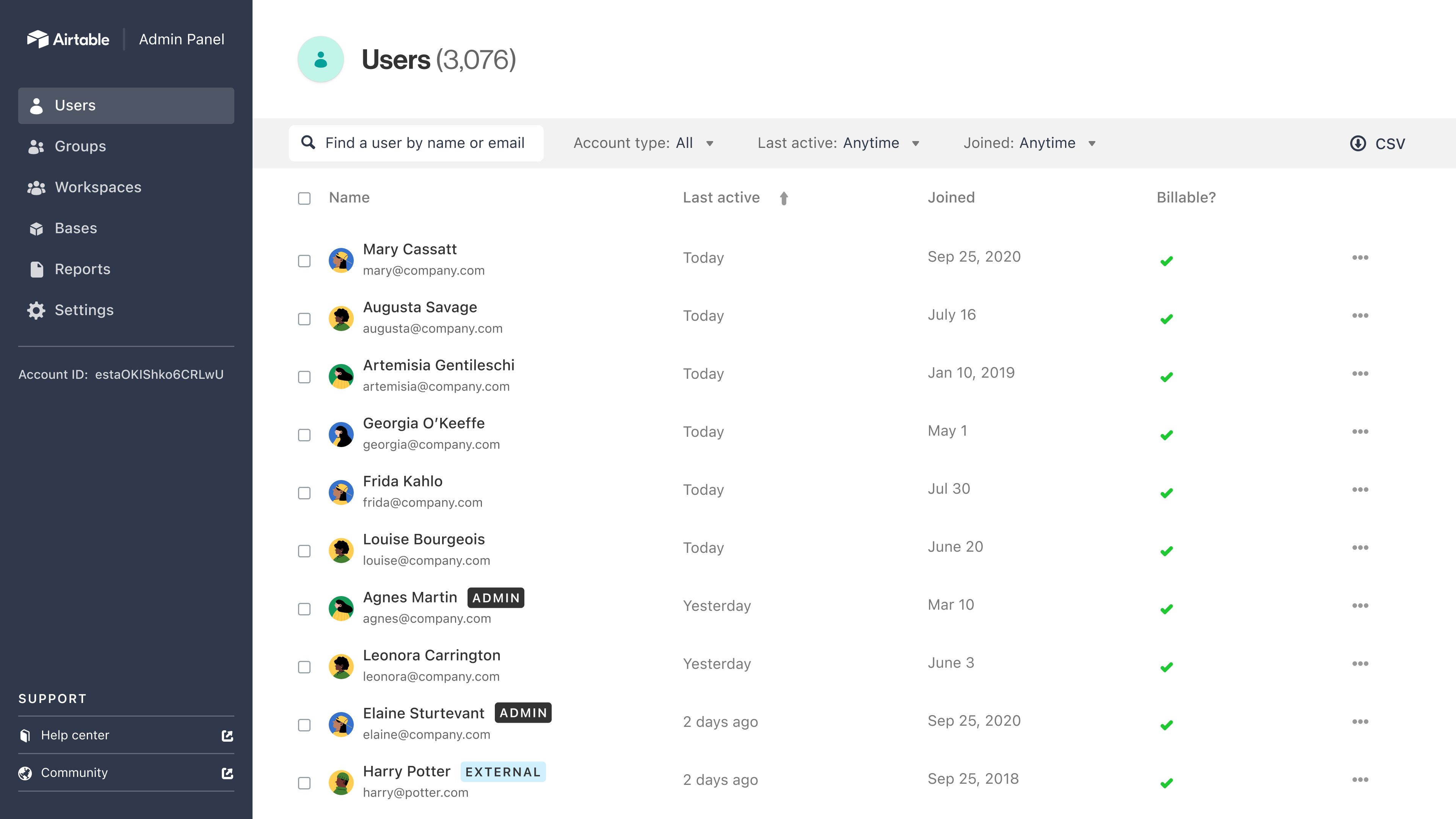
Image source: airtable.com
Key features:
- Grid, Kanban, calendar, and gallery views for visualizing project data.
- Pre-built templates for project tracking, content calendars, CRM, and event management.
- Linked records to connect related tasks, assets, or clients across tables.
- Customizable fields for tracking project-specific information such as status, priority, or budget.
Pros:
- Intuitive interface that combines the simplicity of spreadsheets with database functionality.
- Flexible templates and views make it easy for beginners to get started quickly.
- Multiple views allow teams to customize project visualization based on preference.
Cons:
- Advanced features such as complex automations require higher-tier plans.
- Can be overwhelming for beginners if multiple tables and links are used at once.
Pricing:
- Plus plan: $12 per user/month (billed annually).
- Pro plan: $24 per user/month (billed annually).
- Enterprise plan: Custom pricing.
8. NiftyPM: Lightweight PM for personal projects
NiftyPM is a simple and lightweight project management tool designed to help small teams and individuals manage tasks, timelines, and milestones efficiently. Its minimalistic interface and intuitive design make it beginner-friendly, allowing users to start projects quickly without extensive setup. NiftyPM combines task lists, boards, and roadmaps to provide a clear overview of work while supporting collaboration between team members. It is ideal for freelancers, small teams, and personal projects that don't require complex project structures. With templates, milestones, and team communication features, NiftyPM streamlines workflows while keeping things simple.
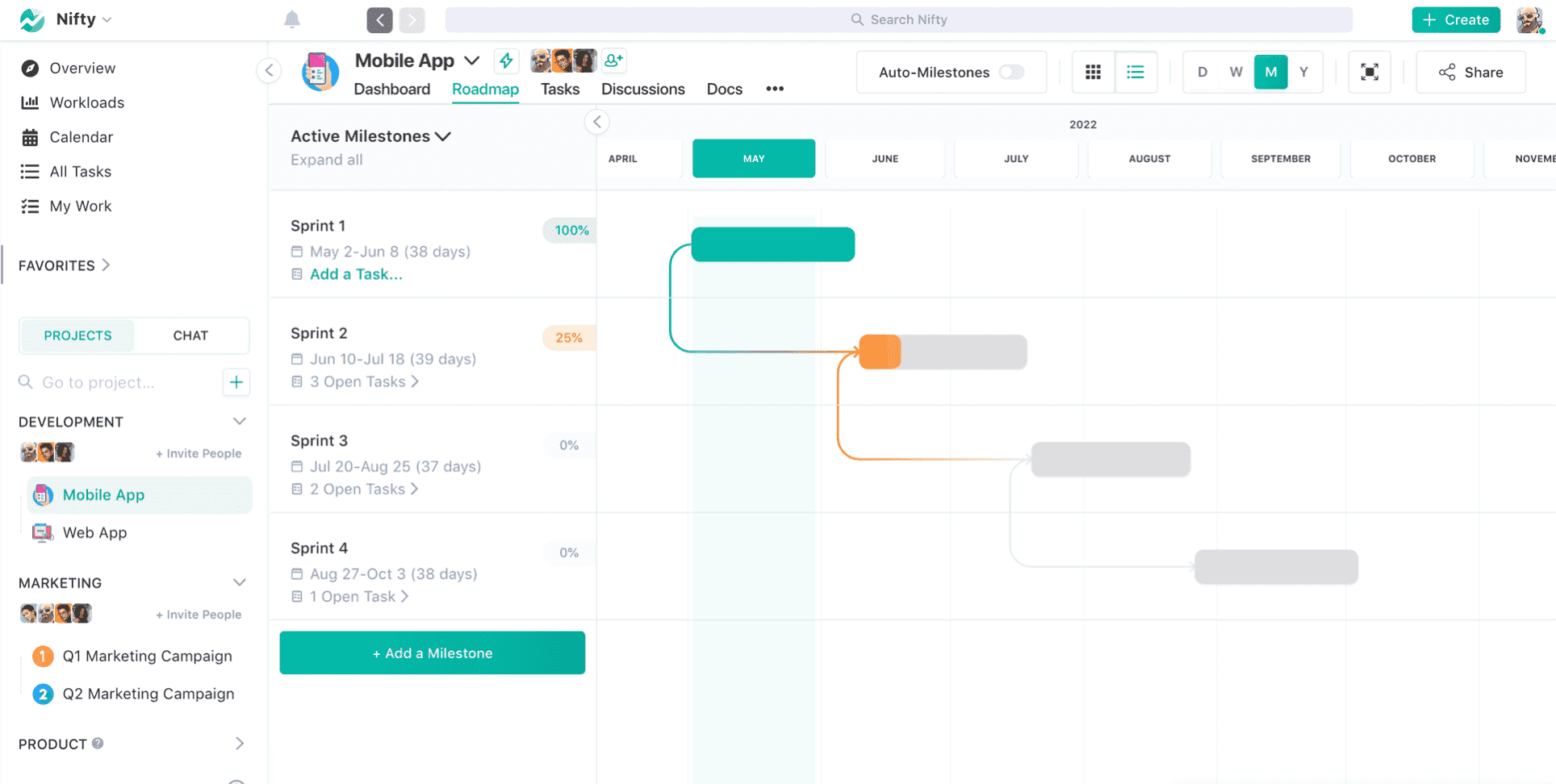
Image source: niftypm.com
Key features:
- Task lists and visual boards that allow teams to see all tasks in progress, completed, or pending in a clear layout.
- Milestones and timelines that provide a comprehensive view of project phases and help ensure deadlines are met.
- Pre-built templates for sprints, campaigns, or personal projects, saving time on initial setup and workflow design.
- Real-time collaboration through comments, file attachments, and notifications that keep all communication contextual and centralized.
Pros:
- Lightweight and beginner-friendly, making it easy for new users to understand project management without a steep learning curve.
- Minimal setup required, allowing teams and individuals to start projects immediately and focus on work instead of configuration.
- Visual boards and roadmaps provide clarity on task progress, dependencies, and project milestones, helping teams stay aligned.
Cons:
- Limited advanced project management features, which may be insufficient for larger teams or complex project workflows.
- Reporting and analytics are basic, so teams may need to rely on external tools for in-depth performance analysis.
Pricing:
- Paid plan: $39/month for 10 users (billed annually).
- Enterprise plan: Custom pricing.
9. Plaky: Simple board-based project tracking
Plaky is a beginner-friendly project management tool that focuses on simple, board-based task tracking for teams and individuals. Its intuitive drag-and-drop interface allows users to organize projects visually without a steep learning curve. Plaky is ideal for small teams, freelancers, or individuals who want to manage tasks quickly while keeping everything centralized. With boards, lists, and task cards, Plaky makes it easy to prioritize work, track progress, and maintain clarity on deadlines. Lightweight but effective, Plaky ensures that essential project management needs are met without overwhelming new users.
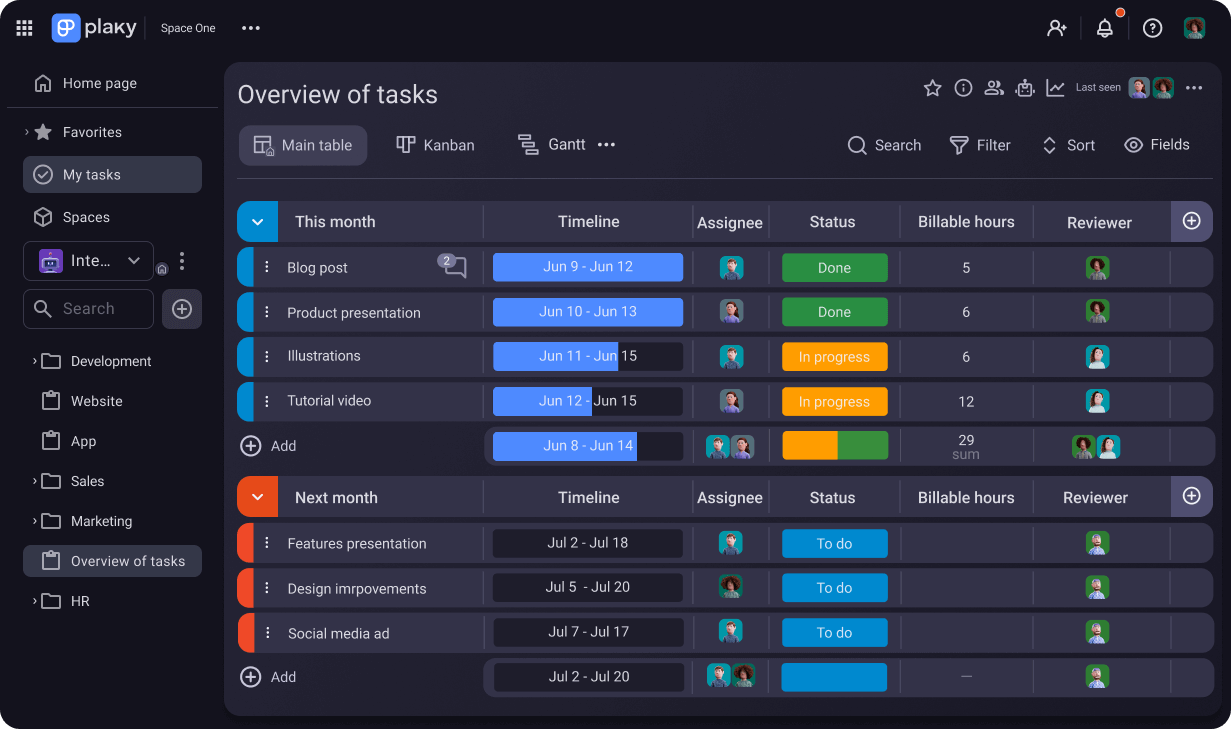
Image source: plaky.com
Key features:
- Drag-and-drop task boards that make it easy to move tasks between stages such as "To Do," "In Progress," and "Completed."
- Customizable lists and cards for tasks, deadlines, assignees, and priorities, allowing teams to structure projects to fit their workflow.
- Visual workflow that provides a clear overview of project progress and task status at a glance.
- Task details including due dates, notes, comments, and attachments, keeping all relevant information in one place.
- Collaboration tools such as team mentions, comment threads, and shared boards for seamless communication.
Pros:
- Very beginner-friendly, allowing teams and individuals to start managing projects without extensive training.
- Visual boards and task cards make it easy to track progress, prioritize tasks, and manage workflows.
- Drag-and-drop interface reduces the complexity of moving tasks and updating statuses.
Cons:
- Reporting and analytics capabilities are basic, which may not be sufficient for larger projects.
- Scaling for larger teams or multiple complex projects can be challenging without additional features or paid plans.
Pricing:
- Paid plan: Pricing varies.
- Enterprise plan: Custom pricing.
10. Wrike: Simple starter plan for basic collaboration
Wrike is a project management tool designed to help small teams and beginners manage tasks, collaborate, and track project progress efficiently. Its intuitive interface, combined with simple task and folder organization, makes it easy for new users to adopt. Wrike provides multiple views, including list, board, and timeline, allowing teams to visualize work in ways that suit their workflow. It is ideal for teams that want straightforward collaboration without unnecessary complexity. With built-in communication, file sharing, and basic automation, Wrike helps teams maintain alignment while keeping project management simple and organized.
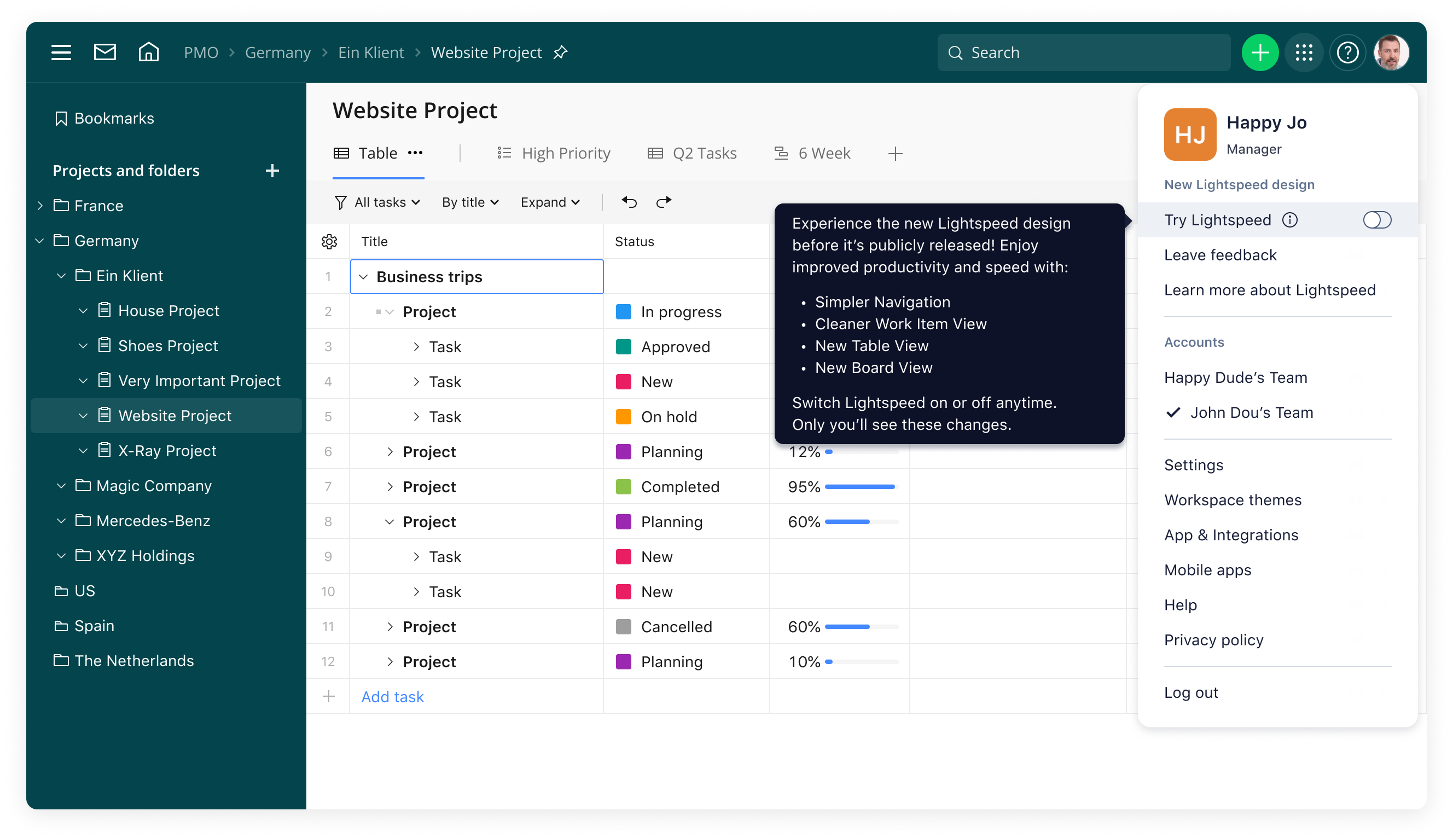
Image source: wrike.com
Key features:
- Task management with due dates, assignees, priorities, and subtasks to clearly define responsibilities.
- Multiple project views including List, Board, Gantt, and Calendar for different workflow preferences.
- Pre-built templates for marketing campaigns, project planning, task tracking, and client work.
- Collaboration tools such as comments, mentions, file attachments, and shared folders to keep communication centralized.
Pros:
- Multiple visual views allow users to choose how they want to manage and track tasks.
- Pre-built templates and basic automation reduce setup time and repetitive work.
- Collaboration features like comments, file sharing, and notifications keep all team communication within the platform.
Cons:
- Advanced features such as detailed reporting, analytics, and complex automation require higher-tier plans.
- Can become overwhelming for larger projects with multiple teams without careful organization.
Pricing:
- Team plan: $9.80 per user/month (billed annually).
- Business plan: $24.80 per user/month (billed annually).
- Enterprise plan: Custom pricing.
11. ProofHub: Centralized workspace for beginners
ProofHub is a project management and team collaboration tool designed to simplify workflows for small teams and beginners. Its all-in-one workspace allows teams to manage tasks, projects, discussions, and files without juggling multiple apps. ProofHub offers an intuitive interface with task lists, Kanban boards, and Gantt charts, making it easy for new users to track progress and deadlines. It is ideal for startups, agencies, and small teams that want a single platform for collaboration and project management. With built-in communication, reporting, and customization, ProofHub helps teams stay organized and focused on delivering results.
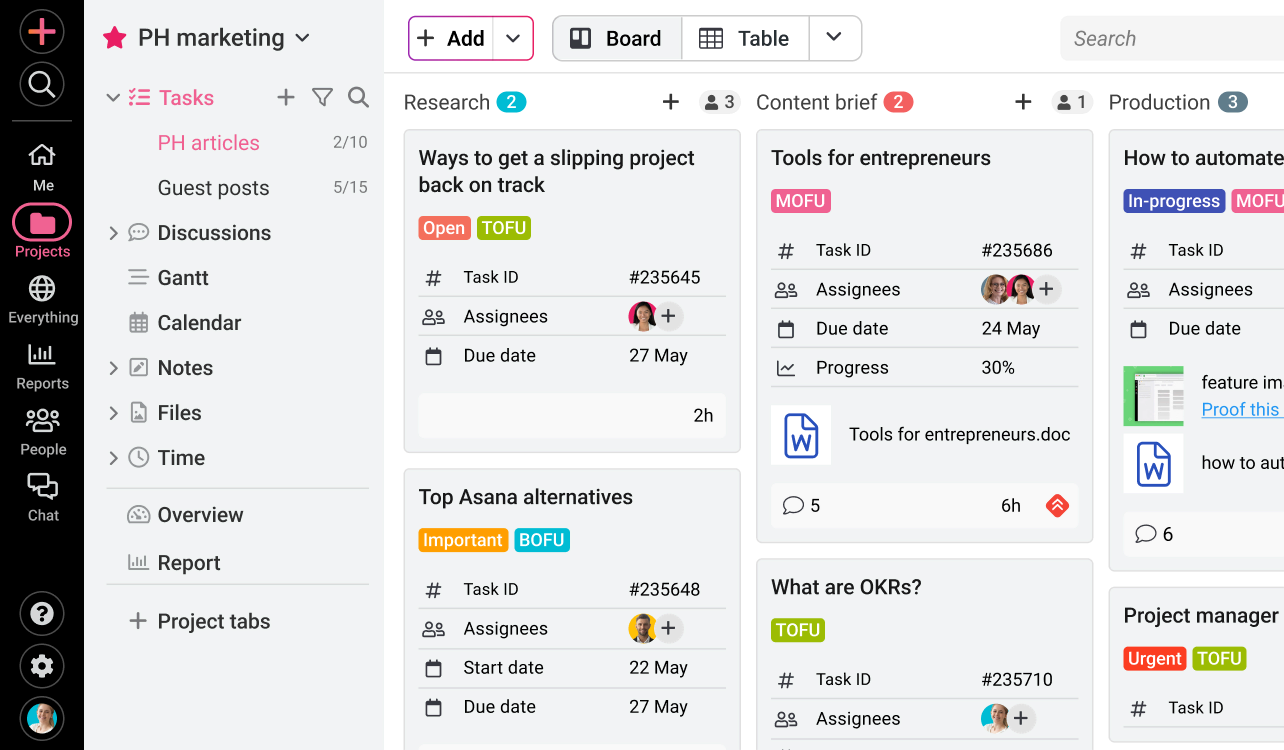
Image source: proofhub.com
Key features:
- Task lists and Kanban boards for visual task management and workflow tracking across projects.
- Gantt charts and project timelines to monitor deadlines, milestones, and dependencies effectively.
- Pre-built templates for project planning, marketing campaigns, client projects, and team workflows.
- Team discussions, comments, and mentions to centralize communication within projects.
Pros:
- Centralized workspace reduces the need for multiple apps, simplifying workflows for beginners.
- Visual task boards, timelines, and Gantt charts provide clarity on project progress and deadlines.
- Collaboration tools such as comments, discussions, and file sharing keep communication organized and contextual.
Cons:
- Advanced customization and reporting features are limited compared to enterprise-level project management tools.
- Scaling for multiple projects or large teams may require careful planning and configuration.
Pricing:
- Essential plan: $45/month (billed annually).
- Ultimate control plan: $99/month (billed annually).
- Enterprise plan: Custom pricing.
12. ProProfs Project: Easy task tracking system
ProProfs Project is a beginner-friendly project management tool designed to help small teams and individuals organize tasks, projects, and timelines efficiently. Its simple and intuitive interface makes it easy for non-technical users to get started without extensive training. The platform combines task lists, Gantt charts, time tracking, and collaboration features to streamline project management. ProProfs Project is ideal for startups, freelancers, and small teams that want straightforward task management and reporting in one place. With pre-built templates, customizable workflows, and real-time updates, teams can manage projects effectively while keeping processes simple and organized.
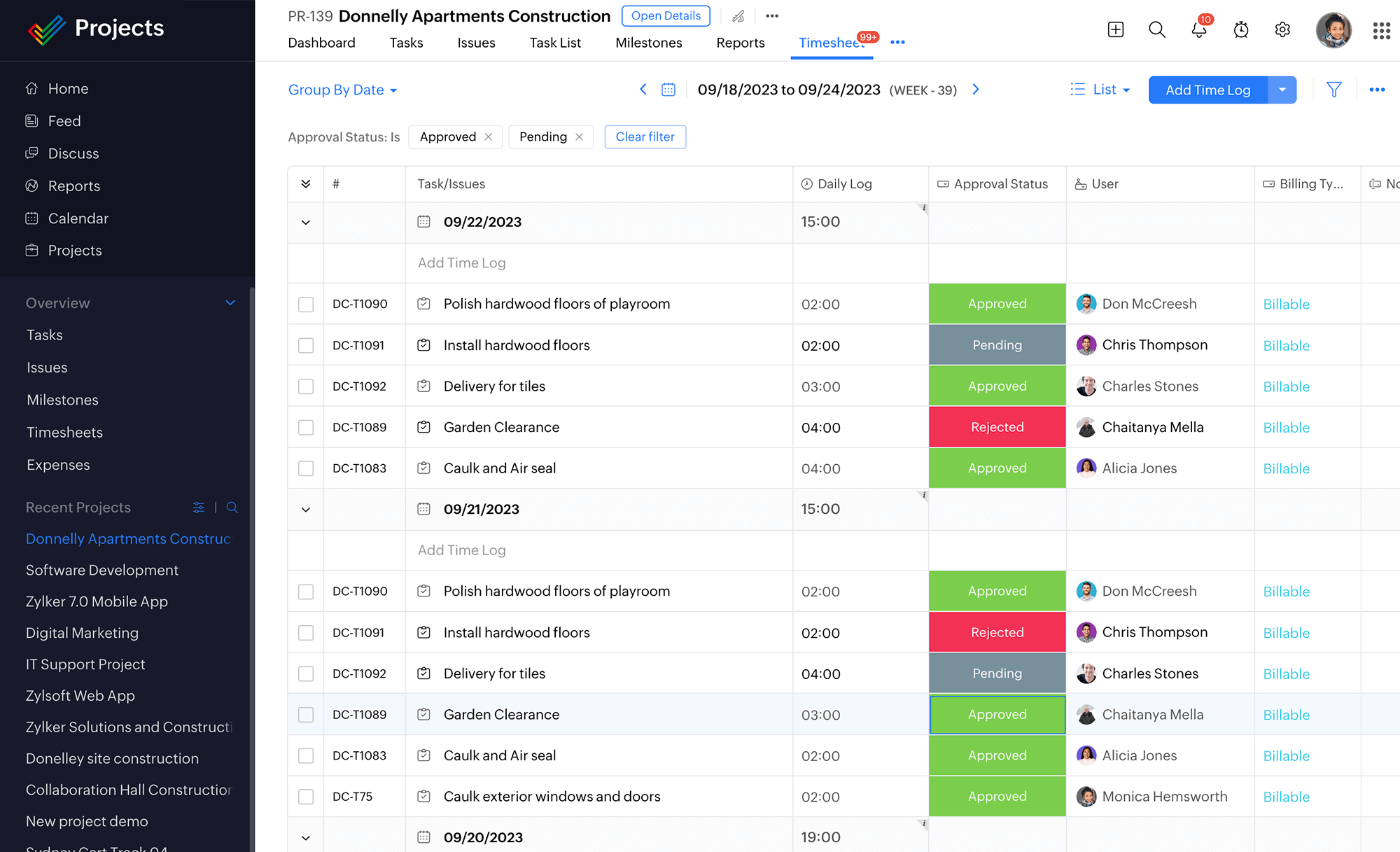
Image source: proprofsproject.com
Key features:
- Time tracking and timesheets to monitor task duration, employee hours, and project productivity.
- Customizable workflows and statuses to match team processes and project requirements.
- Reporting dashboards for insights into task completion, project progress, and team performance.
- File storage and document management to centralize all project resources in one place.
Pros:
- Combines task management, timelines, collaboration, and reporting in one platform, reducing tool sprawl.
- Pre-built templates and customizable workflows make project setup faster and more consistent.
- Collaboration features such as comments, file sharing, and notifications keep communication organized.
Cons:
- Reporting and analytics are basic compared to enterprise-focused project management tools.
- Scaling multiple projects or large teams can become challenging without careful workflow planning.
Pricing:
- Essential plan: $2 per user/month (billed annually).
- Premium plan: $4 per user/month (billed annually).
- Enterprise plan: Custom pricing.
13. ProjectManager: Beginner-friendly planning tools
ProjectManager.com is a versatile project management platform designed for small teams and beginners to plan, organize, and execute projects efficiently. Its intuitive interface combines task tracking, visual timelines, and collaboration features to give teams complete control over their projects. The platform is ideal for freelancers, startups, and small teams that want simple yet comprehensive project planning tools without complexity. ProjectManager.com also offers real-time updates, reporting dashboards, and resource management to help teams meet deadlines and achieve project goals. With templates, mobile access, and customizable project views, users can easily adapt the platform to fit their workflow.
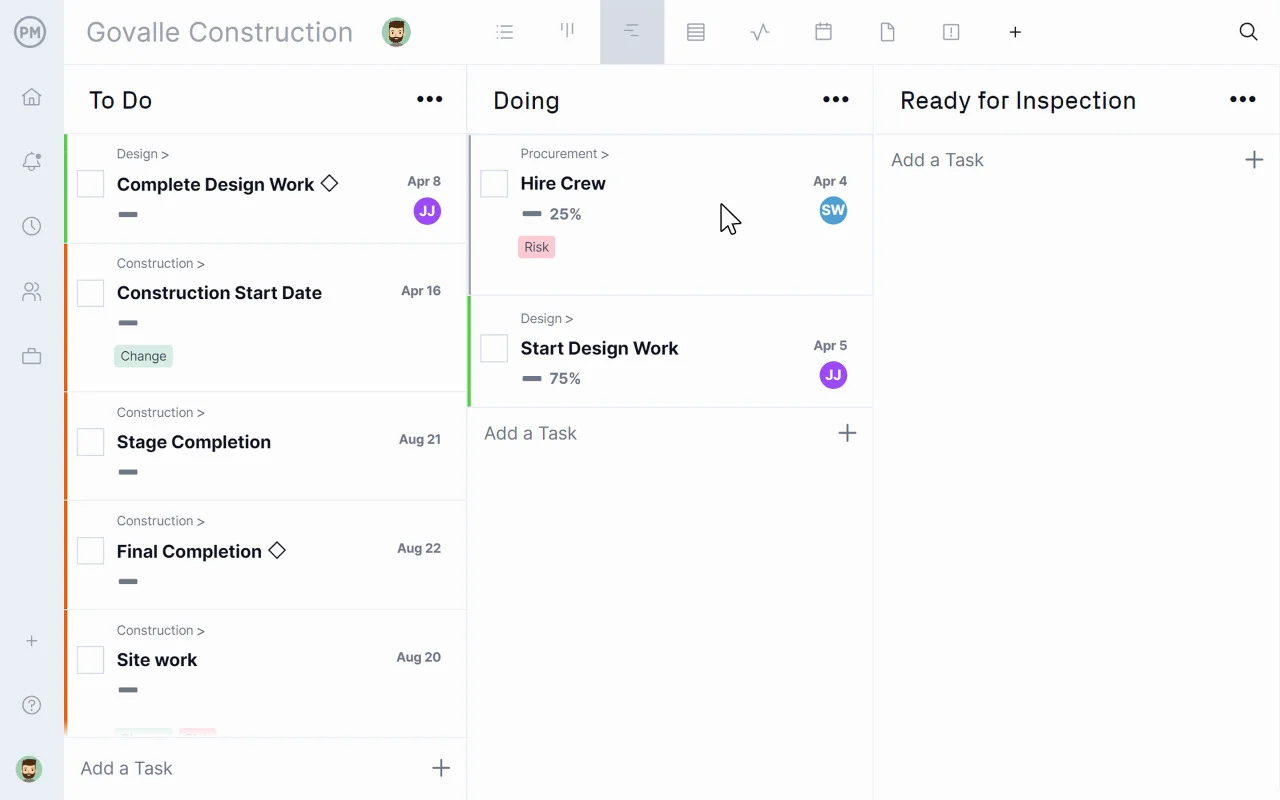
Image source: projectmanager.com
Key features:
- Resource allocation tools to monitor team workloads and ensure tasks are evenly distributed.
- Time tracking functionality to log hours spent on tasks, providing insight into productivity and efficiency.
- Advanced reporting dashboards with visual metrics for project status, team performance, and completion rates.
- Integration support with popular tools like Slack, Google Workspace, Zoom, and OneDrive to streamline workflows.
Pros:
- Intuitive interface simplifies project planning for beginners without sacrificing functionality.
- Multiple visual options such as task lists, Gantt charts, and Kanban boards offer flexible ways to organize work.
- Built-in collaboration tools reduce email overload and centralize team communication.
Cons:
- Large-scale projects may need additional setup and organization to prevent board clutter.
- Some users may experience a learning curve when transitioning from simpler Kanban-only tools.
Pricing:
- Personal plan: $15 per user/month (billed annually).
- Team plan: $20 per user/month (billed annually).
- Business plan: $25 per user/month (billed annually).
- Enterprise plan: Custom pricing.
Who should use an easy project management tool?
Easiest to learn project management software is designed to simplify workflows, reduce learning time, and help teams stay organized without complex setups. These tools are particularly valuable for groups that need a low learning curve but still want powerful task management and collaboration features. By using the easiest project management software to use, teams can quickly implement structured processes and maintain alignment. Beginners, small teams, and non-technical users can all benefit from streamlined task tracking and visual project views. Let's look at who can gain the most from simple project management software.
- Small teams: Small teams often juggle multiple roles and responsibilities, making it essential to have a tool that is simple and intuitive. Simple project management software allows team members to coordinate tasks, deadlines, and communication without getting overwhelmed. Visual workflows and lightweight automation help small teams track progress efficiently. These tools also reduce time spent on training, letting teams focus on actual project work.
- Startups: Startups operate in fast-paced environments where quick decision-making is crucial. The easiest project management software to learn helps new companies set up projects, assign tasks, and track milestones immediately. Startups benefit from features like shared calendars, task dependencies, and templates for common workflows. This ensures the team can scale operations without slowing down productivity.
- Agencies: Agencies managing multiple clients or campaigns need a clear and simple way to track deliverables. Simple project management software provides board views, task assignments, and deadline tracking that keep everyone on the same page. Agencies can use templates for recurring projects, making project setup faster. Easy-to-use reporting and collaboration features also improve client communication and accountability.
- Students & freelancers: Students and freelancers often handle multiple small projects simultaneously, requiring a lightweight but organized system. Easiest-to-use project management software lets them create tasks, track progress, and manage deadlines without complex configurations. Visual task boards and calendar views help prioritize assignments efficiently. It also allows seamless collaboration when working with teammates or clients on group projects.
- Non-technical teams: Teams without a technical background need tools that minimize complexity while still offering full functionality. Simple project management software provides drag-and-drop interfaces, pre-built templates, and straightforward project views. Non-technical users can adopt these tools quickly and track progress without confusion. This reduces dependency on IT support and speeds up project execution.
- Cross-functional groups: Cross-functional teams often involve members from different departments with varying workflows. The easiest project management software to use helps unify these workflows in one platform. Teams can coordinate across departments with shared tables, boards, and automated reminders. This ensures that everyone, regardless of their role, can contribute effectively without learning multiple complex systems.
Benefits of using simple project management tools
Easiest to use project management software provides tangible benefits for beginners, small teams, and non-technical users by making project tracking and collaboration more efficient. By focusing on ease of use and intuitive interfaces, teams can quickly adopt new workflows without the frustration of complex setups. Tools that are easiest to use help organizations streamline tasks, maintain clarity, and improve overall performance. They reduce overhead, accelerate project delivery, and encourage consistent communication across the team. Let's explore the key advantages that make simple project management software an essential choice.
- Faster adoption: Teams can start using simple project management software immediately due to intuitive navigation, templates, and visual project views. The easiest project management software to learn allows users to get up to speed quickly without waiting for lengthy onboarding sessions. Faster adoption reduces downtime and ensures projects progress smoothly from day one. This is particularly beneficial for small teams and startups needing quick results.
- Less training: With beginner-friendly tools, minimal training is required for team members to manage tasks effectively. Simple project management software comes with ready-to-use templates and clear workflows that help non-technical users learn quickly. Reduced training time lowers costs and allows the team to focus on project execution. Teams can also rely on contextual help and guided tutorials for continued support.
- Higher productivity: By reducing complexity, simple project management software allows teams to spend more time on work that matters. Easiest-to-use project management software enables task prioritization, quick updates, and streamlined communication. Automation of repetitive tasks frees up time for strategic planning and execution. Ultimately, teams can complete more tasks in less time, boosting overall productivity.
- Better cross-team alignment: Cross-functional teams benefit from shared workspaces and unified workflows that simple project management software provides. Tasks, deadlines, and responsibilities are visible to everyone, minimizing misunderstandings and duplication of effort. The easiest project management software to use ensures that all team members, regardless of department, stay aligned with goals. Clear communication and shared visibility improve collaboration across teams.
- Reduced tool sprawl: Simple project management software often combines multiple features such as task tracking, messaging, calendars, and documentation in one platform. This reduces the need for multiple disconnected tools and keeps all project-related information centralized. Teams can focus on work rather than toggling between different apps. Fewer tools also mean fewer login credentials, less confusion, and more consistent data management.
Conclusion
Choosing the right project management software can make a significant difference in how teams plan, track, and deliver work. For beginners and small teams, simplicity, clarity, and ease of use are key. From visual boards in Trello and Plaky to flexible databases in Airtable and Notion, each tool offers unique ways to organize tasks, collaborate, and monitor progress.
Tools like Asana, ClickUp, and ProjectManager.com provide structured timelines, Gantt charts, and customizable workflows. Among these, Lark stands out as an all-in-one workspace, unifying project management, communication, docs, and scheduling in one intuitive platform. With easy-to-use tables, multiple views, and built-in collaboration features, Lark reduces complexity and accelerates adoption for teams of any size. Get started today and simplify the way your team manages projects with Lark.
FAQs
What makes project management software easy for beginners?
Project management software is easy for beginners when it combines simplicity, visual clarity, and intuitive navigation. Tools that offer templates, multiple views like Kanban or Gantt, and collaborated communication reduce the learning curve. Lark, for example, brings tasks, docs, tables, and messaging into a single workspace, so new users can manage projects without hopping between apps. Its modular setup allows teams to start with basic features and gradually explore advanced options. This reduces setup time, keeps work organized, and ensures even non-technical users can adopt it quickly.
Is simple project management software suitable for growing teams?
Yes, simple project management tools can scale with growing teams when they provide flexibility and modular features. Lark, for instance, supports unlimited users, multiple tables, and customizable workflows, making it ideal for teams expanding in size or scope. Centralized communication and project tracking keep everyone aligned, even as responsibilities and tasks increase. Lightweight automation and pre-built templates help maintain productivity without adding complexity. By keeping core tools together, Lark ensures that teams can grow efficiently without switching between multiple platforms.
Can easy project management tools handle client or stakeholder workflows?
Easy project management tools can handle client and stakeholder workflows if they offer shared workspaces, access controls, and collaborative features. Lark enables teams to invite external collaborators, share relevant documents, and track tasks transparently. Its multiple views and two-way linked tables ensure that updates are consistent and visible to all stakeholders. Real-time communication within the same workspace avoids delays and miscommunication. Even beginners can manage client workflows effectively, making Lark a practical choice for teams that need simplicity with professional collaboration.
Do simple project management tools include reporting features?
Yes, many simple project management tools include basic reporting features to track task progress, workload, and deadlines. Lark offers dashboards, task summaries, and filters that allow teams to quickly generate insights without complex setup. Teams can view assignments, project statuses, and completion rates in real time, which supports informed decision-making. The reporting is intuitive enough for beginners, while still offering enough flexibility for growing teams. This combination of simplicity and visibility makes Lark ideal for keeping projects on track efficiently.
Are all "easy" project management tools free to use?
Not all easy project management tools are free, though many offer basic free tiers with limited features. Lark provides a robust free plan for up to 20 users, including task management, tables, docs, and collaboration tools. Paid plans unlock advanced features such as larger storage, more automation runs, and extended group calling. This structure allows teams to start without cost and scale features as their needs grow. By providing both free and affordable paid options, Lark ensures teams can adopt a simple PM tool that grows with them.
Related reading
Project portfolio management software: Align strategy, pick the right bets, deliver measurable value
Table of contents
Start using Lark today

Manage all your work in one place
Boost team efficiency by 10x
Save up to 70% on software costs
Table of contents
Start using Lark today
Manage all your work in one place
Boost team efficiency by 10x
Save up to 70% on software costs
Keep reading







2026 Lark Technologies Pte. Ltd.
Headquartered in Singapore with offices worldwide.






Explore: